8 Best Video Enhancer Tools in 2026 (Compared)
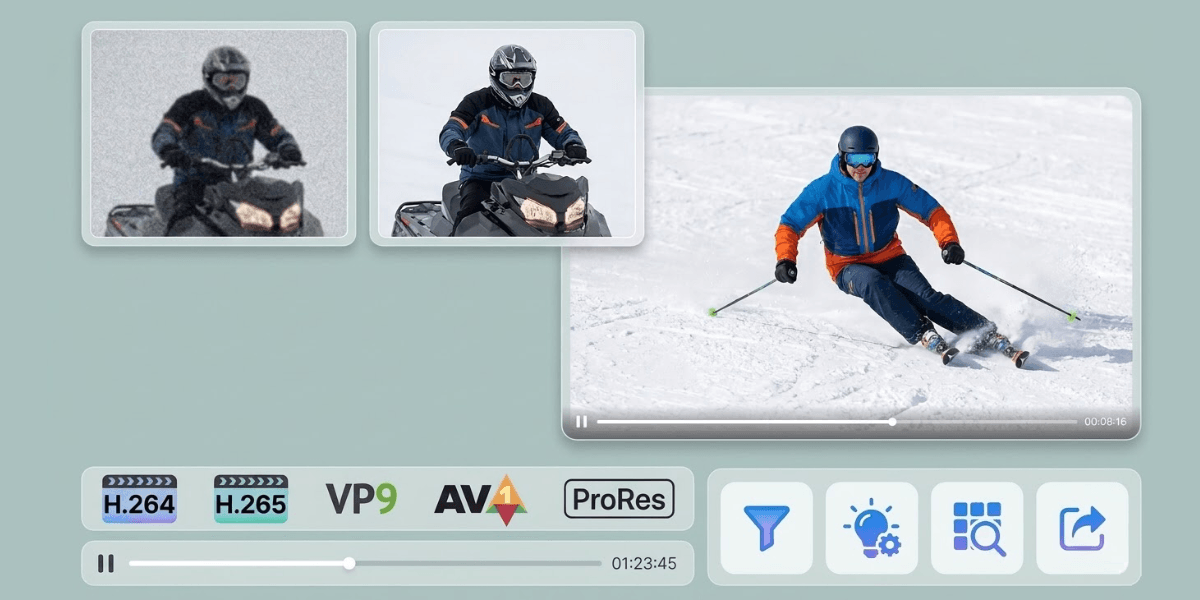
Grainy footage, washed-out colors, and shaky clips - these are the silent killers of a video before it can even get its message across. By 2026, people have ridiculously high visual standards - and it shows. A clean, sharp video gets watched. A blurry one gets closed.
AI has completely changed what's possible here. You don't need a professional setup or hours of manual editing to make footage look great anymore. The right tool handles most of it automatically.
This guide covers the 8 best video enhancer tools available right now, what each one does well, and where they fall short.
What to Look for in a Video Enhancer
Picking a video enhancer takes a bit more than checking features on a list. Some tools look good on paper but fall short in real use. The following features make the better ones easier to spot.
- Resolution upscaling: Start with resolution. A decent tool won’t just stretch the frame. It rebuilds details so the video looks cleaner. The result should feel natural. Not overly sharp or strange.
- Noise and grain reduction: Low-light videos and older clips often look rough and grainy. A good enhancer cleans this up while keeping the details intact.
- Audio enhancement: Background hiss, wind noise, and poor-quality mic audio can be just as damaging as bad visuals. A few tools can even handle both in one go, which is a huge time-saver.
- Workflow integration: Do you have to swap between different tools all the time? The best enhancers will let you integrate video enhancement into your whole workflow, so you're not constantly exporting and re-importing files
- Export quality and commercial rights: Check what actual resolutions the tool can export at. Also, make sure you're not stuck in some sort of rights nightmare if you're working on client projects or paid advertising.
The 8 Best Video Enhancer Tools in 2026
1. Vmake: Best All-in-One for Creators and Marketers

For social media creators and small business owners, Vmake Video enhancer is one of the most practical options on this entire list. It's not just an enhancer — it's a full content creation platform where enhancement is one piece of a connected workflow.
Vmake handles video sharpening, noise reduction, audio cleanup, watermark removal, auto captions, background removal, and UGC video generation all inside the same workspace. That means you enhance your footage and publish it without ever leaving the platform.
Trusted by users across 120+ countries, Vmake reduces production costs by up to 90%. It helps creators produce 5 to 10 times more content in the same amount of time. It holds a 4.5 out of 5 rating on Trustpilot and a full 5.0 on Product Hunt. These ratings show that it works well for how creators actually work.
Key Features:
- AI video upscaling up to 4K
- Noise reduction and audio cleanup in one pass
- Background remover, watermark remover, and auto captions
- Full UGC creation suite alongside enhancement
- Available on web and mobile
Pros | Cons |
Integrated workflow — enhance, edit, and publish from one platform | Cloud-based, so an internet connection is required |
Clean, beginner-friendly interface | |
Strong commercial use rights on paid plans |
Best for: Content creators, e-commerce brands, and social media marketers who just need one tool that can do it all - and do it well.
2. Wink: Best for Portrait and Mobile Content
Wink is an AI-powered video enhancement application developed by Meitu, widely known for its image and video processing technology. It's available across desktop, web, and mobile, making it one of the more accessible options on this list.
With top-notch AI on board, Wink identifies the subject, dives in frame by frame to give you crystal-clear results, and throws in some smart editing tricks for good measure. If you're mostly focusing on portrait work, Wink's got the goods - its facial restoration and beauty features are seriously on point.
On the other hand, if you're looking for more - like caption generation, publishing workflow or even some audio cleanup - then Wink falls a bit short. Wink has no content creation tools, no caption generation, and no publishing workflow. It also lacks audio enhancement entirely, which means you'll still need a second tool to clean up sound. Vmake covers all of that in one place, which matters a lot when you're publishing regularly.
Key Features:
- 4K upscaling with scenario-based modes (portrait, concert, gaming, animation)
- Quality restoration, super resolution, denoise, flicker removal, night enhancement, and video defog
- Face retouch and body refinement
- Batch processing on higher-tier plans
Pros | Cons |
Strong face and portrait enhancement | Limited free credits |
Works across web, desktop, and mobile | |
Free tier available with daily quotas |
Best for: Vloggers and portrait creators focused purely on visual improvement.
3. AVCLabs Video Enhancer AI: Best for Facial Restoration
AVCLabs uses facial recognition combined with motion tracking to deblur and enhance facial details, whether on one face or multiple, moving or still. Its multi-frame super-resolution upscales video from SD to HD and from HD to UHD 4K or 8K.
For testimonial-style or interview content where faces are the primary subject, AVCLabs delivers impressive results. The facial detail reconstruction is thorough and handles difficult lighting conditions well.
That said, it's a single-purpose tool with a premium price tag. The cost is too high for most users to justify alongside a separate video editor. Vmake, by contrast, includes enhancement as part of a platform that also handles captions, watermark removal, UGC generation, and more — at a price point designed for small teams and solo creators.
Key Features:
- AI facial recognition with motion tracking
- Upscaling up to 8K
- Multi-frame super resolution
- Noise reduction and grain removal
Pros | Cons |
Exceptional facial detail restoration | Premium pricing with no broader editing capabilities |
High upscale ceiling at 8K | Limited to visual enhancement only |
Straightforward interface for the quality it delivers |
Best for: Users who need precise facial restoration for testimonials or interview-style content.
4. HitPaw VikPea: Best for Multi-Model Flexibility
HitPaw VikPea offers 10 specialized AI models, each optimized for a specific video scenario. That range is the real differentiator here. Models include General Denoise for natural scenes, a Face Model for portraits, an Animation Model for older animation, a Colorize Model for black and white footage, and a Frame Interpolation Model for smoother motion.
The model variety is genuinely useful, but VikPea shares the same core limitation as most dedicated enhancers — it stops at enhancement. There's no place to add captions, remove watermarks, generate UGC content, or handle audio cleanup. Vmake covers all of that within one workspace, which reduces the number of tools a creator needs to manage on any given day.
Key Features:
- 10+ specialized AI enhancement models
- Upscaling up to 8K
- Cloud acceleration for faster rendering
- Colorization for black and white footage
Pros | Cons |
Wide model variety for different content types | High-resolution processing can be slow on mid-range hardware |
Drag-and-drop simplicity for beginners and experienced users alike | Free trial shows results but forces a paywall at the save stage |
Handles animation and archival footage well | No audio, caption, or publishing tools |
Best for: Creators who work across multiple content types and need model flexibility in a single enhancement tool.
5. Remini: Best for Quick Mobile Touch-Ups
Remini is an AI-based video enhancement solution developed by Bending Spoons, focused on automatically improving video clarity and facial detail. It's available as both a web tool and a mobile app for Android and iOS.
Remini's face-sharpening produces considerably clearer images from low-resolution or out-of-focus footage, and the process is about as simple as it gets. Upload, enhance, download.
For regular content creators, though, the usage caps become a real problem fast.
Personal Plan users are limited to 60 seconds or 60 MB per video, with a weekly cumulative cap of 240 seconds. Vmake's credit-based model is far more scalable, and it adds audio cleanup, captions, and an entire UGC creation suite that Remini simply doesn't offer.
Key Features:
- AI video clarity and face enhancement
- Available on iOS, Android, and web
- Auto color, contrast, and brightness correction
- Resolution upscaling at 2x, 3x, and 4x
Pros | Cons |
Near one-click process, very beginner-friendly | No audio enhancement — purely visual improvement |
Strong portrait and face enhancement | AI tends to over-smooth faces, producing a slightly artificial look |
No powerful hardware required | Strict file size and length caps on all plans |
Best for: Casual users who need fast, face-forward improvement on short clips.
6. Wondershare Filmora: Best for Editing and Enhancement Combined
Filmora hits the sweet spot where editing feels smooth and approachable without burying you in professional-level complexity. The AI video enhancer is part of a full editing suite, making it a practical choice if you want to enhance and edit inside the same workflow.
Filmora offers two AI upscaling modes: a Standard AI enhance mode that runs locally on supported GPUs for fast, unlimited processing without credits, and a Topaz Starlight mode that delivers generative AI super-resolution for professional-grade detail reconstruction.
Where Filmora falls short compared to Vmake is in content publishing and UGC creation. Filmora is an editor first — it has no native UGC generator, no watermark remover, and no built-in social media workflow. Vmake is purpose-built for the full creator pipeline from raw footage to published post, which gives it an edge for anyone focused on social content volume.
Key Features:
- AI video enhancer with Topaz Starlight integration
- Upscaling to 4K
- Noise reduction, color correction, and frame interpolation
- Full editing timeline with effects, transitions, and captions
- AI Mate copilot for automated editing suggestions
Pros | Cons |
Enhancement embedded into a complete editing environment | Color grading tools lack HDR and detailed curve controls found in professional suites |
Standard AI mode runs locally with no credit consumption | Some users have reported unexpected charges and a strict no-refund policy |
Balanced learning curve for beginners and intermediate creators | Can feel heavy if you only need enhancement without full editing features |
Best for: Creators who want a traditional editing timeline with AI enhancement built in.
7. CapCut: Best Free Option for Social Media
CapCut has built a massive following among social media creators for good reason. It's blindingly quick, won't break the bank, and does the job without needing a crash course in video editing. The AI video upscaler inside the desktop editor is convenient for creators already in the CapCut ecosystem.
With CapCut, you can give your vids a 4K upgrade on desktop, and what's even more useful is you can export to TikTok, Instagram and YouTube all in one click - and with an awful lot of format options at your disposal. For casual social posts, it works perfectly well.
For creators who need a more complete and scalable solution, the gaps start to show. CapCut's upscaling tends to over-smooth skin, producing an artificial effect, and audio enhancement is limited. Vmake's enhancement quality is noticeably sharper for content meant for paid ads or professional use, and the full UGC creation suite makes it a more complete tool for anyone publishing at volume.
Key Features:
- AI upscaling up to 4K (desktop)
- Auto captions, background removal, and noise reduction
- Large template library updated with platform trends
- One-click export to social platforms
Pros | Cons |
Generous free tier | Web version capped at 2K resolution |
Deeply integrated with TikTok workflows | More features moving behind the Pro paywall with watermarks appearing late in the editing process |
Fast and beginner-friendly interface | AI upscaling quality lags behind dedicated enhancement tools |
Best for: Social media creators who want a free all-in-one tool for casual content.
8. Zawa A
Zawa AI video enhanceris what both professionals and beginners reach for when output quality is the only priority. It's powered by a deep learning engine that's been trained on millions upon millions of video frames. Zawa rebuilds the details and motion of your footage frame by frame. You can upgrade your footage to 1080p or 4K, 8K, and have a look at the enhanced results straight away - no waiting around for a download.
Key Features:
- Frame-by-frame AI reconstruction
- Frame interpolation for smoother playback
Pros | Cons |
Exceptional output quality, especially for archival footage | No editing, caption, or publishing tools whatsoever |
Easy to use | |
Regular AI model updates |
Quick Comparison Table
Tool | Best For | Max Resolution | Free Tier | Audio Enhancement | UGC Creation |
Vmake | Social media & UGC creators | 4K (Pro) | Yes, 20 credits/day | Yes | Yes |
Zawa AI | Social Media Creators | 4K+ | Yes | No | No |
Wink | Portrait & mobile creators | 4K | Yes, daily quota | No | No |
AVCLabs | Facial restoration | 8K | 3 free enhancements | No | No |
HitPaw VikPea | Multi-model versatility | 8K | Trial, no free export | No | No |
Remini | Quick mobile touch-ups | 4x upscale | 7-day trial | No | No |
Filmora | Editing + enhancement | 4K | Free with watermark | Limited | No |
CapCut | TikTok & social creators | 4K (desktop) | Yes, strong free tier | Limited | No |
Which Tool Is Right for You?
For pure cinematic quality on a powerful machine, Topaz Video AI remains the gold standard. For portrait-heavy mobile content, Wink and Remini do the job quickly.
But for most creators (especially those building a content pipeline around social media, e-commerce, or digital advertising) the video enhancer inside Vmake makes the strongest overall case. It combines solid enhancement quality with a full set of creation tools that none of the other options on this list can match.
When you factor in audio cleanup, watermark removal, auto captions, and UGC generation all under one roof, the value stacks up fast.
Pick the tool that fits the actual job. If the job is publishing great video content consistently and efficiently, Vmake is the one worth starting with.
)