
8 Everyday Apps That Quietly Make Life Easier in 2026
Most apps get deleted by February. The ones that survive fix something small that keeps going wrong. A forgotten grocery item. A confusing transfer. A password you reset for the third time this quarter. Nothing below asks you to rebuild your routine. Each of these just slots into it. KOHO covers money for Canadians, and the rest handles transit, passwords, groceries, tasks, budgeting, and connected-home control.
App | Best For | Pros | Cons | Pricing Snapshot |
KOHO | Everyday Canadian spending and saving | • Prepaid Mastercard • Interest and cash back • Credit-building tools | • Higher rates and perks require paid plans | • Essential: C0/month(subjecttoterms) •Extra: C12/month • Everything: C$14.75/month |
1Password | Passwords and household information | • Encrypted vaults • Autofill and passkeys • Family sharing | • Ongoing subscription (no permanent free tier) | • Individual: US2.99/month for first year billed annually (US3.99/month thereafter) |
Citymapper | Urban trips | • Live departures • Multimodal routes • Disruption alerts | • City coverage varies | • Free download; purchases vary by app store |
Todoist | Quick task capture | • Natural-language dates • Recurring tasks • Cross-device organization | • Calendar view and custom/flexible reminders require payment | • Free Beginner • Paid Pro and Business |
AnyList | Shared groceries | • Live lists • Recipe imports • Meal planning | • Advanced planning tools require Complete tier | • Free base app • Complete: US9.99/year (individual) or US14.99/year (household) |
Google Home | Connected-home control | • Device dashboard •Automations • Voice control | • Compatible hardware required | • Free app; optional hardware and subscriptions |
YNAB | Hands-on budgeting | • Zero-based method • Account imports • Household sharing (up to 6) | • No permanent free tier • Requires active upkeep | •US14.99/month or US109/year |
Notion | Notes and personal systems | • Documents and databases • Templates • Multiple views | • Setup takes time | • Free base plan • Plus: ~US$10/member/month (billed annually) |
A note on prices
Treat every number here as a 2026 snapshot. Availability shifts by region, billing currencies differ, and plans get revised. Read the current terms before paying for anything.
What makes an everyday app useful
An everyday app earns its place when it handles a task you genuinely repeat, then gets out of the way. When every update feels like paperwork, the app has blown its one job.
There's a quick test. Does it come up weekly? Can you open the main feature on the phone already in your pocket? Does it sync or automate work you'd otherwise redo by hand? And does the price make sense for the size of the problem?
The picks also work together, not against each other. A budgeting method allocates money, a spending account moves it, and a password manager guards the logins for both. Start with whatever friction actually interrupts your week.
KOHO

KOHO keeps Canadian spending and savings together in one mobile account, built around a reloadable prepaid Mastercard. You top up through Interac e-Transfer and spend with the physical or virtual card anywhere Mastercard is accepted. Instant transfers and mobile-wallet support handle everyday payments, and bill splitting sorts out the shared expenses that usually end in a spreadsheet argument. Your available balance and real-time spending information show up on a single screen.
Saving happens in the same app. Opt in to interest, and you can earn up to 3.5% on your balance, with no minimum required. Cash back goes up to 2% on eligible spending. Both rates depend on your plan. The optional credit-building tools and borrowing come with their own terms, fees, and eligibility requirements.
Fees depend on the plan, as the table above shows, and optional services can add charges. Plans include a 30-day trial. The trade-off versus a regular bank account is straightforward: you get mobile-first money management with prepaid spending and rewards, but if you need branch services or cheques, compare your requirements separately.
KOHO Account Snapshot | Details |
Account and Card | Combined spending and savings; physical and virtual prepaid Mastercard |
Money Tools | Spending insights; interest and rewards; optional credit building |
Best Fit | Canadians preferring mobile-first money management |
1Password

1Password replaces reused passwords and scattered sensitive notes with generated credentials stored in end-to-end encrypted vaults. Autofill works across supported apps and browsers, and Watchtower flags weak, reused, or exposed credentials so you can fix them before they matter. Passkeys are supported too.
Household sharing is the quiet winner. You can hand someone the Wi-Fi login or the streaming password without opening your entire vault, so the tax documents stay private. The catch is the ongoing subscription after the 14-day trial.
Password-manager snapshot | Details |
Protects | Passwords and passkeys; payment details and documents; secure notes |
Access | Desktop and mobile apps; major browser extensions |
Best fit | Individuals and households replacing reused passwords |
Citymapper

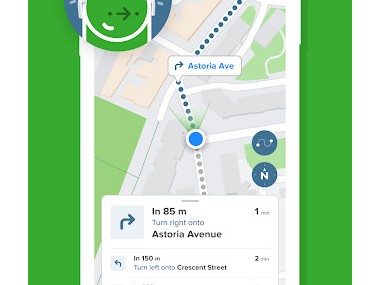
Citymapper compares urban trips across transit and walking, and lets you weigh cycling against ride-hailing or shared bikes and scooters. Its app-store listing advertises routes and maps for more than 400 cities worldwide. Turn-by-turn guidance includes stop notifications, and supported stations even get carriage advice so you exit by the right door.
Check your city first. Route quality and live vehicle positions depend on local feeds, and so does information about nearby shared bikes.
Transit snapshot | Details |
Modes combined | Transit and walking; cycling and shared mobility |
Trip help | Live departures and alerts; stop notifications and offline maps |
Best fit | Commuters and visitors in supported cities |
Todoist

Type "renew insurance Friday at 10" into Todoist, and it schedules the task. That's the whole pitch, and it works. Recurring dates handle monthly chores, and the free Beginner tier includes automatic reminders for tasks with due times. Projects and sections keep obligations organized, while priorities and labels feed filters.
Pro and Business add calendar layouts with time blocking and task durations, plus custom notification lead-times, location-based reminders, and higher collaboration limits. Todoist's 2026 board update also lets you edit subtasks without opening their details, a small change that saves real clicks.
Task-manager snapshot | Details |
Fastest workflow | Natural-language entry with recurring dates |
Organization | Projects with sections; list and board views |
Best fit | Personal capture and lightweight shared projects |
AnyList
AnyList synchronizes shared grocery lists in real time, which ends the duplicate-milk problem when someone adds an item after you've already left the store. Automatic categories group items by department, and you can reorder them to match your store's actual aisles.
Recipes drop ingredients straight into lists, and a meal calendar schedules the week's dinners. Siri or Alexa can add items hands-free when your hands are covered in flour. Basic lists and sharing are free; recipe-planning tools, desktop and web access, and Apple Watch support require the Complete upgrade.
Grocery-planning snapshot | Details |
Shared workflow | Real-time lists organized by store category |
Planning tools | Recipe imports and ingredient transfer; meal calendar |
Best fit | Households coordinating shopping and weekly meals |
Google Home



Google Home gathers compatible devices into one control panel. Home shows device status, Activity surfaces camera events, and the Automations section handles routines triggered by schedules, device states, or household actions.
In practice: adjust the thermostat from bed, or switch off the downstairs lights without walking back down. Voice control needs supported speakers or displays, and Gemini for Home capabilities depend on your device, account, and region. Check compatibility before buying hardware, because speakers and premium monitoring cost more than the free app.
Smart-home snapshot | Details |
Compatible ecosystem | Google Nest and Matter; Works with Google Home |
Main controls | Status and cameras; lighting and climate; routines |
Buying caution | Confirm device compatibility and feature availability |
YNAB

YNAB pairs a budgeting method with software, and the method is the point. This is not a passive dashboard. You assign money you already have to spending or saving categories, including debt payments, then plan for irregular costs and shift allocations when priorities change.
The 34-day trial exists because the upkeep is real, and you should test it before paying. Household sharing covers up to six people. Imports cut the typing, but you'll still review transactions and move money between categories when the car needs repairs.
Budgeting snapshot | Details |
Method | Allocate available dollars before spending |
Planning tools | Connected-account or file imports; savings targets; debt planning |
Best fit | Active household budgeting with spending and net-worth reports |
Notion

Notion gives household notes and project plans a flexible home. Movable blocks combine text with checklists or embeds, and nested pages keep related references together. Database views rearrange the same records without duplicating them, which is exactly what you want for a home inventory or a renovation tracker.
The catch is discipline. You can spend longer designing the system than using it. Start with one page or template and expand only when a recurring need shows up, like tracking contractor visits.
Workspace snapshot | Details |
Content model | Movable blocks and nested pages; templates and databases |
Useful views | Tables and boards; calendars; lists and galleries |
Best fit | People organizing varied personal information |
Choose the friction you want to remove
Pick the recurring task that costs you the most time or creates the most avoidable stress. Don't install everything on this list. Choose an app that fits your routine, and justify the subscription after trying the free plan or trial. Give one tool a small job first. Tonight, start a shared grocery list and invite the person who shops with you.
