SideTrak Swivel 12.5-Inch Attachable Monitor Review (2026): The Best Portable Second Screen for Remote Work?
Working from a laptop while traveling often means sacrificing the productivity of a second screen. After testing the SideTrak Swivel 12.5-inch Attachable Monitor for several months—including during business travel and while working from the beach—I found it offers a practical way to bring a dual-screen workspace almost anywhere. Its lightweight magnetic design attaches directly to a laptop, while the 360-degree swivel, 270-degree rotation, Full HD display, and flexible USB-C, USB-A, and HDMI connectivity make it easy to expand your workspace without carrying a traditional monitor and stand.
Why You Can Trust GearBrain
At GearBrain, we don't simply repeat manufacturer specifications. Every product review is based on real-world testing designed to answer the same questions consumers ask before buying connected technology.
We evaluate products based on:
- Ease of setup
- Daily usability
- Build quality
- Performance over time
- Compatibility with different devices and operating systems
- Value for the money
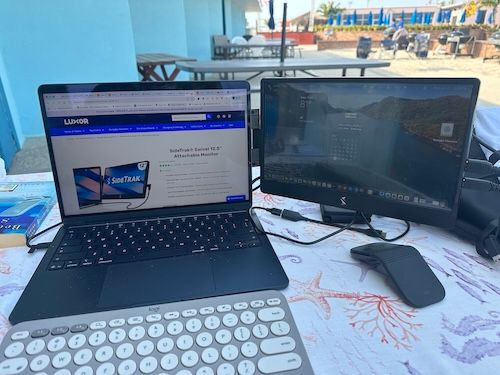
The SideTrak Swivel was used over several months as part of my daily workflow, both at home and while traveling. During testing, I used it to write articles, conduct product research, participate in Zoom and Microsoft Teams meetings, manage email, edit images, and multitask across multiple browser windows. One of the highlights of the review period was using it while working remotely from the beach during the summer, where portability became just as important as display quality.
Buy on Amazon
What Is the SideTrak Swivel?

The SideTrak Swivel 12.5-inch Attachable Monitor is a portable Full HD monitor that magnetically attaches to the back of your laptop, allowing you to instantly create a dual-screen workspace almost anywhere.
Unlike traditional portable monitors that require a separate stand and additional cables, the SideTrak remains attached to your computer. Simply slide it out, rotate it into position, plug in the appropriate cable, and begin working.
Its patented design allows the screen to rotate up to 360 degrees and swivel 270 degrees, making it equally useful for personal productivity, client presentations, or collaborating with colleagues.
Whether you're working in an airport lounge, hotel room, coffee shop, or beach house, SideTrak was clearly designed with mobile professionals in mind.
How We Tested the SideTrak Swivel
Over several months, I incorporated the SideTrak into my normal work routine instead of treating it like a short-term review sample.
The monitor traveled with me on business trips and summer travel where I often worked outside traditional office environments.
During testing, I used it for:
- Writing and editing GearBrain articles
- Running ChatGPT and research simultaneously
- Managing multiple browser tabs
- Email and calendar management
- Microsoft Teams and Zoom meetings
- Reviewing product specifications
- Editing photos
- Monitoring Google Analytics and Search Console
- Social media scheduling
Perhaps the most memorable part of the testing involved working from the beach during the summer months. Normally I avoid bringing an external monitor because it requires an additional carrying case and separate stand. The SideTrak eliminated that inconvenience because it folded directly behind my laptop.
That experience alone demonstrated its biggest advantage—bringing desktop-level productivity almost anywhere.
Design and Build Quality
The SideTrak immediately stands out because of its innovative engineering.
Instead of functioning as another accessory that needs to be unpacked every time you work, it essentially becomes part of your laptop.
Its lightweight construction makes it surprisingly easy to travel with.
Dimensions
- 12" × 7.4" × 0.7"
- Weight: 1.3 pounds
Despite its slim profile, the monitor feels solid throughout normal use.
The magnetic mounting system is particularly impressive.
After attaching the included metal plate to the back of your laptop, the monitor snaps securely into place with surprisingly strong magnets. During testing, I never worried about the monitor accidentally detaching while moving between work locations.
Buy on Amazon
Setup Experience
Overall, installation is straightforward.
Mounting Steps
- Close your laptop.
- Use the included alignment guide.
- Attach the adhesive metal plate.
- Magnetically connect the monitor.
- Slide the display outward.
- Rotate it into position.
- Connect the appropriate cable.
The entire process takes only a few minutes.
I did experience some setup issues initially. Like many USB-C monitors, compatibility depends on whether your laptop supports video output through USB-C. After confirming the proper connection and adjusting my display settings, everything worked as expected.
Once configured, I experienced no reliability issues during the remainder of my testing.
Display Performance
The SideTrak features a 12.5-inch Full HD LCD display with a native resolution of 1920 × 1080.
Specifications include:
- 300 cd/m² brightness
- 60 Hz refresh rate
- 30 ms response time
- 16:9 aspect ratio
- TFT LCD panel
- 600:1 contrast ratio
For productivity work, text appears crisp and easy to read.
Colors are accurate enough for general content creation, spreadsheets, presentations, and web browsing.
While creative professionals performing detailed photo or video color correction will still prefer higher-end IPS displays, the SideTrak delivers exactly what most professionals need for everyday work.
Productivity in the Real World
This is where the SideTrak truly shines.
During testing, I frequently kept:
- Microsoft Word open on one screen
- Research websites on another
- Gmail always visible
- ChatGPT running beside my writing
- Google Docs and Chrome simultaneously
- Analytics dashboards beside editorial content
The extra screen reduced constant window switching.
Instead of repeatedly minimizing applications, I simply looked left.
It sounds simple, but after several weeks of use it became difficult to return to working from only one display.
Portability
For travelers, portability may be the monitor's biggest advantage.
Instead of carrying:
- another monitor
- another stand
- another carrying sleeve
the SideTrak folds flat against your laptop.
At just 1.3 pounds, it adds minimal weight while providing a significant increase in productivity.
This made a noticeable difference while flying and commuting.
Collaboration Features
The patented swivel mechanism adds flexibility beyond personal productivity.
You can rotate the monitor toward:
- clients
- coworkers
- classmates
- family members
This makes sharing presentations or reviewing documents much easier than turning your entire laptop around.
It's one of those features that sounds minor until you begin using it regularly.
Connectivity and Compatibility
The SideTrak supports multiple connection methods, making it compatible with a wide variety of laptops. Some may view this as a positive, and others who don't want more cords in their setup will not. For me, it was not an issue.
Supported connections include:
- USB-C
- USB-A
- Mini HDMI
Compatible operating systems include:
- Windows
- macOS
- ChromeOS
No additional software downloads are required.
Technical Specifications
| Specification | Details |
|---|---|
| Screen Size | 12.5 inches |
| Resolution | 1920 × 1080 |
| Brightness | 300 cd/m² |
| Refresh Rate | 60 Hz |
| Contrast Ratio | 600:1 |
| Aspect Ratio | 16:9 |
| Response Time | 30 ms |
| Weight | 1.3 lbs |
| Dimensions | 12" × 7.4" × 0.7" |
| Operating Systems | Windows, macOS, ChromeOS |
| Connections | USB-C, USB-A, Mini HDMI |
| Power Consumption | 3.65W |
What's Included
Single Monitor Package
- SideTrak Swivel 12.5-inch monitor
- Two magnetic mounting plates
- USB-C to USB-C cable with USB-A adapter
- Mini HDMI to HDMI cable
- Mounting guide
Dual monitor kits are also available for users who want a triple-screen mobile workstation.
Alternatives to Consider
Although the SideTrak Swivel impressed us, buyers may also want to compare it with:
ASUS ZenScreen Series
A popular portable monitor offering excellent image quality but requiring its own stand.
Lenovo ThinkVision M14
A premium lightweight USB-C portable display with excellent color accuracy.
LG gram +View
A larger 16-inch portable monitor that offers more screen real estate but sacrifices some portability.
SideTrak Swivel
The SideTrak remains the better option for users who want an attachable monitor that becomes part of their laptop rather than another accessory to unpack every time they work.
Who Should Buy the SideTrak?
This monitor is ideal for:
- Remote workers
- Hybrid employees
- Business travelers
- Students
- Journalists
- Consultants
- Sales professionals
- Digital marketers
- Content creators
- Anyone who frequently multitasks on a laptop
If you primarily work at a desktop with multiple monitors, the SideTrak may be unnecessary.
However, if your office changes daily, you'll appreciate the flexibility it provides.
Buy on Amazon
Frequently Asked Questions
Does SideTrak work with MacBooks?
Yes. It supports macOS, Windows, and ChromeOS. (Note: I tested this portable screen on a MacBook Air laptop.)
Does it require software?
No. It works without downloading additional software.
Can I rotate the monitor?
Yes. It supports both 360-degree swivel and 270-degree rotation.
Is it easy to travel with?
Absolutely. It folds flat behind your laptop and weighs only 1.3 pounds.
Can it be used for presentations?
Yes. Rotating the display toward another person is one of its most useful features.
Price and Availability
The SideTrak Swivel 12.5-inch Attachable Monitor has an MSRP of $149.99 and is available directly from the SideTrak website and through Amazon.
Considering its innovative design, ease of use, portability, and productivity benefits, it represents excellent value for professionals who regularly work on the go.
Buy on Amazon
GearBrain Verdict
Portable monitors have become increasingly popular as remote and hybrid work continue to grow, but many still require separate stands, additional cases, and extra setup time. The SideTrak Swivel takes a different approach by integrating directly with your laptop, making dual-screen productivity almost effortless wherever you work.
After months of testing—including daily office use, business travel, and working outdoors from the beach—it consistently proved to be reliable, lightweight, and genuinely useful. The magnetic mounting system, patented swivel mechanism, and versatile connectivity options make it stand out in a crowded market of portable displays.
Although I experienced a few minor setup challenges initially, those were quickly resolved and had little impact on the overall experience. Once configured, the monitor became an indispensable part of my mobile office.
For professionals who spend hours working from laptops and want desktop-like productivity without carrying a full workstation, the SideTrak Swivel earns GearBrain's recommendation.
Overall Rating: 9
| Category | Rating |
|---|---|
| Design & Build | ⭐⭐⭐⭐⭐ |
| Ease of Setup | ⭐⭐⭐⭐☆ |
| Display Quality | ⭐⭐⭐⭐☆ |
| Portability | ⭐⭐⭐⭐⭐ |
| Productivity | ⭐⭐⭐⭐⭐ |
| Value | ⭐⭐⭐⭐⭐ |
Pros
- Lightweight at just 1.3 pounds
- Brilliant magnetic attachment system
- Patented 360° swivel and 270° rotation
- Sharp Full HD display
- Works with Windows, macOS, and ChromeOS
- Excellent for travel and hybrid work
- No software required
- Multiple connectivity options
Cons
- Initial setup can require troubleshooting depending on laptop ports
- Not designed for gaming or professional photo editing
- Outdoor visibility decreases in direct sunlight
Bottom Line
If you spend any significant amount of time working on a laptop away from your desk, the SideTrak Swivel is one of the smartest productivity accessories you can buy. It transforms virtually any laptop into a dual-screen workstation in seconds without adding significant bulk to your travel bag.GearBrain Rating: 4.8 out of 5 stars
Would we recommend it? Absolutely. It's one of the most practical laptop accessories we've tested this year and an excellent investment for anyone looking to work smarter from virtually anywhere.
: The Best Portable Second Screen for Remote Work?)