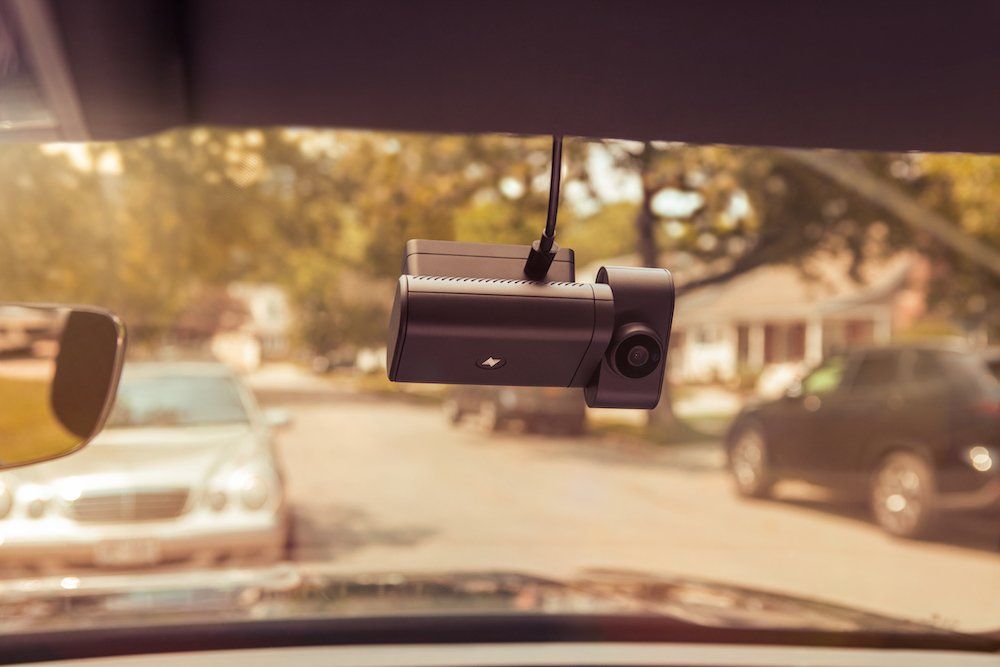
Best Dash Cams for Truckers in 2026: Commercial Fleet Cameras Compared
After a crash or disputed incident, a road-facing camera shows what happened ahead of the truck. An inward view adds driver context, and GPS or vehicle records place the event on a specific trip. Commercial operators need a practical way to retrieve that evidence without waiting for the truck to return.
For a fleet, resolution is only part of the decision. The camera has to capture the needed views and preserve evidence the operator can retrieve after an incident. Fleets that rely on safety alerts or telematics need those records tied to the video.
How Do the Best Truck Dash Cams Compare at a Glance?
Product | Best For | Camera Coverage | AI Safety | Storage / Retrieval | GPS / Telematics | Extra Cameras |
Matrack AI Dashcam | Owner-Operators & Small Fleets | Road + cab | DMS + ADAS | Local + cloud | GPS + ELD context | Up to 5 cameras |
Samsara CM34 | Integrated Fleet Telematics | Road + driver | AI alerts + coaching | Cloud + configurable | Samsara telematics | Side + rear + interior |
Motive DC-64 | AI Driver Safety | Dual-facing | 30+ AI models | Up to 160 hours | Built-in gateway | Expansion supported |
Lytx SF400 | Driver Coaching | Road + cab | MV + AI alerts | Continuous + live | ECM data | Up to 8 views |
Verizon Connect Dual-Facing AI Dashcam | Multi-Camera Visibility | Road + driver | Behavior detection | 90-day cloud | Reveal integration | Up to 4 cameras |
Which Dash Cams Are Best for Truckers and Commercial Fleets?
The five products cover the same commercial video-safety category, but their strongest use cases differ: Matrack is positioned for smaller fleets, Samsara and Motive tie closely into telematics, Lytx emphasizes coaching, and Verizon expands peripheral coverage.
1. Matrack Fleet Dashcam M4000 — Best for Owner-Operators & Small Fleets

Matrack Fleet Dashcam M4000 records 1080p video in both directions, with infrared on the inward-facing lens for nighttime cab footage. GPS tags recorded incidents with location. Continuous footage stays on the microSD card, and 4G LTE sends flagged clips to the cloud. Live view through the Matrack app gives an owner-operator remote access before the truck returns.
DMS and ADAS processing happens on the device, so monitoring continues through a temporary cellular outage. Driver-side detection covers phone use, fatigue, distraction, seat-belt status, and smoking. Road alerts cover forward-collision risk, tailgating, lane departure, and stop-sign violations. Selected detections trigger audible cab warnings; anything queued during an outage uploads when service returns.
A 3-axis G-sensor saves a 60-second impact clip with 30 seconds before the incident and 30 seconds after it. Matrack offers configurations with up to five cameras for additional side and rear views. The M4000 works with Matrack’s ML2-001 ELD. In a shared account, the operator sees video beside GPS location and corresponding HOS records. The FMCSA registry listing applies to the ELD, not the dashcam.
Key Features
- Dual 1080p views
- Offline AI monitoring
- 60-second impact clips
- Five-camera coverage
- ELD record pairing
- 512GB local storage
2. Samsara Dual-Facing AI Dash Cam (CM34) — Best for Integrated Fleet Telematics

For fleets already on Samsara’s Vehicle Gateway, CM34 footage appears in the same dashboard as vehicle data. The road lens records at 1080p by default and has a 2K option; infrared handles the inward view in low light. Drowsiness, distraction, and phone use are among the driver-side detections, with tailgating, speeding, rolling stops, lane departure, and collision risk covered on the road side. CM34 is the current dual-facing model; CM32 is the previous generation and is end-of-sale.
Critical clips upload automatically, and managers pull other recordings from the dashboard as needed. The built-in speaker delivers in-cab coaching. Storage varies with video quality, audio, and connected accessories. Fleets needing more angles route compatible side, rear, or interior cameras through the HD Camera Connector. AI Multicam is a separate multi-camera product, not part of the CM34 hardware.
Key Features
- Optional 2K road
- 167° cab view
- Gateway-connected video
- Automatic event uploads
- Dashboard video requests
- Camera Connector expansion
3. Motive AI Dashcam Plus (DC-64) — Best for AI Driver Safety

The DC-64 combines a 1080p wide road lens, a 1440p zoom lens, and a 1080p infrared driver lens. Motive places the Vehicle Gateway in the same windshield-mounted unit, keeping the camera and telematics hardware together.
More than 30 AI models handle driver and roadway events such as close following, phone use, distraction, speeding, and collisions. Fatigue Detection, added in 2026, looks for yawning, eye rubbing, swerving, and microsleep. During supported collision and near-collision events, Collision Evidence Capture uses the zoom lens to surface license-plate and vehicle details where the feature is available.
Storage mode determines how much footage stays on the device. The longest-retention setting reaches up to 160 hours; higher-quality modes keep shorter windows and preserve zoom footage. Live streaming, video recall, collision uploads, coaching, and Driver Privacy Mode are available now. Motive lists stereo-vision enhancements and dual-SIM connectivity for later in 2026.
Key Features
- Triple optical views
- 1440p zoom lens
- Integrated Vehicle Gateway
- 30+ AI models
- Fatigue Detection
- Collision Evidence Capture
4. Lytx DriveCam® SF400 Series Event Recorder — Best for Driver Coaching
The SF400 is centered on what happens after a safety event reaches the review queue. Its 1080p footage is paired with GPS and ECM/ECU records, giving managers vehicle context alongside the clip. MV+AI flags handheld-device use, inattentiveness, speeding, lane departure, and following-distance problems. Selected detections trigger in-cab alerts. Coach Assist gives managers summaries and suggested discussion points. Driver Self-Coaching routes lower-severity events to the driver for guided review. The safety team handles repeated or higher-risk behavior for direct follow-up.
Continual recording reaches up to 400 hours, with live streaming, automatic uploads, and cloud access through DriveCam. The 360 Hub Kit handles four HD auxiliary views today and is designed to expand to eight. Lytx lists pedestrian, object, and blind-spot detection for certain side and rear cameras for Winter 2026, so those detections are not active yet.
Key Features
- MV+AI detection
- Coach Assist
- Driver Self-Coaching
- 400-hour recording
- ECM vehicle context
- 360 Hub expansion
5. Verizon Connect Dual-Facing AI Dashcam — Best for Multi-Camera Visibility

Road and driver footage goes into Verizon Connect Integrated Video/Fleet, where managers review clips, download them, and use them in coaching. The safety tools flag tailgating, distraction, tiredness, phone use, and posted-speed events. Uploaded clips stay in Fleet for 90 days unless downloaded. If an incident is missing from the event list, Get Video retrieves the recording remotely from the SD card as long as it is still stored there.
Extended View Cameras add up to four side, rear, or cargo angles through a cloud-connected DVR. The DVR handles that expansion separately from the main road-and-cab unit.
Key Features
- 90-day cloud retention
- Get Video retrieval
- Extended View cameras
- Four peripheral views
- Cloud-connected DVR
- Integrated Video
What Kind of Dash Cam Does a Commercial Truck Need?
Start with the evidence the operation needs: the roadway alone, roadway plus cab, or additional views around the vehicle.
Recording-Only vs. Connected AI Fleet Dashcam
A recording-only unit keeps footage on the device until someone retrieves it. For an owner-operator who only wants a basic road record, that arrangement may be enough.
A connected fleet camera links the recorder to cellular or cloud services for event uploads and off-truck access. Add AI, and selected driver or roadway risks are flagged automatically instead of waiting for someone to find them in hours of video. Fleets managing several vehicles generally gain more centralized oversight from that architecture.
Road-Facing vs. Dual-Facing
Road-facing coverage answers what happened in front of the truck. It captures traffic movement, lane position, and the scene ahead without recording the cab.
Dual-facing hardware adds an inward lens, so the same incident captures driver activity. Infrared is especially relevant on overnight routes because the interior image still has to work in low light.
When Side, Rear, and Cargo Cameras Matter
A forward lens cannot show every area around a tractor-trailer. Side cameras cover adjacent lanes and blind zones. A rear unit shows the area behind the truck or trailer during backing and other close maneuvers. Cargo coverage belongs only where the load space itself needs monitoring.
Those extra views normally feed through a connector, DVR, or hub so they stay associated with the same vehicle. Add a camera where it answers something the forward and cab lenses cannot.
Need | Best-Fit Architecture |
Basic road record | Road-facing recorder |
Driver + road context | Dual-facing camera |
Remote incident access | Connected fleet dashcam |
Automated safety events | Connected AI dashcam |
Side/rear blind zones | Multi-camera system |
Cargo or trailer view | Auxiliary camera + hub/DVR |
What Matters Most When Comparing Commercial Truck Dash Cams?

After you choose a layout, compare how well each system records an incident and how easily the fleet can retrieve and interpret that evidence.
Incident Video Quality and Low-Light Capture
Resolution is only one factor in whether an incident clip is usable. The image still needs enough detail around vehicles, signs, and lane markings as lighting changes. For the cab, infrared performance becomes more important after dark. Field of view, frame rate, lens angle, and HDR affect what remains visible in the recording.
DMS and ADAS
DMS focuses on the person behind the wheel, tracking behavior or driver state such as distraction and fatigue. ADAS looks outward at roadway risk, including following distance or lane departure.
An “AI dashcam” label does not tell a fleet which events are actually detected. Compare the documented detection set and what follows each trigger, whether that is an in-cab warning, a flagged clip, or an item for later review.
Automatic Event Capture
An event clip needs more than a trigger. Impact sensors, vehicle signals, and AI detections are common triggers, but the recording window determines whether the lead-up and aftermath are visible.
Check how much pre- and post-event footage is saved, which triggers are automatic, and whether the clip uploads or is only marked on the device for later retrieval.
Local Storage, Cloud Access, and Retention
Local and cloud retention answer different questions. Onboard storage determines how long continuous footage remains before the device overwrites older material. Cloud retention determines how long an uploaded clip stays available remotely.
Compare both windows, which recordings upload automatically, and whether unuploaded footage remains requestable from the device.
GPS and Vehicle/Telematics Context
Location, speed, engine status, and trip records add context when they stay tied to the same timestamp as the clip. The value comes from the relationship between the video and those records, not from GPS as a standalone feature.
With Matrack, dashcam, GPS, and ELD services used together, video, location, and corresponding HOS records live side by side in the same account.
Auxiliary-Camera Expansion
Judge expansion by the hardware path and how the added footage is handled. Check the required connector, DVR, or hub; the number of supported inputs; and whether the extra feeds stay synchronized with the main incident.
Extra angles lose value when they live in a separate interface or have to be retrieved independently.
Power, Installation, and Hardware Reliability
Vehicle compatibility affects both installation time and long-term serviceability. Hardwiring, vehicle-interface cables, OBD-II, 9-pin connections, and 12V adapters all create different installation paths.
For a fleet-wide rollout, check mount security, cable routing, operating-temperature limits, and maintenance access. Repeating the same installation across dozens of vehicles turns a simple connection into a deployment issue.
Service and Contract Structure
Connected cameras often rely on a service plan for cellular data, cloud video, AI functions, telematics, or longer retention. Hardware alone does not show the full package a fleet is buying.
Review the subscription terms alongside the camera specifications, especially required licenses, included retention, and any features tied to a particular service tier.
What Should You Do With Dash Cam Footage After an Accident?
After an accident, preserve the relevant footage before you edit or share it routinely.
- Save the full incident window: Pull enough time before and after the event to show the sequence, then preserve that file before the recording window expires.
- Protect the source file: Store the original recording as retrieved or exported and use a duplicate for review, trimming, or sharing.
- Keep the supporting metadata: Save the timestamp, GPS metadata, and source details that identify the truck and trip.
- Document each handoff: Record each export or transfer, including who received it and when, in case a dispute arises. NIST guidance on digital evidence emphasizes source documentation, integrity, secure copies, and chain-of-custody records.
- Follow the fleet’s incident procedure: Send the footage to the appropriate insurer, legal contact, or internal team under the company’s normal process. Dashcam video may contribute to an incident review, but it does not automatically establish fault or guarantee legal admissibility.
How Should a Dash Cam Be Installed in a Semi-Truck?
Installation starts with a legal windshield position, then moves to power, cable routing, and any auxiliary views.
Federal Windshield Placement
49 CFR 393.60(e) allows vehicle safety technology no more than 8.5 inches below the upper edge of the windshield-wiper-swept area or 7 inches above the lower edge, and the equipment must stay outside the driver’s sight lines. Dash cams fall within this rule because 49 CFR 393.5 includes driver camera systems and video equipment in the definition of vehicle safety technology.
Measure from the wiper-swept area and check the driver’s view before fixing the camera in place.
Power and Mounting
Confirm the truck’s power connection before routing cable or attaching the mount. The installation method depends on the vehicle and hardware: hardwiring, a vehicle interface, a 9-pin connector, OBD-II, or a compatible 12V source.
Set the lens angle from the installed position. Secure wiring away from driver controls and moving parts, but leave enough access for service or memory-card removal when the unit uses removable local storage.
Auxiliary Camera Placement
Place each auxiliary camera around a specific visibility gap. A side unit needs the adjacent lane or blind zone in frame; a rear unit needs the area behind the truck or trailer. Position a cargo camera only where it can see the load area.
Connect those feeds through the approved hub, DVR, or interface so they remain associated with the same truck and incident.
What Should Fleets Know About Driver-Facing Cameras, Privacy, and Audio Recording?



Driver-facing video and in-cab audio raise different privacy questions and belong in separate policy rules.
Cab video shows activity inside the vehicle; an enabled microphone captures conversations. Federal law generally provides a one-party-consent baseline for audio, but state law may impose stricter requirements. Hidden-camera and privacy rules vary by jurisdiction, which matters for fleets that cross state lines.
A written policy should identify who can view cab footage, why it may be reviewed, and how long it is retained. Driver notice needs to explain when the inward-facing lens or microphone is active and how recordings are used.
Privacy controls differ by vendor. Samsara documents driver-facing privacy covers, Motive lists a lens cover for the DC-64, and Verizon provides privacy-cover controls for its dual-facing camera.
These points are general compliance context, not state-specific legal advice.
Frequently Asked Questions
Do commercial truck dash cams need an internet connection?
Not always. Local recording and certain on-device safety functions continue without cellular service on systems designed to operate offline. Cloud uploads and remote features, such as live video, still require connectivity. Before deployment in weak-coverage areas, verify what the device stores during a coverage gap.
Can a dash cam replace an ELD?
No. A dash cam records video; an ELD serves a separate Hours of Service compliance function. An integrated fleet account may display both records together; the camera itself does not become an FMCSA-registered ELD.
Do commercial truck dash cams record when the engine is off?
It depends on the camera’s power design and fleet settings. Some connected systems allow parking or post-trip recording for a limited time; others stop when vehicle power is removed. Check the vendor’s engine-off behavior before relying on the camera for parked-vehicle coverage.
