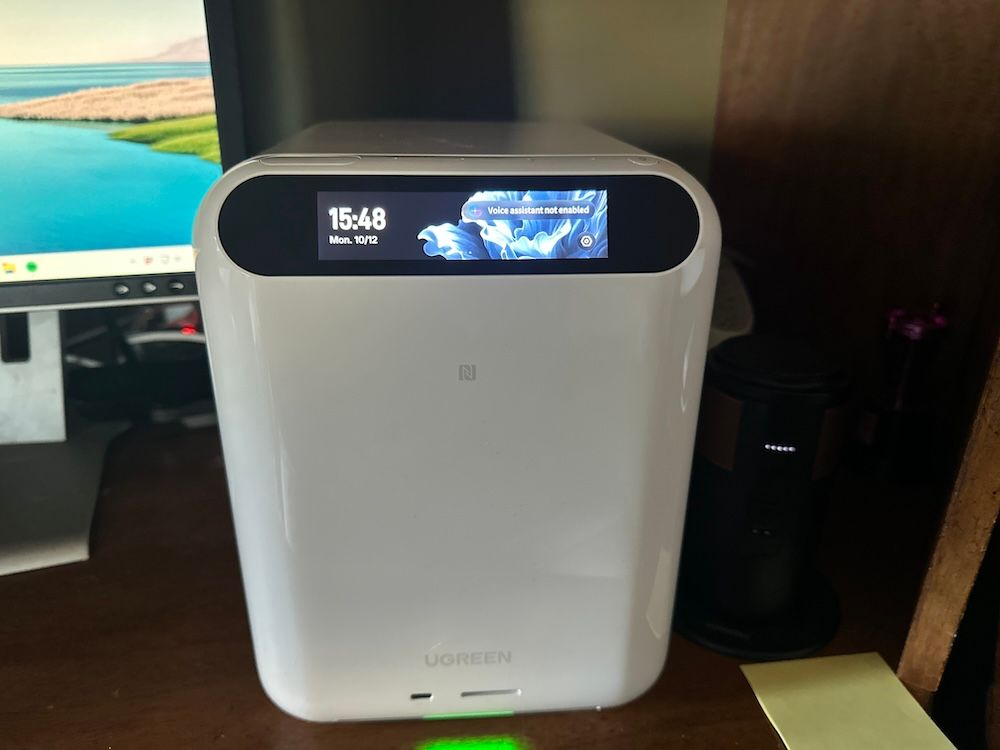
UGREEN HomeAgent HA100 Review: An Ambitious AI Smart Home Hub With Room to Grow
The UGREEN HomeAgent HA100 is one of the more ambitious smart home products I've tested. Rather than serving exclusively as a hub for connected devices, it combines network-attached storage (NAS), surveillance recording, Matter smart home control, and local AI capabilities into one system.
After more than a month of testing in our smart home, we were impressed by the concept, the solid hardware, and the potential to consolidate multiple connected-home functions. However, we also ran into some growing pains, particularly during installation, device pairing, and navigation in the mobile app.
Our verdict: The UGREEN HomeAgent HA100 has considerable potential, especially for homeowners who want local storage and smart home management in one device. Its $799 early-bird price could represent strong value, but the software still needs refinement. We recommend it primarily to tech-savvy buyers comfortable with a developing platform.
GearBrain review snapshot
| Category | Findings |
|---|---|
| Testing period | More than one month |
| Test environment | Verizon Fios gigabit-class connection, dual-band router, iPhone 14 Pro |
| Best features | Local storage, surveillance integration, Matter compatibility |
| Main drawbacks | Complicated setup, confusing app, large size, separate HDD costs |
| Advertised maximum storage | Up to 96TB |
| MSRP | $1,599 |
| Announced early-bird price | $799 |
| GearBrain rating | Pending further testing |
Review disclosure: GearBrain received an early UGREEN HomeAgent HA100 review unit and separately supplied storage drives. Our findings reflect hands-on testing with beta software. Manufacturer claims that we have not independently verified are identified throughout this review.
Order HomeAgent HA100 here.
What Is the UGREEN HomeAgent HA100?

The UGREEN HomeAgent HA100 is a local AI-powered smart home hub designed to bring storage, computing, security, and connected-device control into one platform.
UGREEN introduced HomeAgent during its Smart Living Launch Event in September 2026 as part of its entry into the AIoT market.
The company describes HomeAgent as a local-first platform intended to help homeowners manage connected devices, preserve personal files, store security camera recordings, and eventually coordinate more intelligent household activities.
Unlike a traditional smart home hub, which primarily connects and controls devices, HomeAgent also functions as a NAS system.
This means consumers can use it to store personal photos, videos, documents, and security footage without necessarily depending on separate cloud storage subscriptions.
UGREEN's broader ecosystem includes the HomeAgent HA100, HA100 Pro, MasterAgent MA100, SynCare security cameras, a smart speaker, and Gallery smart photo frames.
The HA100 Pro and MasterAgent MA100 are separate products with more advanced computing capabilities. Consumers should not assume that every feature announced for those models is available on the standard HA100.
UGREEN HomeAgent HA100 Specifications
According to UGREEN's published product information, the HA100 includes:
| Feature | Specification |
|---|---|
| Processor | Rockchip RK3588 |
| AI computing | Manufacturer-rated 26 TOPS |
| Memory | 16GB LPDDR5 |
| Operating system | UGOS Pro |
| Advertised storage capacity | Up to 96TB |
| SATA drive bays | Three, including a dedicated surveillance bay |
| Additional storage | M.2 NVMe expansion |
| Networking | 2.5GbE Ethernet |
| Camera connectivity | Four PoE Ethernet ports |
| Smart home compatibility | Supported Matter devices and UGREEN products |
| Third-party camera support | Compatible ONVIF cameras |
| Mobile support | iOS and Android |
These are manufacturer specifications, not benchmark results from our testing.
Design and Build Quality: Solid Hardware, but a Large Footprint
One of the first things we noticed about the HomeAgent HA100 was its size.
The unit is well-built, with a substantial square enclosure and a small integrated screen. However, it takes up considerably more space than a typical smart home hub.
Consumers with a networking cabinet, equipment shelf, or home office may not mind its size. But homeowners who prefer to hide their technology may find the HA100 hard to fit.
Another important consideration is connectivity.
HomeAgent requires a wired Ethernet connection to the home network.
During our testing, we connected the unit to a dual-band router on our Verizon Fios gigabit-class internet service.
Because the HA100 must connect to a wired network, homeowners need to plan where it will sit. That may mean keeping it near the router or using an existing Ethernet connection elsewhere in the house.
For a device designed to handle security footage, storage, and multiple connected devices, wired networking makes sense. However, it limits the placement flexibility smaller Wi-Fi-connected hubs offer.
How Easy Is the UGREEN HomeAgent HA100 to Set Up?
etup was one of the more challenging parts of our testing.
GearBrain received an early review unit before public availability, so we understood that some software features might still be evolving.
Even so, the installation process was less intuitive than we expected.
We used an iPhone 14 Pro with UGREEN's iOS beta app. The company also supports Android devices.
During our initial setup, we found the app difficult to navigate. Some functions weren't where we expected, and it took time to understand the relationship between the different sections.
The printed user manual was also difficult to use because the text was extremely small.
Fortunately, UGREEN provided a setup video that was much easier to follow. In fact, it was the most helpful resource during installation.
The Beta Software Requires Several Components
UGREEN's September 15 installation guide provides additional context for our experience.
The company identified the software as a beta release and outlined a multi-step update process involving the HA100 operating system, mobile app, Home app, Surveillance Center, and UGREEN IoT Gateway service.
For certain installations, UGREEN also provided instructions involving Docker and a system reboot.
The company said the September 15 update introduced new functions and that it planned additional improvements before retail availability.
This helps explain why the early software experience may feel more complicated than consumers expect from a finished smart home product.
However, even beta software should make essential tasks, such as connecting devices and finding settings, reasonably straightforward.
We hope UGREEN simplifies these processes before more consumers reach the HA100.
Adding Matter Devices

Once we understood the app's layout, adding Matter-compatible devices became more straightforward.
The process involved opening the Smart Home section and selecting the "+" icon to add a device.
From there, the app allowed us to add either a UGREEN product or a compatible Matter device.
UGREEN's setup guide also describes scanning a Matter QR code or manually entering the pairing code, then assigning the device a name, room, and floor.
We appreciate that HomeAgent isn't limited to UGREEN-branded products.
However, some of the devices we connected required additional pairing attempts before working properly.
Order HomeAgent HA100 here.
Login Could Be More Convenient
We also found the sign-in process unusual.
The app offered two methods: a verification code sent by email or signing in to the device with a username and password.
Both methods worked, but accessing the system took longer than with many other smart home products we've tested.
We would like to see UGREEN streamline this experience in future updates.
UGREEN HomeAgent HA100 Matter Compatibility: What Devices Work?
Compatibility is one of the most important considerations when selecting a smart home hub.
UGREEN designed HomeAgent to support its own products, third-party Matter devices, and compatible ONVIF security cameras.
During testing, we used several connected-home products, including LIFX smart lighting, an Aqara Hub M3, Linkind Matter-compatible bulbs, Google Home equipment, Amazon Alexa devices, and a UGREEN indoor security camera.
We established working connections after some initial troubleshooting, although we did not verify every supported function or control method across these products.
Is the UGREEN HomeAgent HA100 a Matter Controller?
Yes, according to UGREEN's September 16 compatibility documentation, the HA100 can control devices on its verified Matter compatibility list as a Matter controller.
However, there is an important distinction between a Matter controller and a Thread border router.
The HA100 does not currently function as a Thread border router.
For Matter-over-Thread devices, homeowners need a compatible Thread border router elsewhere on their network.
We used an Aqara Hub M3 during our testing. The M3 is also listed in UGREEN's verified compatibility documentation.
This distinction matters because Matter is an application-layer interoperability standard, while Thread is a networking technology used by certain smart home devices.
A hub can support Matter control without independently providing Thread networking.
Consumers should therefore verify both Matter compatibility and any additional network infrastructure their devices require.
Which Matter Devices Does UGREEN Support?

UGREEN's September 16 compatibility spreadsheet identifies 57 smart home devices or gateways across several categories.
These include:
- Smart bulbs, light strips, and other connected lighting
- Matter gateways and hubs
- Smart plugs and switches
- Door and window sensors
- Motion and presence sensors
- Temperature and humidity devices
- Selected smart displays and other connected accessories
Examples include the Aqara Hub M3, Aqara Hub M2, Aqara Camera Hub G5 Pro, SwitchBot Hub 3, and several compatible lighting products.
For gateway-based devices, UGREEN recommends completing initial setup in the manufacturer's own app, updating firmware, and pairing any supported subdevices before sharing the gateway with HomeAgent through Matter.
Important: This is UGREEN's verified compatibility list, not a list of 57 devices independently tested by GearBrain.
Compatibility and available functions may vary by device, firmware version, and connection method.
Readers should consult UGREEN's latest compatibility list before purchasing.
Can HomeAgent Work With Third-Party Security Cameras?
According to UGREEN, HomeAgent supports compatible third-party ONVIF cameras in addition to its own SynCare camera lineup.
This could be particularly useful for homeowners who already own IP security cameras and want to consolidate recording and storage.
However, ONVIF compatibility does not automatically guarantee that every camera function will work.
We recommend checking UGREEN's verified camera compatibility information.
During our testing, we connected a UGREEN indoor camera. Initial pairing was troublesome, but we eventually got it working.
We will publish a separate review examining that camera's capabilities and performance.
Uliya AI Assistant: What Can HomeAgent Do?
One of HomeAgent's more interesting features is Uliya, UGREEN's AI assistant.
According to UGREEN's September launch announcement, Uliya is designed to help users control supported devices, retrieve home status information, review recorded events, and receive notifications about household activity.
For example, the company describes scenarios in which homeowners could ask whether a package arrived, check on a pet, or control connected lighting.
UGREEN also describes voice-controlled scenes, cross-space device control, and interactions with compatible security cameras.
These capabilities could help HomeAgent evolve beyond a conventional hub that simply responds to commands.
Creating Scenes and Automations
UGREEN's installation guide outlines two particularly interesting functions.
The first is the ability to create a scene involving multiple devices.
For example, a homeowner could create a Sleep mode that changes lighting and other supported device settings, then activate it through the app or Uliya voice commands.
The second is camera-triggered automation.
According to UGREEN's guide, supported camera detection events, including people or package detection, can be used as automation triggers.
A compatible device could then perform a configured action.
For example, a camera detecting someone approaching the home could potentially trigger a connected light.
This type of coordination is one of the more compelling possibilities for an AI-assisted smart home.
However, we have not yet independently tested these advanced voice-controlled scenes or camera-triggered automations.
We plan to evaluate them during continued testing.
Camera Voice Interaction and Photo Capture

UGREEN's instructions require updating the relevant software, gateway service, and camera firmware.
Users must also configure the camera's location and enable its microphone.
This is notable because it suggests HomeAgent's AI functions are designed to work across connected cameras and other smart home devices.
But until we test it ourselves, we consider it a manufacturer-documented capability rather than a verified GearBrain finding.
AI Highlights and Proactive Home Monitoring
UGREEN is positioning HomeAgent as more than a traditional smart home controller.
The company says the platform identifies meaningful moments in video footage, organizes photo highlights, creates highlight videos, and displays selected content on UGREEN Gallery smart frames.
UGREEN also describes AI-powered recognition of people, vehicles, pets, and packages.
The company says HomeAgent can surface unusual activity, summarize events, and support keyword searches across recorded footage.
These features could appeal to families who want to organize security recordings and preserve meaningful moments without manually reviewing hours of video.
However, we have not yet independently verified the accuracy, responsiveness, or reliability of these AI functions.
We also haven't completed testing with larger media libraries or multiple simultaneous camera feeds.
Those are important areas for future evaluation.
Local Storage: One of HomeAgent's Biggest Strengths

Perhaps HomeAgent's most compelling feature is its ability to combine smart home management with local data storage.
Today, homeowners often use separate systems to store personal photos, back up smartphones, manage security cameras, and control smart devices.
HomeAgent aims to consolidate these functions.
UGREEN advertises support for storing files, photos, security footage, and connected-device activity locally.
The company also says core storage, file management, surveillance, and smart home functions can operate over the local network without monthly storage fees.
For households with extensive personal media collections or multiple security cameras, this could provide meaningful convenience.
Does the UGREEN HomeAgent HA100 Include Hard Drives?
No. Buyers need to purchase compatible storage drives separately.
UGREEN's installation documentation states that initialization requires at least two HDDs: one for NAS storage and another for surveillance recording.
The HA100 includes three SATA bays, with one dedicated to surveillance storage.
UGREEN supplied drives separately for our review unit, allowing us to complete the installation and begin testing.
The company's September compatibility spreadsheet also lists supported HDD models, including options from Seagate, Western Digital, and Toshiba.
Consumers should consult that list rather than assuming any available hard drive will work.
How Much Storage Does the HA100 Support?
UGREEN advertises a maximum capacity of 96TB.
That figure represents supported storage capacity, not storage included with the product.
Actual usable capacity depends on installed drives, configuration, and storage overhead.
While this storage amount could appeal to families with large media libraries or substantial surveillance needs, we have not yet completed capacity, transfer-speed, or long-term reliability testing.
Is HomeAgent Completely Cloud-Free?
Not entirely.
UGREEN describes HomeAgent as a local-first platform, but its press materials clarify that some functions may still require internet access or cloud services.
These can include account registration, authentication, remote access, mobile notifications, software updates, and optional cloud-enabled services.
The company says core local functions can operate over the home network, but we haven't yet independently completed offline testing to determine exactly which features remain available without internet access.
Consumers interested in privacy and local control should understand that local-first doesn't necessarily mean fully cloud-independent.
Real-World Performance: A Work in Progress
After more than a month with HomeAgent, our experience has been promising but not consistently seamless.
The hardware feels substantial, and the concept of combining storage, security, and connected-home control is attractive.
But the software experience still needs work.
The app was difficult to navigate during setup; the login process felt unnecessarily complicated, and several devices required additional pairing attempts.
The UGREEN indoor camera also took some troubleshooting before we established a working connection.
These problems didn't prevent us from continuing our evaluation, but they made HomeAgent feel more like an emerging platform than a finished consumer product.
UGREEN's own installation guide confirms that the September software was a beta release and that further updates were planned.
We expect some of these issues may improve as development continues.
However, we will need to retest the system after future updates before concluding whether those improvements have been delivered.
How Much Does the UGREEN HomeAgent HA100 Cost?
UGREEN announced a $1,599 MSRP for the HomeAgent HA100, with a $799 Super Early Bird offer tied to its pre-order and crowdfunding program.
The discounted price is approximately 50% below the stated MSRP.
UGREEN's September announcement said reservations would begin with a deposit starting at $50, ahead of its originally planned October 27 Kickstarter campaign. Pre-order here.
Buyers should verify current campaign dates, final pricing, fulfillment terms, and included accessories directly with UGREEN before placing an order.
Remember that compatible hard drives are an additional expense.
Is $799 a Good Value?
At first glance, $799 may seem expensive for a smart home hub.
However, HomeAgent doesn't compete only with compact hubs that control a few lights, plugs, and thermostats.
It also offers NAS storage, surveillance management, and an expanding local AI platform.
Buying separate equipment for those functions could cost considerably more, depending on the products and storage capacity selected.
Still, HomeAgent won't necessarily replace every feature of a dedicated NAS, an established smart home controller, or a voice assistant.
The value proposition is strongest for homeowners who will actively use both the storage and smart home functions.
If all you need is a simple hub to control a handful of devices, the HA100 is probably more than you need.
Order HomeAgent HA100 here.
UGREEN HomeAgent HA100 Pros and Cons
What We Like
- Combines NAS storage, surveillance, and smart home management.
- Supports compatible third-party Matter devices and ONVIF cameras.
- Solid construction and substantial hardware capabilities.
- Local-first approach to storage and processing.
- Dedicated surveillance storage functionality.
- Promising AI-assisted automation and media-management capabilities.
- Attractive announced early-bird pricing for buyers who need multiple functions.
What Could Be Better
- Large enclosure requires dedicated space.
- Wired Ethernet connection limits placement flexibility.
- Mobile app navigation needs improvement.
- Login process is more cumbersome than expected.
- Initial pairing difficulties with some devices.
- Compatible HDDs must be purchased separately.
- Matter-over-Thread devices require an external Thread border router.
- Advanced AI features still need independent verification.
UGREEN HomeAgent HA100 Frequently Asked Questions
Is the UGREEN HomeAgent HA100 worth buying?
The HA100 is worth considering if you want local storage, security camera management, and Matter smart home control in one device. However, GearBrain's early testing revealed software usability and pairing issues, so buyers seeking a polished plug-and-play experience may want to wait for further updates.
Is the UGREEN HomeAgent HA100 a Matter controller?
Yes. UGREEN's September 16 compatibility documentation identifies the HA100 as a Matter controller for devices on its verified compatibility list. However, it does not currently act as a Thread border router.
Does the UGREEN HomeAgent HA100 support Thread devices?
It can work with supported Matter-over-Thread devices when a compatible Thread border router is available on the home network. The HA100 itself does not currently provide Thread border router functionality.
What smart home devices work with HomeAgent?
UGREEN's September 16 list identifies 57 compatible smart home devices and gateways, including selected lighting products, sensors, plugs, switches, and hubs. GearBrain independently connected several devices but did not test the complete list.
Can HomeAgent work with third-party security cameras?
UGREEN says HomeAgent supports selected ONVIF-compatible cameras alongside its own security cameras. Buyers should verify their specific camera models and supported functions before purchasing.
Does HomeAgent include storage drives?
No. Buyers must purchase compatible drives separately. UGREEN's installation documentation requires at least two HDDs for initialization: one for NAS storage and another for surveillance storage.
How much storage does the UGREEN HomeAgent HA100 support?
UGREEN advertises support for up to 96TB. Actual usable capacity depends on installed drives and configuration.
Can HomeAgent work without an internet connection?
UGREEN says core storage, security, file management, and smart home functions can operate locally. However, account authentication, remote access, notifications, software updates, and some other functions may require internet access. GearBrain has not yet completed independent offline testing.
What is Uliya?
Uliya is UGREEN's AI assistant, designed to help users control supported devices, retrieve household information, activate scenes, and interact with compatible cameras. GearBrain plans to evaluate its more advanced capabilities as testing continues.
Can HomeAgent replace Alexa or Google Home?
Not completely. HomeAgent offers overlapping smart home functions, but buyers should not assume it provides every feature, integration, or voice assistant capability available through Alexa or Google Home.
GearBrain Verdict: A Promising Vision for the Future of the Smart Home
After more than a month of testing, we believe the UGREEN HomeAgent HA100 represents an interesting direction for the connected home.
For years, consumers have relied on separate products for smart home control, security camera recording, personal storage, and digital media management.
HomeAgent attempts to bring those functions together into one locally managed platform, with AI intended to make the experience more intelligent and useful over time.
We like the concept.
We also appreciate its solid hardware, Matter compatibility, storage capabilities, and potential to work with devices from multiple manufacturers.
At the announced $799 early-bird price, the HA100 could be a compelling option for consumers who intend to use several of its capabilities.
However, our hands-on testing also revealed that the software experience is still developing.
Setup could be easier, the app needs clearer navigation, and device pairing wasn't always smooth.
We also want to see how effectively UGREEN delivers its more ambitious AI features, including voice-driven automation, intelligent surveillance search, and proactive household assistance.
Our recommendation: The UGREEN HomeAgent HA100 is a promising product for smart home enthusiasts and homeowners who want to consolidate local storage, surveillance, and connected-device management. But buyers who prioritize simplicity and mature software should consider waiting until the platform is further refined.
We're continuing to test the HA100 and will update this review as UGREEN releases new software, expands compatibility, and adds more AI capabilities.
Editor's note: This review is based on more than one month of hands-on testing with an early HomeAgent HA100 unit and beta software. GearBrain will update the review as we independently test additional features.
