Hisense RoamView Buyer’s Guide: What to Know Before You Buy
The way we use screens around the home is changing. Instead of putting a television on a wall and leaving it there, Hisense wants its newest display to follow you from room to room.
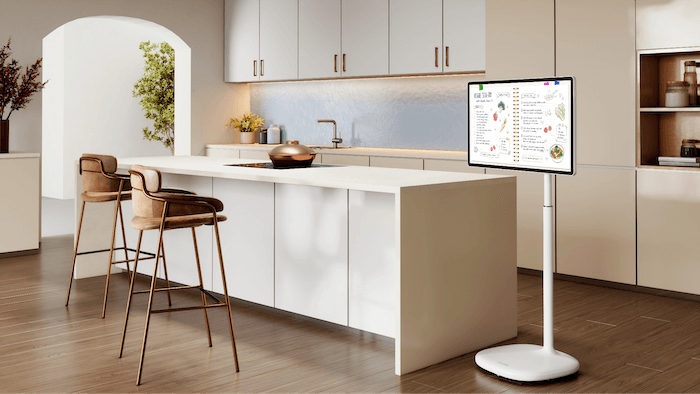
The Hisense RoamView (32S6S) is a 32-inch 4K touchscreen smart display designed to combine some of the functionality of a television, tablet, video-calling display, smart home controller, and digital workspace in one portable device. It can roll around the home on its freestanding base or detach from the stand and sit on a tabletop easel.
More importantly, RoamView doesn't have to stay plugged in while you use it. Its built-in battery provides up to 10 hours of cord-free operation, according to Hisense, allowing you to move the display from the kitchen to a bedroom, office, patio or other location without repeatedly finding another power outlet.
At $1,199.99, however, RoamView is considerably more expensive than a typical 32-inch television. You're not just paying for the display. You're paying for its combination of portability, touchscreen controls, battery operation, adjustable stand, Android operating system, camera, and built-in Google Gemini AI.
Here's what you need to know before deciding whether the Hisense RoamView makes sense for your home.
Buy on Best Buy
What is the Hisense RoamView?

RoamView is part of Hisense's expanding lifestyle product lineup and represents a different approach to the traditional television.
Instead of designing a screen around a permanent installation, Hisense designed RoamView around mobility. The 32-inch display sits on a rolling, freestanding base that lets users move it between rooms. The screen's position can also be raised, lowered, tilted, and swiveled to accommodate different viewing situations.
The screen can also detach from the rolling stand and be used with a tabletop easel. That opens up additional possibilities for people who don't always want a large floor stand taking up space.
Hisense describes RoamView as a 4K touchscreen, giving it four times the detail of Full HD. Because it's touch-enabled, you can swipe, tap, and pinch directly on the display rather than relying entirely on a traditional remote control.
Think of it less as a television on wheels and more as an oversized Android tablet designed to travel around the home.
What can you do with RoamView?
RoamView's biggest advantage is that it can change roles depending on where you put it.
Roll it into the bedroom, and it can become a television for watching a movie in bed. Move it into the kitchen, and it can display recipes or cooking videos on a screen much larger than a tablet. Put it in a home office, and its built-in camera can turn it into a video-conferencing display.
Hisense also suggests using RoamView for workouts, gaming, displaying digital artwork, and controlling compatible smart home devices. The Android operating system provides access to apps and other content directly from the touchscreen.
This versatility is important when evaluating its $1,199.99 price. Buyers aren't necessarily purchasing RoamView to replace one television. The idea is that a single portable display could do the job of several screens or devices.
Buy on Best Buy
Up to 10 hours without an outlet
One of RoamView's most important features is its built-in battery.
Hisense rates the display for up to 10 hours of battery life, depending on how you use it. That means you don't have to plug and unplug a power cable every time you move it around the house.
For example, you could watch something while cooking dinner, roll RoamView into another room afterward, and continue watching without interrupting playback simply to reconnect power.
The battery also makes RoamView potentially useful on a porch, patio or backyard where an electrical outlet may not be conveniently located.
Keep in mind, however, that "up to 10 hours" is a maximum figure. Actual runtime can vary based on screen brightness, streaming, camera use, wireless connectivity, and other factors.
And while RoamView can be used outside, buyers shouldn't assume portability means it is an outdoor TV. Unless Hisense specifies appropriate weather resistance for a particular environment, it should be protected from rain, moisture, and extreme conditions.
32-inch 4K touchscreen
Touch control is another major difference between RoamView and a conventional television.
Instead of navigating everything through a remote, users can interact directly with the 32-inch screen. Hisense supports familiar gestures including tapping, swiping, and pinching.
That's particularly useful when RoamView is being used for something other than watching television. Browsing a recipe, navigating an app, looking at photos, or working with creative tools can feel much more natural with touch controls.
The 32-inch size also sits in an interesting middle ground. It's considerably larger than most tablets and computer monitors but still small enough to move around the home.
Google Gemini AI is built in

One of the more interesting smart features is Google's Gemini AI.
Hisense says users can interact with Gemini using text, voice, photos, and the RoamView's camera. Gemini can help with tasks such as writing, planning, brainstorming, and learning.
That potentially gives RoamView another role beyond entertainment.
For instance, someone working from home could use Gemini to brainstorm ideas or help plan a project. A student could ask questions while studying. In the kitchen, users could ask for cooking-related information while viewing a recipe.
It also illustrates how products such as RoamView are beginning to blur the lines between TVs, tablets, and AI-powered home displays.
Buy on Best Buy
Built-in camera for video calls
RoamView also includes a built-in wide-angle camera, letting the display function as a large video-calling screen without an external webcam.
According to Hisense, the camera can automatically keep users properly framed. That could be useful when you're moving around during a family video call, joining a remote meeting, or creating content.
The combination of the large screen, camera, microphone capabilities, and portability could be particularly appealing to households that frequently make video calls.
As with any internet-connected device containing a camera and microphone, buyers should also review the available privacy settings and understand how to disable or restrict camera and microphone access when they're not needed.
RoamView as a smart home display

For GearBrain readers, one particularly interesting use case is turning RoamView into a mobile smart home control center.
Hisense specifically lists smart home control among RoamView's possible uses.
A large touchscreen could provide a convenient interface for viewing compatible cameras, controlling lights, adjusting thermostats, or accessing other connected-home apps. Unlike a permanently mounted smart home dashboard, RoamView could move to wherever you're spending time.
However, buyers should verify compatibility with their specific smart home devices and apps before purchasing RoamView primarily for this purpose. Android support doesn't automatically mean every smart home device or ecosystem will offer the same functionality on the display.
Businesses could use RoamView, too

RoamView isn't limited to residential use.
Its combination of portability and a large touchscreen could make it useful for small businesses, showrooms, events and retail environments. Businesses could use it to display promotions, product information, presentations, announcements, or branded content.
Because the screen doesn't need to remain permanently installed or continuously connected to an outlet, a business could reposition it throughout the day depending on where it's needed.
It could also serve as an interactive display at trade shows, sales presentations, or demonstrations.
What are the benefits of Hisense RoamView?
RoamView's primary benefit is flexibility. Instead of buying screens for several locations, users can move one large display wherever they need it.
The battery removes one of the biggest obstacles to that idea because you don't have to keep searching for a power outlet. The adjustable rolling stand lets you change the viewing position whether you're sitting, standing, exercising, or cooking. The tabletop easel provides another configuration when the full stand isn't practical.
The 4K touchscreen also makes RoamView more interactive than a normal television, while Android, Gemini, and the built-in camera expand its usefulness beyond streaming movies and shows.
In other words, the strongest reason to buy RoamView isn't simply its picture resolution. It's how many different jobs one screen can do.
What should you consider before buying?
The biggest consideration is price.
At $1,199.99, RoamView costs substantially more than many conventional 32-inch 4K displays. If all you want is a television for a bedroom, kitchen, or home office, there are much less expensive options.
You're paying the premium for mobility, battery operation, touch controls, the adjustable stand, camera, and smart features.
Buyers should also think realistically about how often they would move the screen. If RoamView ultimately stays in the same room all year, much of its value proposition disappears.
Homes with tight spaces, stairs or uneven transitions between rooms may also find a rolling display less convenient than homes with open, single-level floor plans.
Buy on Best Buy
Who should buy the Hisense RoamView?
RoamView makes the most sense for people who genuinely want a screen that serves multiple purposes in multiple rooms.
It could be especially appealing to apartment dwellers who don't want several televisions, families who frequently move entertainment between rooms, people who work from home, users who follow digital workout programs, home cooks who want a large recipe display, and households that make frequent video calls.
Smart home enthusiasts may also appreciate having a movable 32-inch touchscreen available as a potential control dashboard.
Small businesses could find it useful as a portable promotional, informational, or presentation display.
On the other hand, shoppers simply looking for an inexpensive television should probably look elsewhere. RoamView's premium price only becomes easier to justify when you'll actually use its mobility, touchscreen, battery, camera, and smart capabilities.
Price and availability
The Hisense RoamView 32S6S is priced at $1,199.99 and launched in the United States through Best Buy, with Amazon availability also planned.
Buyers can learn more about the 32-inch S6 RoamView through Hisense's official RoamView product page.
Buy on Best Buy
GearBrain's take
Hisense RoamView represents an interesting evolution of the television. Instead of asking where a TV should be installed, Hisense is asking why the screen needs to stay in one place at all.
By combining a 32-inch 4K touchscreen with a battery, rolling adjustable stand, tabletop easel, Android operating system, built-in camera, and Google Gemini, RoamView offers far more flexibility than a conventional TV. Its ability to move between entertainment, video calling, recipes, workouts, smart home controls, and AI-assisted tasks could make it particularly useful in homes where screens are needed in different places throughout the day.
The tradeoff is its $1,199.99 price. There are much cheaper ways to put a 32-inch screen in a room, so RoamView likely won't appeal to shoppers primarily concerned about price.
But that's not really what Hisense is selling. RoamView is designed for buyers who value one screen that can go almost anywhere and do several different jobs.
If you routinely carry a tablet from the kitchen to the bedroom, wish you had a bigger screen for video calls, or want a smart display that isn't permanently tied to one wall or countertop, RoamView offers a compelling alternative.
If you plan to keep your screen in one place, a traditional smart TV will offer better value. For households that can take advantage of its mobility and versatility, however, RoamView introduces a genuinely different way to think about where — and how — a screen fits into the connected home.
Check out our smart home product find engine, to see other compatible products that work with Google Assistant, Amazon Alexa-enabled devices, or any other smart-connected device in your home.
