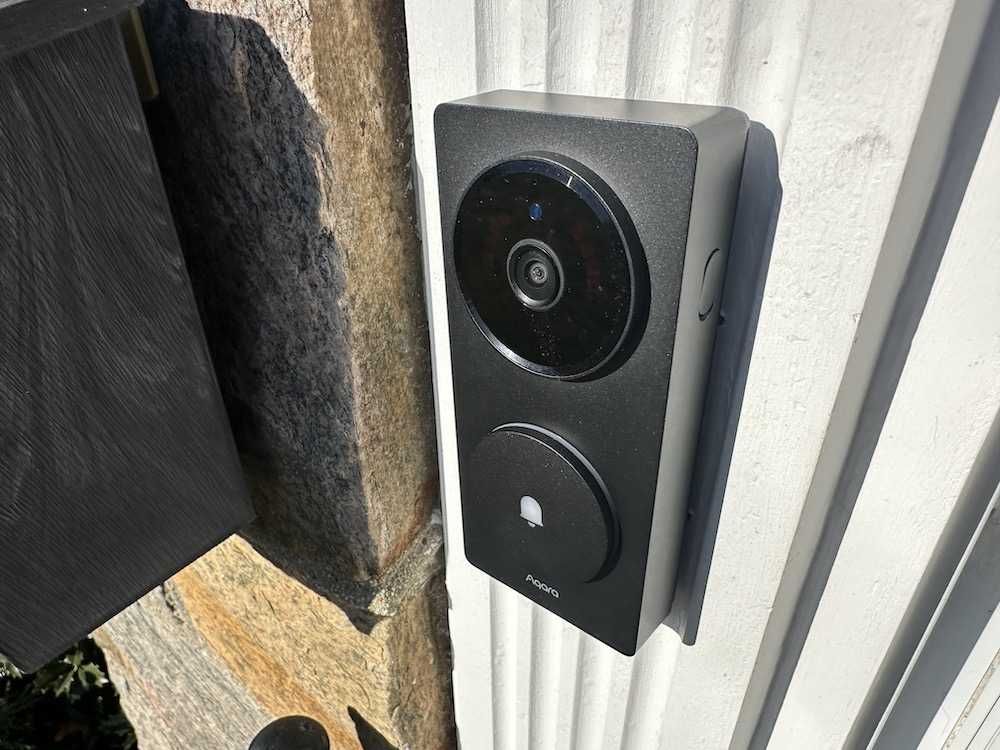
Aqara Doorbell Camera Hub G410 with Chime Review
The smart video doorbell market has become crowded with look-alike products that focus on basic motion alerts and cloud subscriptions. Aqara is taking a different approach with its Doorbell Camera Hub G410, positioning it not just as a doorbell, but as a cornerstone for a modern, multi-protocol smart home.
After installing and testing the Aqara Doorbell Camera Hub G410 for the past four months, it’s clear that this product is aimed at power users, Apple Home households, and anyone already invested in the Aqara ecosystem who wants deeper local control, advanced automation, and broad platform compatibility—without being locked into ongoing subscription fees.
Below is a detailed, real-world review to help buyers understand exactly what the G410 does well, where it struggles, and who should (and should not) buy it.
What Is the Aqara Doorbell Camera Hub G410?

The Aqara Doorbell Camera Hub G410 is a 2K smart video doorbell with a built-in smart home hub. Unlike most doorbells that only handle video and notifications, the G410 also functions as:
- A Matter Controller
- A Thread Border Router
- An Aqara Zigbee hub
- A multi-protocol bridge supporting Wi-Fi, Thread, Zigbee, and Bluetooth
This makes it one of the most technically ambitious video doorbells available today.
In practical terms, that means the G410 doesn’t just watch your front door—it can also connect, manage, and automate dozens of smart devices throughout your home, including lights, locks, sensors, switches, and even newer Matter-compatible devices like robovacs and EV chargers.
Design and Hardware Overview
From a design perspective, the G410 is understated and modern. It looks clean on the doorframe and doesn’t scream “security camera,” which is a plus for homeowners and renters alike.
Key hardware highlights include:
- 2K resolution camera
- f/1.8 aperture for improved low-light performance
- 175° ultra-wide field of view
- Millimeter-wave (mmWave) presence sensor
- On-device facial recognition
- Separate indoor chime with microSD storage
The decision to house the microSD card inside the indoor chime (supporting up to 512 GB, not included) is a smart one—it protects recordings from theft or tampering if the doorbell itself is removed. I really like this feature.
Video Quality and Field of View


Video quality is one of the G410’s strongest areas.
The 2K resolution, combined with the wide field of view, captures far more detail than standard 1080p doorbells. Faces are easier to recognize, packages are clearly visible, and the wide-angle lens reduces blind spots near the doorstep.
Low-light performance is also solid thanks to the f/1.8 aperture, though—as with most battery-powered doorbells—it won’t replace a dedicated wired security camera for nighttime clarity.
Smarter Detection with mmWave Presence Sensing
One standout feature is the mmWave presence sensor, which significantly improves motion detection accuracy.
Unlike traditional PIR sensors that rely on heat changes, mmWave detection is better at identifying real human presence. In daily use, this translates into:
- Fewer false alerts from passing cars
- More reliable notifications when someone actually approaches the door
- Better differentiation between motion and presence
This matters because too many false alerts quickly lead users to disable notifications entirely—defeating the purpose of a smart video doorbell. And our house is at an intersection, so we would have gotten a ton of false alerts without this feature.

On-Device Facial Recognition (No Subscription Required)
Another major differentiator is on-device facial recognition.
The G410 can recognize familiar faces locally and trigger:
- Custom notifications
- Automations
- Smart home actions
Importantly, this all works without a required subscription, which is increasingly rare in the video doorbell category.
That said, in real-world use, the facial recognition setup was more challenging than expected, especially for first-time users. Training the system took longer than competing cameras, and the workflow inside the Aqara app could be more intuitive.
Advanced users will appreciate the capability—but beginners may find this frustrating at first.
Advanced Matter Bridging and Smart Home Integration
This is where the G410 truly separates itself.
As a Matter Controller and Thread Border Router, the doorbell can connect and manage more than 50 types of Matter-compatible devices, including:
- Smart locks
- Sensors
- Lights and switches
- Appliances
- Robot vacuums
- EV chargers
The Advanced Matter Bridging feature enables Aqara’s facial recognition events to serve as automation triggers on third-party platforms like Home Assistant, unlocking powerful cross-platform workflows that most doorbells can’t offer.
Platform Compatibility: One of the Most Flexible Doorbells Available

The G410 works across nearly every major smart home ecosystem:
- Apple Home (with HomeKit Secure Video)
- Amazon Alexa
- Google Home
- Samsung SmartThings
- Home Assistant (via RTSP)
Why HomeKit Secure Video Matters
For those unfamiliar, HomeKit Secure Video (HKSV) is Apple’s privacy-focused video platform. When enabled:
- Video analysis happens locally on your Apple Home Hub
- Clips are end-to-end encrypted
- Recordings do not count against iCloud storage limits
- Apple cannot view your footage
HKSV requires an iCloud subscription and an Apple Home Hub, and video resolution is capped at 1200p, but for iOS households prioritizing privacy, it’s a major advantage.
RTSP, Local Streaming, and NVR Support (A Rare Feature)
One of my favorite features—rarely found in video doorbells—is RTSP support.
When hardwired, the G410 can stream video locally to:
- Home Assistant
- Frigate
- Blue Iris
- Other NVR systems
For advanced users building local-first security systems, this is a huge win and something most consumer doorbells simply do not offer.
Storage Options: Cloud and Local Flexibility
The G410 offers one of the most flexible storage setups available:
- Aqara cloud storage (end-to-end encrypted)
- 1-day free storage for 6 months
- 90-day storage with HomeGuardian subscription
- Apple iCloud (via HomeKit Secure Video)
- Local microSD storage (up to 512 GB)
- NAS backup support
This flexibility lets users choose between cloud convenience, local privacy, or a hybrid approach.
Power Options and Battery Life

The doorbell can be installed in two ways:
- Hardwired (low-voltage AC/DC)
- Battery-powered (six AA batteries)
Battery life is rated at up to five months, assuming about 10 activations per day. Real-world battery life will vary based on motion frequency and feature usage.
Real-World Installation Notes
From my experience:
- Wi-Fi quality is critical—make sure you have strong coverage at the door.
- Pair the doorbell near your router, not at the door. Initial setup at the front door caused connection issues.
- Place the chime close to the doorbell for best performance.
- The chime is loud, which is a plus.
- Wiring compatibility can be hit or miss; in my case, I had to rely on battery power when wiring didn’t consistently deliver power.
- Make sure you loosen the screw on the side of the Doorbell Camera to release the mounting bracket. Use the supplied screwdriver.
App Experience and Ease of Use
The Aqara app is powerful—but not beginner-friendly.
New users may find:
- The setup flow is confusing
- Facial recognition harder to configure than competitors
- Advanced features buried in menus
Experienced smart home users will appreciate the depth, but first-time doorbell buyers may struggle.
Pricing and Availability
The Aqara Doorbell Camera Hub G410 has an MSRP of $129.99, positioning it competitively among premium smart video doorbells—especially considering it also functions as a full Matter, Thread, and Zigbee smart home hub.
The G410 is now available for purchase directly from Aqara’s official website, as well as through authorized retailers and major e-commerce platforms, including Amazon across multiple regions:
- United States
- Canada
- United Kingdom
- France
- Germany
- Italy
- Netherlands
- Poland
- Spain
At this price point, the G410 delivers strong value for users who want a video doorbell plus advanced smart home hub functionality in a single device—potentially reducing the need to purchase a separate Matter or Thread hub.
Who Should Buy the Aqara Doorbell Camera Hub G410?
Recommended for:
- Existing Aqara users
- Apple HomeKit / iOS households
- Users who value privacy and local control
- Smart home enthusiasts using Home Assistant
- Buyers who want Matter, Thread, and Zigbee in one device
Not ideal for:
- Android-only households
- Users looking for a simple, plug-and-play doorbell
- Those heavily invested in a single non-Apple ecosystem
- Beginners unfamiliar with smart home setup and networking
Summary
The Aqara Doorbell Camera Hub G410 is one of the most technically advanced video doorbells on the market, offering features rarely found in this category—especially local streaming, Matter hub functionality, and multi-protocol support.
It’s not the easiest doorbell to set up, and it’s not for everyone. But for experienced users, Apple Home households, and Aqara fans, it delivers a level of flexibility, privacy, and smart home integration that few competitors can match.
If you’re already in the Aqara ecosystem—or want a doorbell that does far more than just show you who’s at the door—the G410 is a compelling, forward-looking choice.
Pros
- Built-in Matter Compatible Hub
- 175 degree field of view (FOV)
- On-device facial recognition
- Rate RTSP & NVR Support
- Flexible video storage options
Cons
- Setup can be challenging
- Need strong Wi-Fi at the placement of G410
- Hardwiring is not always reliable
- Not a plug-and-play video doorbell
Check out The GearBrain, our smart home product find engine, to see other compatible products that work with Google Assistant, Amazon Alexa-enabled devices, or any other smart-connected device you have in your home.
Note: GearBrain may earn affiliate commissions from qualifying purchases. Our editorial selections are based on hands-on evaluation, ecosystem impact, and long-term value for consumers navigating the connected world.
