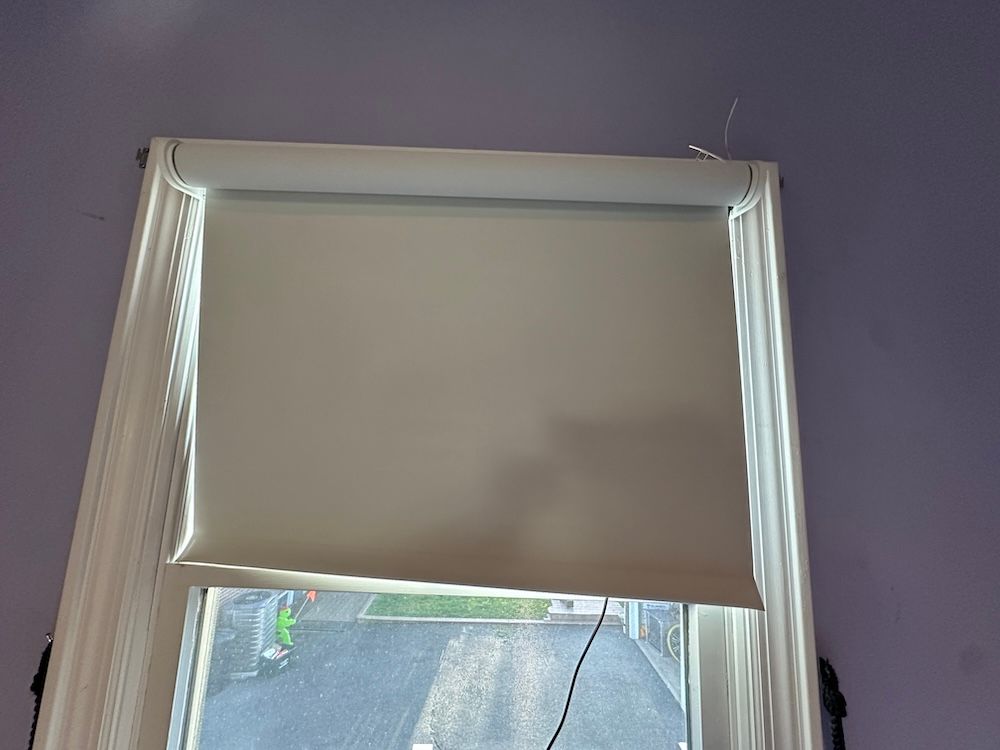
GE Smart Shades Review: Premium DIY Smart Shades That Bring Savant-Level Design to Every Home
Motorized smart shades have traditionally fallen into two categories: expensive professionally installed systems or DIY products that often require complicated installation and proprietary hubs.
GE Smart Shades aim to change that.
Developed using technology from Savant—one of the most respected names in luxury home automation—these new Matter-compatible shades bring premium design, whisper-quiet operation, rechargeable batteries, and modern smart home compatibility to homeowners who want professional-looking results without paying for professional installation.
Available in both blackout and light-filtering fabrics with white or gray color options, GE Smart Shades are designed to complement modern interiors while integrating into Matter-enabled smart homes.
After spending several weeks living with two GE Smart Shades, one feature stood above everything else:
Installation is remarkably simple.

Unlike many competing motorized shades that require multiple brackets, careful alignment, and significant adjustment, GE's innovative mounting system lets homeowners install the mounting plate first before snapping the shade into place.
That thoughtful engineering makes these some of the easiest smart shades we've ever installed.
That doesn't mean everything is perfect.
During our testing, we encountered several Matter-related challenges that weren't unique to GE but are worth discussing. We also discovered a hidden programming button that can be difficult to reach, especially for users with larger hands.
Still, after weeks of testing, GE Smart Shades left a very positive impression.
Key Features
GE Smart Shades include many of the premium features homeowners expect from high-end motorized window treatments:
- Matter-compatible smart home connectivity
- Works with Apple Home, Amazon Alexa, Google Home, and Samsung SmartThings
- Thread wireless networking
- Included programmable remote control
- Whisper-quiet motor
- Rechargeable battery rated for up to six months
- Magnetic charging cable
- Blackout or light-filtering fabrics
- White or gray color choices
- Hidden mounting hardware
- DIY installation
- Multiple standard widths
- Aluminum trim
- Double-woven performance fabric
- Assembled in the USA
Starting at $299.99, GE positions these shades between entry-level DIY products and premium professionally installed systems.
See Pricing on Amazon
Specifications
| Feature | Details |
|---|---|
| Connectivity | Matter over Thread |
| Voice Assistants | Alexa, Google Home, Apple Home |
| Smart Platforms | SmartThings, Apple Home, Alexa, Google Home |
| Remote Included | Yes |
| Motor | Quiet rechargeable motor |
| Battery | Rechargeable (up to 6 months claimed) |
| Charging | Magnetic USB charger |
| Fabric Options | Blackout or Light Filtering |
| Colors | White or Gray |
| Maximum Standard Height | 76 inches |
| Width Options | 24", 30", 32", 34", 36", 38" |
| Price | Starting at $299.99 |
Design & Build Quality
The first thing you'll notice after opening the box is that these don't look like inexpensive DIY blinds.
Everything about the product feels premium.
The aluminum trim gives the shades a clean architectural appearance while the double-woven fabric has a noticeably higher-quality feel than many competing DIY window coverings.
Unlike traditional roller shades where brackets remain visible after installation, GE's hidden mounting system creates a much cleaner finished appearance.
Once installed, visitors simply see a modern roller shade rather than exposed hardware.
That attention to detail gives the shades a custom-installed appearance despite being designed for DIY homeowners.
We tested the blackout fabric version.
The fabric itself feels durable and well made while operating smoothly throughout the entire travel range.
Although the blackout material performed well, we did notice slightly more light leakage around the edges than we experienced with comparable blackout products from Lutron and Bringnox.
That isn't necessarily a fault of the fabric itself.
Inside-mounted shades naturally allow small gaps along each side of the window, something GE also points out in its measuring guide. Homeowners seeking maximum darkness should instead choose an outside-window installation that extends several inches beyond the window frame, especially when selecting blackout fabric.
Overall, build quality exceeded our expectations.
Measuring Your Windows Before Buying
One area where GE deserves considerable credit is the quality of its measuring guide.
Many smart shade manufacturers provide only basic instructions. GE instead walks homeowners through the entire decision-making process before they ever place an order.
See Pricing on Amazon
Step 1: Decide How You Want to Mount the Shades
Before measuring anything, determine whether you want an:
Inside Mount
Installing inside the window frame creates a clean, built-in appearance that showcases decorative trim and works especially well in modern homes.
However, your window must meet several requirements:
- Minimum 3-inch window depth
- Square window opening
- Minimal obstructions such as locks or cranks
- Solid mounting surface
Keep in mind that inside mounting naturally leaves small light gaps along each side of the shade. For bedrooms requiring maximum darkness, GE recommends outside mounting instead.
Outside Mount
Outside mounting positions the shade above or on the window frame.
This approach:
- Blocks more light
- Covers the complete window frame
- Works better on non-square windows
- Is recommended for blackout fabrics
- Provides the best privacy
For media rooms and bedrooms, this is generally the better option.
Step 2: Measure Carefully
For inside-mounted shades, GE recommends measuring the window width in three locations:
- Top
- Middle
- Bottom
Always use the smallest measurement.
This ensures the shade will fit through the narrowest part of the window opening.
Measure using a steel tape measure—not a cloth measuring tape—and record measurements to the nearest one-eighth inch.
Step 3: Select the Correct Size
One of the easiest mistakes homeowners make is ordering a shade that's too large.
GE's recommendation is simple:
Never order a shade wider than your smallest measured width.
Instead, select the closest standard size that's equal to or slightly smaller than your measurement.
For example:
- Window width 31¾" → Order 30"
- Window width 35⅞" → Order 34"
Ordering larger will prevent the shade from fitting correctly.
Step 4: Height Is Easy
Fortunately, you don't need to worry much about height.
Every standard GE Smart Shade includes 76 inches of fabric.
After installation, you'll simply program the upper and lower travel limits using the included remote.
That means the same shade can work on windows as short as 24 inches or nearly the full 76 inches.
Installation & Setup
Installation is where GE Smart Shades truly distinguish themselves from much of the competition.
Having installed several smart shade systems over the years—including products from Lutron and Bringnox—we expected another lengthy installation.
Instead, GE surprised us.
The process was significantly easier than almost every other motorized shade we've tested.
See Pricing on Amazon
What's Included
Inside the box you'll find:
- Pre-cut smart shade
- Mounting plate
- Remote control (already paired)
- Magnetic charging cable
- Screws and drywall anchors
- Washers
- U-shims for uneven walls
The installation guide also lists the additional tools you'll need, including a drill, screwdriver, level, stud finder, measuring tape, painter's tape, and pencil.
Installation Experience
The biggest difference compared to competing products is GE's mounting system.
Most smart shades require attaching several brackets before carefully fitting the roller into place.
GE does things differently.
The mounting plate is attached separately to the wall or window frame. Once installed, the shade simply slides onto the plate and locks securely into position.
It sounds like a small design change.
In practice, it dramatically simplifies installation.
During our testing, setup was noticeably faster than Lutron's installation process and considerably easier than Bringnox.
One important tip: make sure the motor side of the shade is positioned where you'll have convenient access for future charging. Although the rechargeable battery is rated to last up to six months, you'll eventually need access to the charging port.
Programming Travel Limits
Once installed, the included remote lets you customize exactly how far the shade opens and closes.
Because every shade includes 76 inches of fabric, you'll program the upper and lower limits after installation rather than ordering a custom height.
The remote arrives pre-paired with the shade, making this process straightforward. Holding the appropriate button combinations places the shade into limit-adjust mode, allowing you to raise or lower it to the desired position before saving the new limits.
Charging
One thoughtful feature we particularly appreciated was the magnetic charging system.
Unlike many motorized shades that require awkward cable connections, GE includes a magnetic charger with an adjustable head that easily attaches to the USB charging port.
Although the USB port itself is tucked into a somewhat tight location, the magnetic connector largely eliminates the frustration of trying to insert a cable into a recessed port.
According to GE, the rechargeable battery can last up to six months between charges under normal use, and the shades should be fully charged before their initial installation.
See Pricing on Amazon
Smart Home Compatibility

One of the biggest selling points of the new GE Smart Shades is their support for Matter, the smart home standard designed to allow devices from different manufacturers to work together.
Instead of locking homeowners into a proprietary ecosystem, GE Smart Shades can integrate with:
- Apple Home
- Amazon Alexa
- Google Home
- Samsung SmartThings
using Matter over Thread.
This is exactly where the smart home industry is heading, and GE deserves credit for embracing an open standard rather than requiring its own app or dedicated hub.
However, there's an important distinction buyers should understand.
Unlike many smart home products that include their own companion app, GE Smart Shades rely almost entirely on your Matter ecosystem for automation and control. Aside from the included remote, your smart home platform becomes your primary interface for creating routines, scenes, and voice control.
For homeowners already invested in Matter, this makes perfect sense.
For first-time smart home users, there's a bit more of a learning curve.
Our Matter Experience

Our testing environment used an Aqara Hub M3 as our Matter controller.
Connecting the first GE Smart Shade went smoothly.
The Matter pairing process was straightforward, and within minutes the shade was visible inside our Matter ecosystem.
The second shade, however, reminded us that Matter is still very much a work in progress.
Initially, the shade became stuck and would not respond to commands from either the remote or our Matter controller. After speaking with GE's support team, we discovered the issue could be resolved by performing a factory reset before pairing the shade again.
Once reset, the shade connected normally and performed as expected.
It's worth emphasizing that this wasn't unique to GE.
Over the past year, we've tested numerous Matter-compatible products, and we've seen similar behavior across multiple manufacturers. Connectivity and automation reliability often depend more on the quality of your Thread network and Matter controller than on the device itself.
During testing, reliability depended heavily on the quality of the Matter Thread network rather than the GE Smart Shades themselves. Like many Matter-compatible devices we've tested, performance improved when connected to a strong Thread Border Router and an up-to-date Matter controller.
However, Matter is still evolving.
During our testing, we found automation options to be more limited than those available through many manufacturer-specific apps, and we occasionally had difficulty getting Matter controllers to consistently recognize the shades or include them in automations. While basic routines such as Good Morning, Good Night, and Leave Home worked well, more advanced automation options remain somewhat limited today.
These challenges are more reflective of the current state of the Matter ecosystem than GE's hardware, and we expect both reliability and automation capabilities to improve as Matter continues to mature.
See Pricing on Amazon
Voice Control
Once paired with a Matter controller, GE Smart Shades can respond to voice commands from supported ecosystems.
For example:
- "Alexa, open the bedroom shades."
- "Hey Google, close the living room shades."
- "Hey Siri, lower the office shades."
Voice control worked well once everything was properly configured.
The important thing is making sure your smart speaker or smart display is acting as a Matter controller (or is connected to one). If it isn't, you'll have difficulty discovering and controlling the shades.
If you're new to Matter, GearBrain recommends understanding how Matter controllers and Thread Border Routers work before purchasing any Matter-compatible devices.
No Dedicated App—Is That a Good Thing?
One interesting aspect of GE Smart Shades is what they don't include.
There is no dedicated GE Smart Shades mobile app.
At first, we weren't sure how we'd feel about that.
Many smart products require downloading yet another app simply to perform basic setup or automation.
GE has taken the opposite approach.
Everything revolves around Matter.
For many homeowners, that's actually a benefit because it keeps all automations inside one ecosystem rather than splitting devices across multiple apps.
On the other hand, manufacturer apps often offer more sophisticated automation options than Matter currently supports. As a result, power users may miss advanced scheduling, conditional automations, battery reporting, or custom features that are common in proprietary ecosystems.
For now, this is one of the tradeoffs of choosing an open Matter-based solution.
Performance
Overall performance was excellent.
The motor operates exactly as advertised.
It's quiet.
Really quiet.
Whether opening the shades first thing in the morning or closing them late at night, operation is smooth and unobtrusive. If someone else is sleeping in the room, the motor is unlikely to disturb them.
This is one area where GE clearly delivers a premium experience.
Movement is also smooth from top to bottom without jerking or hesitation.
Once travel limits were programmed, the shades consistently stopped exactly where expected.
Blackout Performance
We tested the blackout fabric version.
Overall, it performed well and significantly darkened the room.
That said, we wouldn't describe it as completely blackout under every condition.
Compared with blackout smart shades we've tested from Lutron and Bringnox, we noticed slightly more light entering around the edges.
Fortunately, this has more to do with installation style than fabric quality.
Inside-mounted shades naturally leave narrow gaps along each side of the window.
If complete darkness is important—particularly in bedrooms or media rooms—we recommend mounting the shades above the window frame and extending them several inches beyond the window opening. GE's measuring guide specifically recommends this approach for blackout installations because it significantly reduces side light leakage.
See Pricing on Amazon
Battery Life & Charging
GE advertises up to six months of battery life on a single charge.
While our testing period wasn't long enough to independently verify that claim, we appreciated several design decisions.
First, the battery is rechargeable.
Second, the magnetic charging cable is excellent.
Unlike many competing products that require awkward cable positioning, the magnetic connector easily snaps into place and the adjustable charging head makes reaching the recessed USB port much easier. According to the installation guide, the shades should be fully charged before first use and typically require about six hours to recharge.
Troubleshooting Tips We Learned
One of the more valuable lessons from our testing involved learning how the hidden programming button works.
Although the button is somewhat difficult to access, especially if you have larger hands, understanding its functions can save considerable frustration.
Here's what happens when holding the programming button:
- One jog: Enters remote pairing mode
- Two jogs: Enables Matter pairing mode (LED turns blue)
- Three jogs: Removes the remote pairing
- Four jogs: Performs a factory reset
In our case, performing the factory reset solved the issue with the second shade and allowed it to pair normally with both the remote and our Matter controller.
That's the type of real-world troubleshooting you won't always discover until you've actually lived with a product.
What Buyers Are Saying
Our experience closely matched what many verified buyers are reporting.
The overwhelming majority praise:
- Extremely easy installation
- Premium appearance
- Quiet motor
- Smooth operation
- High-quality materials
- Matter compatibility
- Rechargeable battery
- Convenient remote control
Many buyers also felt the premium price was justified by the quality and ease of installation.
The most common criticisms included:
- Minor side light leakage
- Battery life varying depending on usage
- Occasional Matter connectivity challenges
- Premium price
Overall, buyer sentiment is overwhelmingly positive, especially among homeowners looking for DIY motorized shades without sacrificing quality.
Pros
- One of the easiest smart shades we've ever installed
- Premium aluminum construction
- Excellent overall build quality
- Modern hidden mounting system
- Whisper-quiet motor
- Rechargeable battery
- Excellent magnetic charging system
- Matter compatibility
- Works with Apple Home, Alexa, Google Home and SmartThings
- Remote included
- Attractive modern appearance
- Assembled in the USA
Cons
- Hidden programming button can be difficult to access
- No dedicated mobile app
- Matter automations are still somewhat limited
- Occasional Matter pairing challenges
- Slightly more side light leakage than some competing blackout shades
- Premium price
Who Should Buy GE Smart Shades?
These shades are an excellent choice for homeowners who:
- Want DIY installation instead of professional installation
- Already use Matter-compatible smart home platforms
- Want premium-looking motorized shades
- Value quiet operation
- Prefer rechargeable batteries
- Want voice control through Apple Home, Alexa, Google Home, or SmartThings
- Are upgrading bedrooms, home offices, media rooms, or living spaces
Who Might Want Something Else?
You may want to consider another option if:
- You want advanced automation features beyond Matter's current capabilities.
- You prefer products with dedicated mobile apps that provide extensive customization.
- You require absolute blackout performance with virtually no edge light leakage and plan to use inside mounting.
- You prefer a professionally installed whole-home automation system.
For homeowners seeking a fully integrated luxury automation experience, GE also told us these shades are based on technology similar to what is used in Savant's professionally installed smart home systems. If you're building a high-end custom home and want whole-home automation managed by professionals, Savant remains one of our favorite professionally installed smart home platforms. The GE Smart Shades offer many of the same design principles and user experience—but in a DIY-friendly package at a much lower cost.
GearBrain Rating
| Category | Score |
|---|---|
| Design | 9/10 |
| Build Quality | 9.5/10 |
| Installation | 10/10 |
| Ease of Use | 9/10 |
| Smart Home Compatibility | 8/10 |
| Performance | 9/10 |
| Battery & Charging | 9/10 |
| Value | 8.9/10 |
Overall Rating: 9/10
GearBrain Recommended
Final Verdict
GE Smart Shades successfully bring premium motorized window treatments into the DIY market. Their clean design, remarkably simple installation, quiet operation, and Matter compatibility make them an excellent choice for homeowners who want automated light control without paying for professional installation.
The installation experience is easily one of this product's biggest strengths. GE has thoughtfully redesigned one of the most frustrating parts of installing motorized shades, allowing homeowners to mount the bracket first and simply snap the shade securely into place. Combined with premium aluminum trim, quality performance fabrics, whisper-quiet operation, and a rechargeable battery, the overall experience feels closer to a professionally installed system than a typical DIY product.
Matter compatibility also gives these shades impressive flexibility by allowing them to work across Apple Home, Amazon Alexa, Google Home, and Samsung SmartThings. While the current Matter ecosystem still has occasional reliability challenges and more limited automation options than some proprietary smart home platforms, those limitations reflect the current state of Matter itself rather than shortcomings in GE's hardware. As Matter continues to mature, we expect the overall experience to become even stronger.
There are a few minor drawbacks. The hidden programming button can be difficult to access, the blackout version allows slightly more side light leakage than some competing products when installed inside the window frame, and buyers should understand that Matter automations are still evolving. None of these issues, however, overshadow the product's strengths.
If you're looking for premium smart shades that combine elegant design, exceptional ease of installation, quiet performance, and open smart home compatibility, GE Smart Shades earn GearBrain's recommendation as one of the best DIY motorized smart shade systems currently available.
