Linkind Smart Light Stick Pro Review: Creative Flame Effects, Helpful AI, Premium Price
A smart bulb with an AI Assistant that guides you to display multiple colors at once and fine-tune a flickering flame offers plenty of creative possibilities—but is it worth the premium price? I spent a few weeks testing a Linkind-provided two-pack of Smart Light Stick Pro bulbs in our smart home, exploring their 50 color zones, adjustable flame effects, and Dotis AI lighting assistant. I also connected them to Alexa, Google Home, Apple Home, Samsung SmartThings, and Matter Controller to see how easily they fit into an existing setup. The lighting impressed me, though the bulb’s unusual shape, price, and AI limitations give buyers a few things to consider.
Quick verdict: Is the Linkind Smart Light Stick Pro worth buying?

The Linkind Smart Light Stick Pro is worth considering if you want animated flame effects, multiple colors within one bulb, and an AI assistant that simplifies creative lighting controls. During our testing, it responded reliably and worked with Alexa, Google Home, Apple Home, and Samsung SmartThings. However, its premium price is harder to justify for basic lighting, its elongated shape requires clearance, and Dotis doesn't replace setup or troubleshooting support.
At the sale price of $32.99 per bulb, this is a specialty lighting purchase. Its strongest argument is the experience you can create with its 50 color zones and 16 million colors.
What is the Linkind Smart Light Stick Pro?

The Linkind Smart Light Stick Pro is a T19-shaped smart LED bulb with an E26 screw base. Its defining feature is multizone color control: different parts of the bulb can display different colors simultaneously, creating gradients and moving effects.
That gives it a different purpose from a conventional smart bulb that fills its entire surface with one color. You can use the Light Stick Pro for ordinary white illumination, then switch to layered colors or adjustable flame effects when you want a different atmosphere.
Product naming note: The review samples were identified as Smart Light Stick Pro. Linkind’s current website lists the product as “Smart Light Stick Color+White 850lm.” Match the specifications and packaging when shopping rather than relying on the word “Pro” alone.
Key specifications and buying requirements
| Item | Details |
|---|---|
| Brand and tested product | Linkind Smart Light Stick Pro; two-pack supplied |
| Bulb shape/socket | T19 / E26 |
| Wireless connection | 2.4GHz Wi-Fi; 5GHz is not supported |
| Manufacturer-listed dimensions | 2.24 × 5.15 inches (57 × 131mm) |
| Power | Manufacturer lists 8W maximum consumption; 60W refers to incandescent-equivalent positioning |
| White brightness | Current Linkind listing: 850 lumens; supplied specification sheet: 800 lumens |
| Supplied color-output specifications | Red: 150 lumens; green: 430 lumens; blue: 130 lumens |
| White color-temperature range | Listed at 1000K–6500K |
| Colors/zones / LEDs | 16 million colors / 50 zones / 160 LEDs |
| Brightness adjustment | Advertised 1%–100% through app or voice control |
| App | AiDot for iOS and Android |
| AI assistant | Dotis for lighting requests and settings |
| Platforms tested | Amazon Alexa, Google Home, Apple Home, Samsung SmartThings |
| Matter controller used in testing | Aqara Hub M3 |
The dimensions, Wi-Fi requirements, power consumption, and current 850-lumen rating come from Linkind’s product listing, checked October 22, 2026. We did not measure electrical consumption or lumen output. The 800-versus-850-lumen difference is a documentation discrepancy, not a measured performance finding.
How we tested the Linkind Smart Light Stick Pro
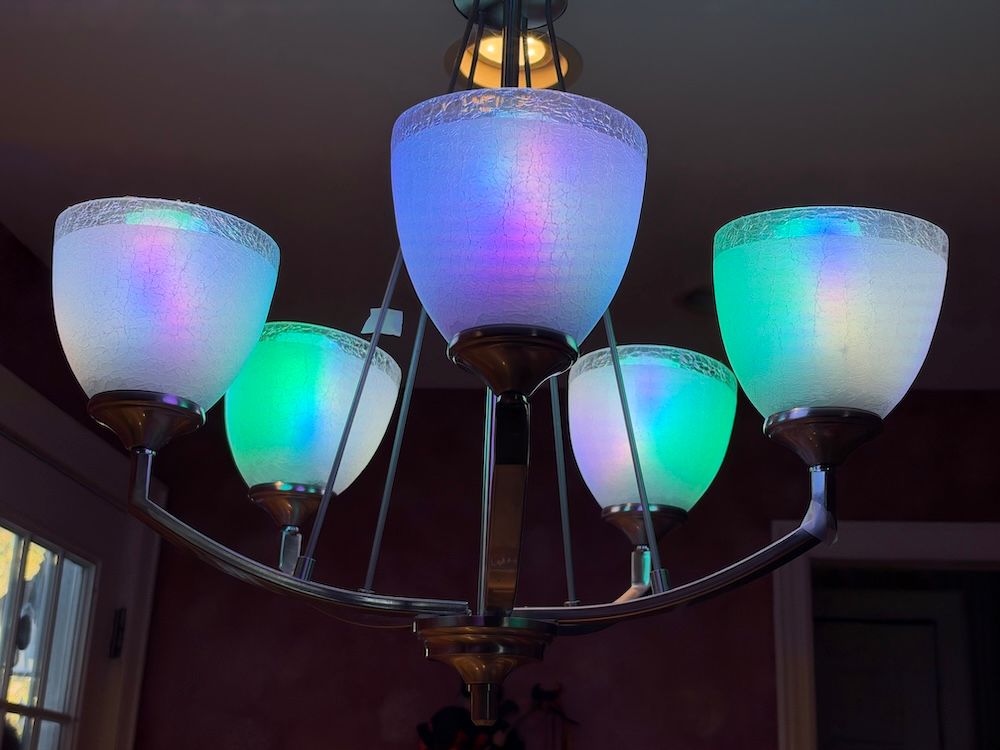
I used the supplied two-pack for a few weeks in our smart home, including installing one in a living-room lamp and using multiple smart light sticks in a kitchen chandelier. Testing covered the AiDot app, color and flame controls, Dotis lighting assistance, voice control, and connections to Alexa, Google Home, Apple Home, and Samsung SmartThings. I also paired the light sticks with an Aqara Hub M3 using Matter and observed how they behaved during an internet interruption.
This review evaluates everyday use rather than laboratory measurements. Linkind’s broader synchronization claims are described separately from the features we directly assessed.
Setup: Easy installation, with one Matter pairing inconvenience

Installation was extremely easy in our living-room lamp. The E26 base screwed into place without a problem, and connecting the lights to our smart-home platforms was straightforward overall.
One detail matters before you begin: use the AiDot app to control these Linkind smart lights. Do not look for a separate Linkind app for this product.
My other recommendation is to give each bulb a short, easy-to-say name. A name such as “Living Room Lamp” makes voice commands easier to remember and helps distinguish one light from another.
Matter pairing introduced the main setup inconvenience. The QR code on the Light Stick was hard to access, so I manually entered the pairing code on a card in the box when adding it to our Aqara Hub M3. Pairing succeeded, but the code placement made the process less convenient than it could have been.
Before installing the bulb in a tight fixture, make sure you can access its pairing information.
Design: Check your lampshade before buying
The stick-shaped design is distinctive, and the bulb felt durable to the touch. Its shape also creates a practical buying consideration: an E26 socket match doesn't guarantee enough space around the bulb.
We had no difficulty installing it in our living-room lamp or kitchen chandelier, but a close-fitting shade or restricted opening on a lamp or fixture could make installation awkward. Check both the available height and the space needed to turn the bulb into the socket.
I am interested in the dedicated fixtures Linkind has been promoting for these lights. They could offer more ways to display the effects, but we didn't test those fixtures, and we couldn't confirm their availability for this review. Choose based on the fixture you can use today.
Lighting performance: The 50 zones make the difference
The Light Stick Pro’s strongest feature is the control it gives you over a single bulb's appearance. You can use multiple colors in the same light and adjust intensity, flame behavior, and flame speed.
Those controls make it useful for creating special effects in a room. A gentle, flame-inspired setting creates a different mood than a faster, more energetic animation, while multicolor combinations offer another route to decorative lighting.
The adjustable flame controls stood out to me. My grandson helped me test these, and he liked the moving lights, as he called it. I hadn't previously tested a smart bulb with this combination of flame control and multizone customization.
During normal connected use, I experienced no noticeable delays, failures, or unexpected behavior. The lighting controls worked as expected throughout the review period.
Linkind also advertises more than 120 preset scenes, tunable white light, schedules, and music synchronization using a smartphone microphone through AiDot. These expand the advertised feature set, but our testing does not establish the quality of every preset or music-sync mode.
Dotis AI: Helpful for scenes, limited for support

Dotis was one of the most interesting parts of the experience. It was the first AI assistant built into a smart-lighting app that I had personally tested.
In use, it helped with scenes, lighting controls, and automation actions. That is valuable because AiDot’s range of options can feel overwhelming for a first-time smart-lighting user. With 50 zones to explore, an assistant that translates what you want into lighting settings makes the product more approachable.
However, its assistance stayed within those lighting functions. In my testing, Dotis could not guide device installation, check compatibility with my hubs or controllers, or troubleshoot product problems.
I would like to see Linkind expand Dotis into those areas. Helping a user create a lighting effect is useful; helping resolve a connection problem or setup issue would make the assistant more valuable throughout ownership.
For now, view Dotis as a lighting assistant. Our experience does not establish autonomous problem diagnosis or an agent that independently manages the wider smart home.
What about Dotis+ and ImmerSpace?
The supplied product materials describe Dotis+ as powered by ChatGPT and capable of generating lighting shows from prompts. They also describe ImmerSpace synchronization across compatible bulbs, strips, panels, TV backlights, and other lighting, with support described as “32+ devices.”
Those are manufacturer claims. We tested Dotis lighting assistance, but did not independently verify the underlying AI model, separately evaluate Dotis+, or test a 32-device synchronized installation. Do not assume that every AiDot-connected light supports every synchronization feature.
Compatibility: What worked in our smart home?
| Platform or connection | Hands-on result | Practical takeaway |
|---|---|---|
| Amazon Alexa | Connected easily; voice control worked well | Use a simple device name |
| Google Home / Google Assistant | Connected easily; voice control worked well | Everyday voice control was reliable |
| Apple Home | Connected successfully without reported issues | Successful integration in our test home |
| Samsung SmartThings | Connected successfully without reported issues | Successful integration in our test home |
| Matter with Aqara Hub M3 | Paired successfully using manual code entry | QR-code access was inconvenient |
| AiDot | Used for Linkind lighting controls and Dotis | Central app for the specialty lighting experience |
Successful platform connections don't mean every advanced effect is exposed in every ecosystem. Use AiDot for the detailed lighting experience described in this review; we did not verify a complete feature-by-feature mapping across third-party apps.
Internet outages, local control, and privacy
When I interrupted the internet, the smart functions I was using became unavailable. The bulb remained illuminated at its last setting, effectively serving as a regular light in that moment.
That is a limitation of the configuration and control paths we tested. It does not establish that every local Matter command fails without internet access, because this review did not isolate and verify each local control path during the outage.
We also did not audit the app’s data handling or establish which processing occurs locally. If offline operation is a priority, verify the specific controller, command, and automation you intend to use.
Price and value: Are the effects worth the premium?
| Package | Supplied regular price | Supplied sale price | Per bulb at supplied sale/package price |
|---|---|---|---|
| One-pack | $39.99 | $32.99 | $32.99 |
| Two-pack | $79.99 | $59.99 | About $30.00 |
| Three-pack | $89.99 | Not specified | $30.00 |
| Four-pack | $119.99 | Not specified | About $30.00 |
Linkind’s product page displayed $32.99 against $39.99 for the single bulb when checked October 22, 2026. The remaining package prices above were supplied for this review and were not independently confirmed at checkout. Promotions can change.
My biggest reservation is price. Paying $32.99 for one smart bulb is a substantial commitment, particularly if you plan to equip several lamps.
The value becomes more persuasive if you will regularly use the multizone colors, adjustable flames, and Dotis assistance. If your needs stop at white light, dimming, schedules, and voice commands, those specialty features are harder to justify.
The supplied bundle pricing also deserves attention: the two-, three-, and four-pack options all come to approximately $30 per bulb. At these prices, larger quantities offer little additional per-bulb savings.
Pros and cons
Pros
- Fifty color zones support layered colors and animated effects within one bulb.
- Adjustable flame intensity and speed provide useful creative control.
- Dotis simplifies lighting settings that could otherwise feel overwhelming.
- Reliable responses during several weeks of connected use.
- It connected successfully to all four major smart-home platforms tested.
Cons
- Premium pricing for buyers who mainly need basic smart lighting.
- Elongated shape may complicate installation in some shaded fixtures.
- The Matter QR code on the light stick was hard to access.
- Dotis did not help with installation, compatibility checks, or troubleshooting.
- Smart functions used in our outage test became unavailable without internet access.
Final recommendation: Who should buy it?
I recommend the Linkind Smart Light Stick Pro for smart-home users who enjoy experimenting with decorative lighting and have a suitable fixture. The combination of multizone colors, adjustable flames, and useful AI lighting assistance gives it a distinctive appeal.
It's less compelling for someone who primarily wants an affordable bulb for everyday illumination. Buyers who require verified offline smart control should also establish that behavior in their intended setup before relying on it.
After a few weeks of use, my impression is positive: the lighting was responsive, the creative controls were engaging, and Dotis made a complex set of options easier to explore. Better troubleshooting assistance, easier access to the Matter code, and a lower price would strengthen the recommendation.
Frequently asked questions
Which app does the Linkind Smart Light Stick Pro use?
It uses AiDot for iOS and Android. AiDot provides lighting controls and access to Dotis; you do not need to search for a separate Linkind app for this bulb.
Can one bulb display two colors at the same time?
Yes. Its 50 color zones allow different portions of the bulb to show different colors, supporting gradients and animated effects.
Does it work with Alexa, Google Home, Apple Home, and SmartThings?
We successfully connected it to all four platforms. Matter pairing with an Aqara Hub M3 also succeeded after we manually entered the pairing code.
Will it fit a standard lamp?
It has a standard E26 screw base, but its T19 shape still requires sufficient fixture clearance. It fit our living-room lamp; check your shade and opening before purchasing.
Does Dotis troubleshoot connection problems?
It did not provide setup, compatibility, or troubleshooting assistance in our testing. Its usefulness centered on lighting settings, scenes, and automation actions.
Does the Light Stick Pro work without internet?
In our internet outage test, it stayed illuminated at its last setting, while the smart functions we used became unavailable. We did not establish offline behavior for every local Matter command or controller.
Is it a 60-watt bulb?
The 60W description refers to incandescent-equivalent positioning. Linkind lists its current Light Stick product's maximum electrical consumption as 8W.
Editor’s note: Linkind provided three two-packs of Smart Light Stick Pro bulbs for this review. I tested them in our smart home for a few weeks. The observations and recommendations above reflect that hands-on experience.
Use GearBrain’s Compatibility Find Engine to see which smart lights work with your existing smart home, voice assistant, and smartphone.
