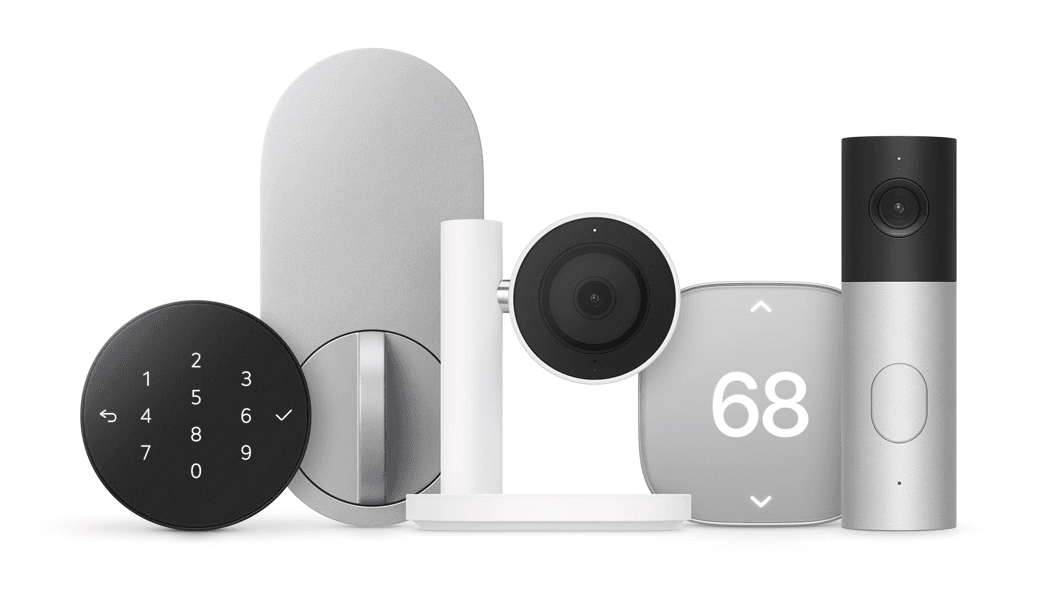
Apple Home Collection Buying Guide: Will It Work With Your Smart Home?
Apple’s new Home Collection gives iPhone users more options for managing home security, access, and comfort—but will it work with the smart home you already own? Developed with LG and Schneider Electric, the lineup includes cameras, a video doorbell, a smart lock, thermostats, and room sensors designed for Apple Home. This buying guide explains what each product offers, what it costs, and how to check compatibility with your existing devices before you buy.
Quick answer: What is Apple Home Collection?
Apple Home Collection is a new accessory lineup developed with LG and Schneider Electric for Apple Home. It sits within a much larger ecosystem of compatible products. For buyers, the practical question is which new accessories fill a need, which existing devices can stay, and what hubs, installation work, and subscriptions the finished system requires.
Key takeaways
- Separate the new collection from the broader Apple Home accessory directory.
- Shop by exact model, region, and feature, not just brand.
- Budget for bridges, power accessories, installation, and services alongside hardware.
- Check camera recording, lock access, and automation requirements individually.
- Expand one room or use case at a time, and test the experience before committing to a whole-home purchase.
What is in the new collection, and what does it cost?
Apple announced these U.S. starting prices. Availability begins in December 2026, with some products following in early 2027. Check individual shipping dates before ordering.
| Accessory | Starting price | Shopping purpose |
|---|---|---|
| LG Indoor Cam Plug-in | $199.95 | Indoor monitoring |
| LG Outdoor Cam Plug-in | $299.95 | Outdoor monitoring |
| LG Floodlight Cam | $399.95 | Outdoor monitoring and lighting |
| LG Video Doorbell Wired | $249.95 | Front-door monitoring |
| LG Smart Deadbolt Lock | $349.95 | Entry access |
| LG Smart Thermostat | $199.95 | Heating and cooling control |
| LG Temperature Sensor | $39.95 | Room sensing |
| Schneider Home Smart Thermostat | $199.95 | Heating and cooling control |
| Schneider Home Smart Thermostat Room Sensor | $39.95 | Room sensing |
Apple describes iPhone tap setup and Home app management without a separate manufacturer account. LG’s lock supports hands-free Ultra Wideband access with compatible Apple devices. Its cameras support iCloud+ event history.
Choose a thermostat only after checking HVAC compatibility. Schneider confirms Matter and Thread support for its thermostat, optional room sensors, and regional requirements for energy features.
What do the new LG cameras and video doorbell offer?

Apple Home Collection includes four LG camera products: an indoor camera, an outdoor camera, a floodlight camera, and a wired video doorbell. Apple describes video capture of up to 2.5K and recognition of people, familiar faces, pets, vehicles, and packages. Monitoring features use a compatible home hub, such as HomeView, HomePod, HomePod mini, or Apple TV 4K. These are announced capabilities; GearBrain has not yet tested the new lineup.
| Product | Distinctive announced features | What buyers should check |
|---|---|---|
| LG Video Doorbell Wired | Separate visitor and package cameras; 2.5K front view and full-HD lower view; spotlight; chimes through HomeView, HomePod, and HomePod mini | Existing doorbell wiring, power requirements, mounting position, and package visibility |
| LG Floodlight Cam | Motion-activated adaptive dual floodlights and low-light color night vision | Electrical installation, coverage area, light placement, and mounting requirements |
| LG Outdoor Cam Plug-in | Adjustable viewing angle and low-light color night vision | Suitable power access, cable routing, outdoor placement, and Wi-Fi coverage |
| LG Indoor Cam Plug-in | Manual or Home app tilt control; automatic tilt-down privacy behavior when the first household member returns | Room placement, household presence settings, and the privacy behavior you want |
The doorbell’s two views address different needs: identifying a visitor and checking a delivery near the doorstep. The indoor camera’s physical tilt behavior gives buyers another privacy consideration beyond app permissions. Apple says it can adjust its view when users check in and tilt down to stop monitoring when someone returns home. Test how those settings fit your household after installation.
Recording, AI video search, and what happens when Wi-Fi drops
According to Apple, supported iCloud+ plans provide 10 days of event video history for these cameras, without a separate camera-service subscription. This is event history; buyers should not interpret it as a promise of continuous cloud recording.
Apple also announces automatic clip descriptions and natural-language recording searches on eligible iCloud+ plans. These features can help a household find an event by describing it rather than manually checking every clip. Eligibility depends on the plan and compatible Apple hardware and software; check those requirements before including AI features in your purchase decision.
Built-in storage keeps the cameras recording during a Wi-Fi outage. Local recording resilience does not mean remote viewing, cloud uploads, or other connected features remain available when the network is down. Apple also describes quick live snapshots and access to footage through the Home app on supported iPhone, iPad, Mac, Apple TV 4K, and HomeView devices.
What makes LG’s Smart Deadbolt Lock different?

The LG Smart Deadbolt Lock combines several entry methods. With a home key on a compatible iPhone or Apple Watch, Ultra Wideband can identify an approaching user and enable hands-free unlocking. Apple also lists tap-to-unlock, a PIN keypad, and a concealed physical backup key slot. Check compatibility for your phone or watch: support for tapping a home key does not prove hands-free access is available.
The lock can report door-open, door-closed, and tampering conditions, including an alert if the door is open while the lock is engaged. You can share guest permissions through the Home app. For a household with visiting relatives, a dog walker, or a house sitter, compare how each person will enter and how access will be revoked afterward.
Apple says the lock supports Matter and Aliro, with core access functions operating locally without an internet connection. That local capability should be distinguished from remote control and notifications, which require their own connectivity.
Using the doorbell and lock together
The Home app can combine the doorbell view and lock control so a household member can identify a visitor, speak to them, and grant entry. Doorbell presses can trigger chimes on HomeView, HomePod, or HomePod mini and notifications on supported Apple devices. Apple also describes Siri control. Before relying on remote guest access, test permissions, notifications, and connectivity from outside the home.
How do the thermostats and room sensors manage comfort?
LG and Schneider each offer a thermostat and a companion room-sensing option. Apple describes Adaptive Temperature, which uses on-device iPhone intelligence to adjust heating and cooling based on household presence, nighttime routines, and time away. The intended benefit is less manual scheduling; actual comfort and energy results will depend on the home, HVAC equipment, and settings.
Apple says the thermostats can use temperature and humidity readings across rooms, including the new standalone sensors and sensors in supported HomeView, HomePod, and HomePod mini hardware. Buyers should check the supported hardware generation and configuration rather than assume every existing Apple speaker provides those readings.
Both new thermostats and the temperature/humidity sensors are described as Matter compatible. Apple also announces on-device wire detection to help with installation and compatibility across a broad range of HVAC equipment. Broad support still requires checking your exact system: wiring assistance does not establish compatibility with every boiler, heat pump, electric-heating installation, or proprietary controller.
Clean Energy Guidance and usage insights
In the contiguous United States, Apple says Clean Energy Guidance can move heating and cooling toward cleaner, lower-cost periods when the household has a compatible utility plan. The Home app also provides usage insights and peak/off-peak rate information. Availability is conditional, and the announcement does not guarantee savings for an individual smart home.
Choose between the LG and Schneider thermostat after checking HVAC fit, room-sensor requirements, and how each fits your broader energy setup. Schneider separately confirms Thread connectivity and describes its thermostat’s integration with Apple’s energy features.
How do setup, Thread, and automations work?

Apple describes a consistent setup process across the collection: bring an iPhone close to the accessory to begin pairing, then manage it through the Home app without downloading a separate manufacturer app or creating another account. Siri control is part of the announced experience. NFC pairing requires an iPhone with the latest operating system; additional features require compatible hub hardware and software.
Apple says every accessory in the collection supports Thread. Treat this as a connection capability rather than a promise that every function—including camera video—travels over Thread. Check the network and hub requirements for each device and feature. Apple also says accessories update their network credentials when the household changes its Wi-Fi, reducing the need for manual reconfiguration.
Scenes and automations can coordinate the products. Apple’s examples include a morning routine that adjusts the temperature, changes the indoor camera’s position, and plays music; departure routines that lock the door and start monitoring; and arrival routines that set the temperature and enable hands-free entry. These examples show configurable behavior, so review household permissions and test the final routine at home.
What privacy protections does Apple describe?
Apple says the Home app's personal data and camera footage are protected with end-to-end encryption, preventing Apple, LG, and Schneider from reading that information. Camera processing can take place on the household’s home hub or through Apple’s Private Cloud Compute, with encrypted iCloud+ event storage where supported.
For buyers, privacy planning also includes deciding which household members can view cameras, who can unlock doors, and how guest access is managed. Check those settings during installation and revisit them when household membership changes. The indoor camera’s tilt-down behavior is another feature to evaluate alongside access permissions.
Where will the collection be sold, and what else might installation cost?
The announced rollout begins in December 2026, with select accessories following in early 2027, through Apple’s online store, Apple Store app, and retail stores. This is a phased launch: the overall rollout date should not be read as the shipping date for every product.
| Products | Announced markets | Announced finishes |
|---|---|---|
| LG wired doorbell, floodlight camera, outdoor plug-in camera | U.S., Canada, UK | Essence Graphite or Essence Silver |
| LG indoor plug-in camera | U.S., Canada, UK | Essence White |
| LG smart deadbolt | U.S. and Canada | Essence Graphite or Essence Silver |
| LG thermostat and temperature sensor | U.S. and Canada | Essence White |
| Schneider Home thermostat | U.S. and Canada | Silver + White |
| Schneider Home room sensor | U.S. and Canada | White |
Installation accessories are separate purchases. Apple lists these U.S. starting prices:
| Installation accessory | Starting price |
|---|---|
| LG C-Wire Power Adapter | $24.95 |
| Schneider Home Trim Plate | $14.95 |
| Schneider Home C-Wire Power Adapter | $24.95 |
Apple and Schneider list slightly different thermostat and sensor prices in their announcements; the main product table uses Apple’s published starting prices. Confirm the actual checkout price and required accessories before ordering.
For customers who prefer professional setup, Apple announces paid third-party installation through ADT in the U.S. beginning fall 2026. Ask what the installation quote covers, whether additional electrical or HVAC work is required, and which products are supported. Do not assume the service is bundled with the hardware.
Apple separately states that HomeView is not offered for sale in the European Union because iOS does not offer Siri AI there. That statement concerns HomeView; use the market table above and individual accessory listings when evaluating the collection’s regional availability.
Apple Home Collection, Apple Home, and HomeView: What is the difference?

Think of the collection as a single shopping option within Apple Home. Apple’s directory also includes lighting, outlets, window coverings, irrigation products, sensors, bridges, and entertainment equipment from many manufacturers. Not all listings are part of the new collection.
HomeView is a separate display and home hub option. Apple also identifies compatible HomePod and Apple TV hardware as hub options for collection features. Buyers should check the prerequisites for the features they want rather than assume they must buy a display.
This distinction matters when deciding what to replace. Start with the devices already installed in your home. Record their model numbers and any bridges they use. Then identify the gap you want to fill: seeing packages, controlling a cold bedroom, sharing door access, or simplifying lighting.
Will Apple Home Collection work with the smart home you already own?

Use an inventory before making a shopping list:
| What to record | Why it matters |
|---|---|
| Exact manufacturer, model, and generation | Similar product names can hide different compatibility |
| Region and electrical specifications | A listing does not establish suitability for every country |
| Current ecosystem and connection method | Wi-Fi, Thread, Zigbee, and other connections need different checks |
| Required bridge or gateway | An accessory may depend on another device remaining installed |
| Features you actually use | Basic control may be less extensive than the manufacturer’s app |
| Firmware and software requirements | Support can depend on updates |
| Existing subscriptions | Replacing hardware may change recording or service costs |
Check the feature, not just the compatibility badge
Ask specific questions. Can the camera record in your preferred service? Can the lock use your iPhone as a key? Can a sensor trigger the automation you want? Does the thermostat control your particular heating equipment?
A useful compatibility statement names the model, connection path, prerequisites, supported functions, and limitations. “Works with Apple” is too broad for a purchase decision.
Check every bridge before removing it
The accessory directory includes entries that explicitly name bridges: Philips Hue Bridge, Lutron systems, IKEA TRÅDFRI Gateway, Aqara hubs, and Hunter Douglas PowerView Hub, among others. Check those bridge requirements before purchase.
Do not assume a new home hub replaces every manufacturer bridge. Ask which accessories that bridge exposes, which generation is supported, and what functions remain available through Apple Home.
Confirm Matter and Thread separately
When evaluating a product, ask two questions: What smart home standard does this exact model support, and how does it connect? Verify Apple Home support for the product category and desired functions, as well as any controller or Thread border router requirements. A standard or radio label alone doesn't answer the full compatibility question.
How to check whether your devices work with Apple Home
Before replacing a smart device or buying a new one, check whether the model you own already supports Apple Home.
Start with GearBrain’s Compatibility Find Engine. As of October 15, 2026, GearBrain’s platform lists 816 smart devices compatible with Apple HomeKit, according to GearBrain’s database count. Use the Apple HomeKit results to explore compatible products and look for your existing devices. This is a catalog of products listed on GearBrain, rather than a count of every Apple Home-compatible device on the market.
Don’t see your device? Its absence from GearBrain’s platform does not necessarily mean it is incompatible. Check Apple’s Home accessory directory and the manufacturer’s current documentation for your exact model, required hubs or bridges, firmware, and supported features. Apple Home compatibility doesn't automatically mean support for every feature, such as HomeKit Secure Video or home keys.
Want personalized help? Join the GearBrain Assistant beta
Sign up to beta test GearBrain Assistant, our new AI platform designed to help you understand which devices work with Apple Home and the smart home equipment you already own. Share your exact models and ask questions about compatibility, required hubs, setup, and potential additions to your home.
Request beta access to GearBrain Assistant and help shape the platform.
Which accessories should you buy first?
Cameras and doorbells: Start with the view you need
Choose locations before choosing models. For a doorbell, check whether the intended mounting position can show visitors and deliveries. For outdoor cameras, identify power, mounting height, weather exposure, and nighttime lighting. For an indoor camera, consider household privacy preferences and who can view footage.
The accessory directory includes Aqara, eufy, Eve, Logitech, Netatmo, Arlo, and other camera entries alongside the new LG models. Use it to identify candidates, then check each exact model’s recording options and current support.
Keep Home app viewing and HomeKit Secure Video recording as separate comparison fields. Preserve the Secure Video labels supplied in the list, but verify them before purchase, including any required base station, plan, or firmware.
Locks: Choose access methods and physical fit together
Record door thickness, existing lock style, and installation constraints before comparing smart features. Decide who needs access and how they should enter: key, PIN, phone, watch, or guest permission.
The accessory directory identifies selected Aqara, Level, Schlage, Yale, Lockly, and other locks as supporting home keys. Keep that distinction visible. Do not turn a home-key label into a promise of hands-free unlocking; confirm the exact access method and compatible phone or watch.
For buyers, a reliable fallback and easy household access deserve as much attention as the newest unlocking feature.
Thermostats and room sensors: Begin with your heating system
A thermostat purchase should start at the equipment and wiring. Identify the system type, zones, existing thermostat connections, and any proprietary controls. Use the manufacturer’s compatibility checker or consult your installer when the answer is unclear.
The accessory directory spans central HVAC thermostats, radiator valves, electric heating controls, and AC controllers. These products solve different problems. Compare within the appropriate heating or cooling category before comparing brands.
For room sensors, verify which thermostat or automation can use the readings. Avoid assuming that every sensor listed in Apple Home can perform every thermostat’s remote-sensing function.
Lighting, switches, and outlets: Match the product to everyday use

Start with one room and ask how people use its physical controls. Compare a smart bulb, wall switch, plug-in dimmer, and smart outlet against the task at hand.
The accessory directory includes Philips Hue, LIFX, Nanoleaf, Meross, Legrand, Leviton, and many others. Exact model names and bridge notes are more useful than a brand-wide compatibility claim.
Before purchasing, check bulb shape, fixture type, load limits, dimming requirements, wiring, and outdoor ratings where relevant. Consider whether visitors and family members can operate the room without opening an app.
Shades, fans, air treatment, and irrigation: Check the installation
These categories can involve more than pairing a device. Record shade dimensions and motor requirements, fan wiring, filter replacement costs, irrigation fittings, or appliance operating limits as appropriate.
Use the directory to narrow the options. Then compare installation effort, maintenance, manual operation, and the specific controls available in Apple Home.
Speakers and receivers: Keep entertainment compatibility distinct
The accessory directory has extensive AirPlay-enabled speaker and receiver sections. Use those listings to compare entertainment options. Do not imply that an AirPlay designation establishes the same controls or automation behavior as a thermostat, lock, or light.
For audio purchases, define the task first: streaming from an Apple device, listening in multiple rooms, or integrating existing speakers. Confirm support for that task on the exact equipment.
Robot vacuums and routers: Verify the model and current software.
The accessory directory includes entries for ECOVACS, iRobot, and Roborock vacuums, plus AmpliFi and Linksys routers. Check current manufacturer documentation before describing supported commands or network features. Do not extend compatibility from one named model to an entire brand.
What should your budget include?
Build the budget around a working installation:
Total cost = accessories + required hubs or bridges + installation and power accessories + recurring services.
For a first project, choose one useful outcome. Add its supporting hardware and installation costs before comparing alternatives. For a larger rollout, repeat that calculation room by room.
Also allow time for setup and testing. Before buying duplicates for the rest of the house, check daily control, home access, notifications, and recovery after a restart.
Common buying mistakes
- Treating every device in Apple’s accessory directory as part of Apple Home Collection.
- Buying by brand name while overlooking the exact supported model.
- Removing a bridge without confirming what depends on it.
- Assuming every camera listing offers identical recording features.
- Confusing home-key support with a particular unlocking method.
- Buying a thermostat before verifying the heating system and wiring.
- Treating an older directory entry as evidence of current availability or ongoing support.
- Assuming every advanced feature transfers between ecosystems.
Frequently asked questions
Do I need to replace my existing Apple Home accessories?
Build a replacement list only after checking the models you own. Identify any missing functions or support issues before spending money on a substitute.
Does an Apple Home listing guarantee every feature works?
Use the listing as a starting point. Confirm the controls, installation requirements, and services needed for your intended use on the exact model.
Is HomeView the same thing as Apple Home Collection?
No. HomeView is separate hardware; the collection is the new lineup of partner accessories. Compare the role of each product before assembling a system.
Can I mix brands?
The directory covers many manufacturers. For mixed-brand purchases, verify each device’s supported connection path and the intended shared scene or automation, rather than assuming every feature works across the group.
Will every product in this directory still be available?
Do not assume so. The appendix includes older products and regional entries. Check current sales, support, and firmware status before recommending or buying one.
Does camera recording require a subscription?
Apple says supported iCloud+ plans provide 10 days of event history for the new LG cameras. AI summaries and natural-language search require an eligible plan and compatible Apple hardware and software. Check the plan’s camera limits and feature requirements before buying.
Will everything keep working during an outage?
Apple announces built-in camera storage for Wi-Fi interruptions and local core access for the LG lock. That doesn't guarantee uninterrupted remote viewing, notifications, cloud uploads, or every automation during a network or power outage.
Should I buy an entire collection at once?
We recommend starting with a specific need and testing the results. A successful front-door or single-room project gives you practical evidence for expanding.
GearBrain’s buying advice
The best place to start is the home you already own. Inventory your devices, decide what you want to improve, and confirm the full path from accessory to everyday use.
Start with GearBrain’s Compatibility Find Engine, or request access to the GearBrain Assistant beta to help you explore your devices. Confirm model-specific requirements against current manufacturer documentation before purchasing.
Before you buy: Final checklist
- Confirm the exact model and regional version.
- Verify the features you plan to use.
- Identify all required hubs, bridges, and software.
- Check wiring, power, dimensions, and installation.
- Include recurring costs and household access needs.
- Check support status, return policy, and warranty.
- Test one installation before expanding.
Evidence note: Product descriptions and announced prices come from manufacturer materials. This guide does not claim hands-on testing of the new collection. The appendix reproduces the supplied directory. Additional launch details were incorporated from the Apple announcement text supplied by the editor on October 15, 2026. The directory is not an independent certification of every listed product’s present availability or feature support.
