Prepared October 14, 2026. This prelaunch buying guide is based on Apple’s published product information and specifications. GearBrain has not yet tested HomeView. Recommendations reflect those specifications and our analysis of buying considerations.
Quick answer: Should you buy Apple HomeView?
Apple HomeView is worth considering if you use an iPhone or iPad and want a shared screen for Apple Home controls, FaceTime, entertainment, and Siri AI. Before buying, confirm that your essential accessories can be added to Apple Home. Choose the desktop model for flexible placement and a fuller speaker system; choose wall-mounted for a permanent dashboard, and budget for installation and power accessories.
Five things to know before you preorder
- Both desktop and wall-mounted HomeView models are listed at $299, with availability beginning November 13, 2026.
- Start by checking Apple Home compatibility for your existing devices.
- Desktop and wall-mounted models differ in audio hardware and included accessories.
- Setup requires an iPhone with iOS 27.2 or later, or an iPad with iPadOS 27.2 or later, and Wi-Fi internet access.
- Siri AI starts in English, and Apple says usage limits may apply.
What is Apple HomeView, and how does it work?
 Apple HomeView smart display www.gearbrain.com
Apple HomeView is a smart display combining a household dashboard, video-calling screen, entertainment device, and voice assistant. Its rounded, square design resembles an oversized Apple Watch, but it's meant to serve the home.
The desktop model sits on a domed aluminum base with an adjustable stainless steel hinge. Apple offers it in Silver, Starlight, Rose Pink, and Space Gray. The wall-mounted model comes in Silver and Space Gray, with wired and plug-in mounting options.
Both use a 7-inch Liquid Retina display with True Tone and a 12MP Center Stage camera. Apple describes HomeView as a shared device that can recognize up to six people and personalize their experience. The built-in Home app provides the interface for compatible accessories, scenes, and automations.
Consider whether a shared screen would simplify calls, camera checks, or lighting controls in your household.
Apple HomeView specifications at a glance
| Feature | Published specification or requirement |
|---|
| U.S. price | $299 for either model |
| Availability | Preorder now; available starting November 13, 2026 |
| Display | 7-inch Liquid Retina touchscreen; True Tone |
| Resolution | 1088 × 1088 pixels, 220 ppi |
| Brightness | 500 nits maximum; 0.3 nits minimum |
| Processor | A18 |
| Camera | 12MP Center Stage |
| Microphones | Four-microphone array |
| Connectivity | Wi-Fi 6E, Bluetooth 6.0, Thread |
| Desktop audio | Two full-range drivers, down-firing woofer, dual passive radiators |
| Wall-mounted audio | Two full-range drivers |
| Power | Wired power required |
| Setup device | iPhone with iOS 27.2+ or iPad with iPadOS 27.2+ |
Sources: Apple HomeView specifications and Apple’s preorder page.
Will HomeView work with the smart home you already own?
Start with Apple Home. Apple says HomeView can control and manage the accessories in your Home app. That makes inventorying your current devices the most useful step before ordering.
An accessory working with Alexa or Google Home does not establish that it works with Apple Home. Likewise, a manufacturer's name isn't enough: different models, generations, and firmware versions can have different capabilities.
Open Apple Home and identify which essential devices are already present. Then list the missing devices. For each missing product, check its exact model number, manufacturer documentation, supported functions, and any required bridge.
| Existing accessory | What to check before buying HomeView |
|---|
| Lights, switches, and plugs | Can the exact model join Apple Home directly or through a supported bridge? |
| Cameras and doorbells | Does it support live video and the notifications you need? Check recording separately. |
| Smart locks | Confirm lock control; verify home key support separately if that matters to you. |
| Thermostats | Check available controls, schedules, and whether advanced functions remain in the manufacturer’s app. |
| Sensors and shades | Confirm the device and desired automation triggers are supported. |
| Security systems | Verify the specific integration; do not assume every panel, sensor, or monitoring service transfers. |
How do Matter and Thread affect compatibility?
HomeView acts as a Matter controller, allowing you to add and control supported Matter accessories through Apple Home. Check each accessory’s supported features and any bridge requirements before buying.
Apple’s Home app supports Matter accessories, and HomeView’s specifications list Thread networking. Apple’s Matter documentation explains that you can add supported Matter accessories through the Home app. However, a Matter label does not establish that every feature will appear on every platform.
Treat Matter as a potential connection path and check the exact accessory’s supported functions. Thread is a networking technology, rather than a guarantee of Apple Home compatibility. A device’s wireless connection and its control-platform support are separate checks.
Can you keep your existing hubs and bridges?
Possibly. Some accessories depend on a manufacturer’s bridge to expose them to another platform. Check whether your current bridge supports Apple Home or Matter, which connected products it exposes, and whether firmware updates are necessary.
Do not remove a working bridge until you have verified the replacement arrangement. A new dashboard does not automatically replace every radio, integration, or manufacturer service in your home.
Use GearBrain’s compatibility platform to research your devices, then confirm current manufacturer requirements for the exact models you own.
Desktop or wall-mounted: Which HomeView should you choose?
 www.gearbrain.com
Choose desktop for easier placement decisions and the additional bass hardware. Choose wall-mounted for a fixed control point. Both cost $299, but their total setup costs differ.
| Buying consideration | Desktop HomeView | Wall-mounted HomeView |
|---|
| Suggested placement | Counter, desk, shelf, bedside table | Hallway, entrance, shared control area |
| Colors | Four | Two |
| Audio hardware | Drivers plus woofer and passive radiators | Two full-range drivers |
| Included power accessories | USB-C cable and 30W adapter | Sold separately |
| Installation | Requires a suitable surface and outlet | Requires compatible mount and power plan |
For a first HomeView, desktop is our practical starting recommendation: you can assess where the household actually uses it before committing to a wall location. This is a placement recommendation, not a hands-on performance verdict.
For wall mounting, consider viewing height, camera angle, power access, and whether children or seated family members can reach the controls. Apple sells compatible mounting hardware, a USB-C cable, and a power adapter of at least 20W separately. Obtain an installation estimate if you want concealed wiring.
Which features matter most in everyday use?
 Siri and Apple Iintelligence www.gearbrain.com
Display and placement
Apple specifies brightness from 500 nits down to 0.3 nits, with selected features changing the information shown based on proximity. Those capabilities may suit both daytime rooms and bedside placement. We still need testing to assess glare, viewing angles, and nighttime comfort in real homes.
Choose a location based on tasks: a kitchen screen might prioritize timers and calls, while an entrance dashboard might prioritize lighting and compatible camera feeds. Check dimensions and reach before choosing a mount.
Camera and household calls
The Center Stage camera is designed to keep people framed during calls. For families who regularly use FaceTime, a shared screen may be more convenient than holding a phone.
Consider what the camera will face, background activity, and whether that room offers a comfortable place for calls. Picture quality and microphone performance will need hands-on evaluation.
Music and multiroom audio
Apple lists Spatial Audio and AirPlay support. The desktop model’s additional woofer and passive radiators make it the more compelling configuration if music is a priority, but specifications alone can't determine sound quality.
Confirm that your preferred audio services and existing speakers support the connection you intend to use. HomeView supports compatible third-party audio and video apps from iPhone; that does not promise every iPhone app will run on its screen.
Siri AI and shared privacy
Apple describes Siri AI as personalized assistance powered by Apple Intelligence. Its launch language is English, with possible usage limits. Before buying primarily for AI, assess the specific tasks you need rather than assuming unlimited availability or universal app access.
Apple says access to personal content depends on the paired iPhone or iPad being on the same Wi-Fi network, recently unlocked, and the user being recognized by face. That is a meaningful condition for a device intended to serve multiple people.
How much will your HomeView setup really cost?
 How much will your HomeView setup really cost?Apple
Budget for the complete system, not just the display. A $299 purchase can become more expensive if you need mounting accessories, installation, bridges, or replacement devices.
Think in three spending levels:
- Basic setup: Desktop HomeView with an existing compatible Apple device, Wi-Fi network, and accessories.
- Expanded setup: HomeView plus a supported bridge or a few accessories chosen to address specific gaps.
- Installed setup: Wall-mounted HomeView, mounting and power hardware, possible professional installation, and any accessory upgrades.
Check subscriptions for the services you plan to use, including entertainment and camera recording. Do not assume buying the display includes every service or premium accessory feature. Keep existing paid services until you know whether the new arrangement meets your needs.
What about the Apple Home Collection?
 What about the Apple Home Collection? www.gearbrain.com
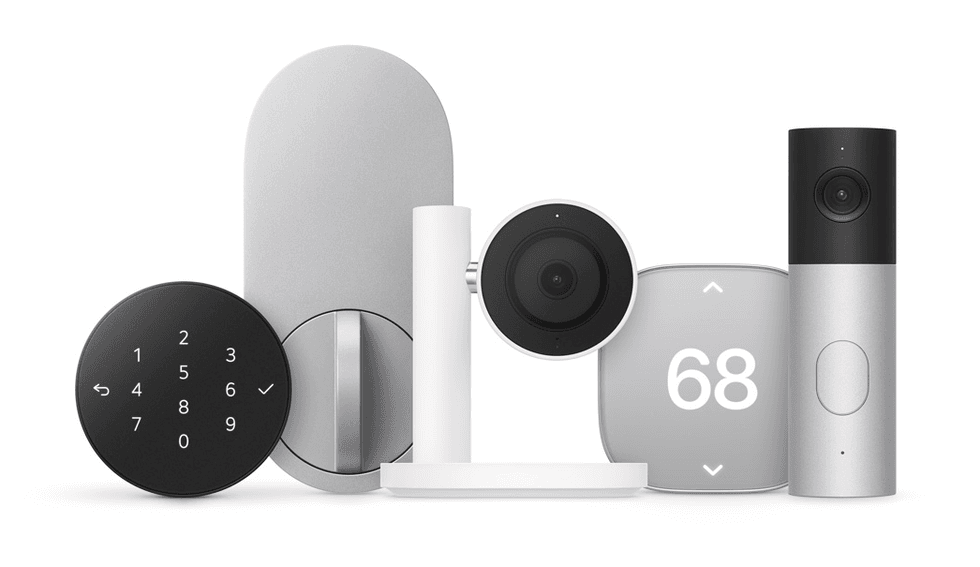
Apple describes a collection of accessories developed with selected brands, including cameras, thermostats, and a door lock. Its product page marks the collection “Coming later.”
Don't base a launch-day installation on an accessory without confirmed availability and specifications. Existing supported accessories are still worth evaluating; buying HomeView doesn't mean you must immediately replace a working home.
For broader shopping research, see GearBrain’s smart lighting guide and video doorbell guide. Check current model details before making a compatibility decision.
Common HomeView buying mistakes
The first mistake is checking a brand instead of a model. Record model numbers and firmware versions, especially for older products.
The second is assuming basic control means full feature support. Turning on a light does not establish access to every effect; viewing a camera does not establish recording features; controlling a lock does not establish home key support.
The third is planning wall placement before planning power. Include installation and hardware in the budget.
Finally, avoid ordering around an unverified promise that one device will replace all your apps. Decide which tasks must work in Apple Home and which can reasonably remain in a manufacturer’s app.
Who should preorder HomeView, and who should wait?
HomeView is worth considering for Apple households whose key accessories already work in Apple Home and who want a single place for controls, FaceTime, and entertainment. The desktop model is a sensible option if you still haven't decided where to place it.
Wait if your essential devices have unclear compatibility, your household depends on unsupported phones, or a future accessory is central to your plan. Waiting for reviews also makes sense if sound quality, AI reliability, or camera performance is your main reason to buy.
Apple HomeView FAQs
 HomeView in Silver, Starlight, Rose Pink, Space Gray colorsApple
How much does Apple HomeView cost?
Apple lists both models at $299 in the United States. Wall-mounted hardware, power accessories, and possible installation add to that price.
When will Apple HomeView be available?
Apple lists preorder availability now and a November 13, 2026 release date. Besides Apple.com, we found you can pre-order HomeView on Amazon, Best Buy, Walmart, and Target. Check delivery estimates for your model and location.
Will HomeView control my existing smart devices?
Apple says it can manage accessories in your Home app. Check exact models and required bridges before assuming an existing device can be added.
Does HomeView support Matter and Thread?
HomeView lets you control supported Matter accessories through Apple Home and includes Thread networking. Before buying, confirm that your accessory’s device category and the features you need are supported.
Do I need an iPhone to set it up?
Apple requires an iPhone with iOS 27.2 or later, or an iPad with iPadOS 27.2 or later, plus Wi-Fi internet access.
Is HomeView battery powered?
No. Apple specifies wired power for both versions. Plan to access an outlet or a suitable wall-power solution.
Does the wall-mounted model have the same speakers?
No. Both have two full-range drivers; the desktop model adds a woofer and two passive radiators in its base.
Do I need to buy Apple Home Collection accessories?
No. Apple also supports compatible third-party accessories. The collection is marked as coming later, so check individual launch details.
Your final HomeView buying checklist
- List the models of your essential accessories.
- Confirm Apple Home support and the functions available there.
- Identify required bridges, firmware updates, and subscriptions.
- Check that your iPhone or iPad meets the software requirements.
- Choose a location based on household tasks.
- Add mounting, power, and installation costs to your budget.
- Verify preorder delivery and accessory availability.
- Separate published features from performance still awaiting testing.
Before you buy, ask: Will HomeView work with the smart home you already own? Once you know that, you can judge whether its display, calls, audio, and AI assistance justify the cost for your household.
Plus, check out The GearBrain, our smart home compatibility find engine, to see other compatible products that work with Apple HomeKit, Amazon Alexa, and Google Assistant-enabled devices.
From Your Site Articles
Related Articles Around the Web