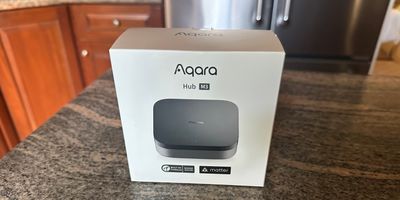
Aqara Hub M3 Review: A Powerful Matter Controller for the Modern Smart Home
Smart home hubs are changing. In the past, their primary job was connecting devices that used protocols such as Zigbee or Z-Wave. Today, a hub also needs to deal with Matter, Thread, multiple smart home ecosystems and consumers' growing demand for local processing and greater privacy.
The Aqara Hub M3 is designed for this new generation of smart homes.
Priced at $159.99, the M3 is Aqara's most advanced smart home hub. It combines a Matter Controller, Matter Bridge, Thread Border Router, Zigbee hub, Bluetooth connectivity, dual-band Wi-Fi and a 360-degree infrared (IR) controller in one compact device. It also offers Power over Ethernet (PoE), local automations and 8GB of encrypted local storage.
GearBrain tested the Hub M3 in a real home with a variety of smart devices compatible with Apple Home, Amazon Alexa, Google Home, Matter and Zigbee. We also used the M3 as a Matter Controller for multiple devices, including smart blinds and shades from GE Lighting, Lutron, Bringnox and other manufacturers.
Overall, we found the M3 to be one of the most versatile standalone smart home hubs we've tested. But our testing also exposed an important limitation consumers should understand: Matter can make devices interoperable, but it doesn't necessarily give you the same automation capabilities across every smart home ecosystem.
What is the Aqara Hub M3?

Aqara introduced the Hub M3 at CES as the next evolution of its smart home hubs. Unlike a basic Zigbee hub, the M3 is designed as a multi-protocol Edge Hub capable of performing more smart home processing locally.
The M3 supports:
- Matter
- Thread
- Zigbee
- Bluetooth 5.1
- 2.4 GHz and 5 GHz Wi-Fi
- Ethernet
- Power over Ethernet
- Infrared devices
It can also connect with Apple HomeKit and other IoT platforms that support Matter. The M3's ability to function as both a Matter Controller and Thread Border Router is particularly important for consumers building a new smart home around Matter-over-Thread devices.
The M3's hardware also includes a dual-core ARM A7 processor and 8GB of eMMC storage. Aqara designed the local storage to reduce cloud dependency while helping protect user privacy. An internal real-time clock helps maintain stable operation of local IoT devices and automations if the home's internet connection goes down.
Buy on Amazon
Why local Edge automations matter
One of the M3's most interesting features is what happens behind the scenes.
For existing Aqara users, adding an M3 can strengthen the smart home network by allowing supported automations between Aqara devices to execute locally instead of relying entirely on cloud services.
The M3 can take the lead over compatible Aqara Zigbee hubs and Wi-Fi devices, moving supported automations to the Edge. This can improve response times while allowing compatible automations to continue operating during an internet or cloud-service interruption.
Some Aqara Home functions still require internet access. These can include automations involving push notifications, location services, geofencing, weather and sunrise/sunset information.
Still, reducing dependence on cloud processing is a significant advantage, particularly as consumers put more connected devices into their homes.
Matter Controller, Matter Bridge and Thread Border Router

Three terms are particularly important when understanding what the M3 can do.
As a Matter Controller, the M3 can commission and manage compatible Matter devices.
As a Matter Bridge, it can expose supported Aqara Zigbee devices to compatible Matter ecosystems.
And as a Thread Border Router, it connects Matter-over-Thread devices to the home's IP network.
Aqara's manual specifically confirms that the M3 acts as a Border Router on a Thread network and supports Matter-over-Thread child devices. Thread devices are added according to the individual device's instructions rather than requiring users to manually select the M3 during every pairing process.
Combining these capabilities makes the M3 especially interesting for consumers who have an existing Zigbee smart home but want to start adding Matter and Thread products.
Zigbee isn't going away
Although Matter and Thread receive most of the attention today, millions of Zigbee devices are already installed in homes.
Aqara wisely hasn't abandoned them.
The M3 can manage up to 127 compatible Aqara Zigbee devices, serving as a Matter bridge for supported products. This means existing Aqara users don't necessarily have to replace their Zigbee sensors, switches and other devices as they transition toward Matter.
The manual confirms that Zigbee and BluetoothZigbee and Bluetooth child devices can be added to the M3 through their normal pairing procedures by selecting the M3 as the appropriate hub.
This makes the M3 particularly attractive as an upgrade for someone with an established Aqara smart home.
Buy on Amazon
360-degree IR controller brings older devices into the smart home
One of the M3's more unusual features is its built-in 360-degree infrared controller.
The hub uses multiple IR transmitters positioned around the unit to provide broad coverage. The diagrams in Aqara's manual show the IR receiving and transmitting surfaces surrounding the compact hub, allowing signals to reach IR-controlled devices positioned around a room.
This allows the M3 to control compatible traditional appliances that still use infrared remotes.
Aqara has also added the ability to bridge one compatible infrared air conditioner or air-to-air heat pump into Matter. Depending on the Matter platform, this can allow a traditional IR-controlled AC system to become part of Matter automations.
That's a clever way of bringing an older appliance into a modern smart home without replacing the appliance itself.
How to set up the Aqara Hub M3

Aqara gives users considerable flexibility when installing the M3.
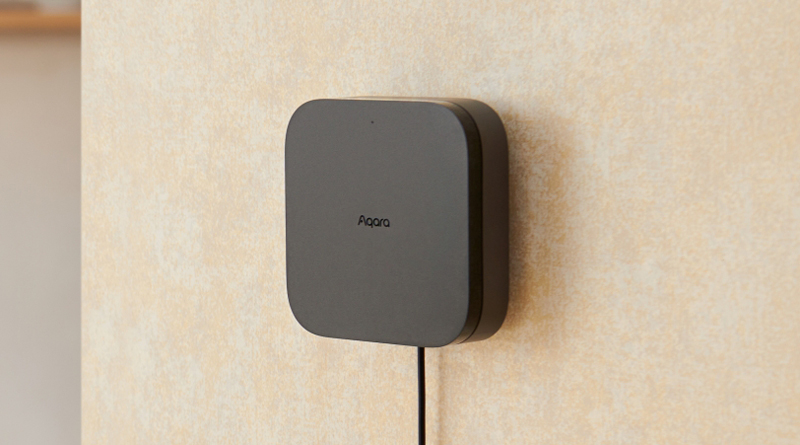
It can sit on a tabletop or be mounted to a wall or ceiling using the included bracket, screws and anchors. If you're using the IR controller, Aqara recommends positioning the M3 so objects don't obstruct its infrared transmitting area.
The hub can be powered through USB-C or PoE using its RJ45 Ethernet port. The manual also gives users two networking choices: dual-band Wi-Fi or wired Ethernet. Aqara recommends wired networking when possible because it can help avoid instability caused by wireless interference.
For most consumers, however, Wi-Fi will probably be the easiest option.
Download the Aqara Home app, power up the M3 and open the app. Select the "+" button, choose Hub M3 and follow the instructions.
The M3 supports Aqara MagicPair, which means the Aqara Home app can automatically discover the hub after it is powered up and ready for network configuration.
During setup, you'll also need to complete a second verification step by scanning the QR code on the product or manual, or entering the eight-digit pairing code.
Buy on Amazon
GearBrain setup tip: stay close to your router
Here's one thing we learned during testing that can save you some frustration.
Set up the M3 close to your Wi-Fi router before moving it to its permanent location.
We tried setting up the M3 in different areas of our test home. The farther we moved from the router, the more difficult the initial setup became.
Interestingly, Aqara's own instructions reinforce our experience. During network configuration, Aqara recommends keeping your phone as close to the M3 as possible and making sure your phone is connected to the same Wi-Fi network you intend the M3 to use.
Our recommendation is simple: connect the M3 to your home network near the router, make sure everything is functioning properly and then move the hub to the location where you plan to use it.
If you have Ethernet available, that's another good option. PoE can make installation particularly clean because one Ethernet cable can provide both networking and power.
Adding the M3 to Apple Home
Apple Home users can also add the M3 directly to their Apple smart home.
Open the Apple Home app, tap the "+" icon to add an accessory and scan the HomeKit setup code. You can also enter the HomeKit setup code manually.
Aqara recommends keeping the QR code stored somewhere safe in case you need to add the hub again later. If pairing fails, the M3's network can be reset by holding its function button for 10 seconds before attempting setup again.
The manual also confirms the M3's Works with Apple Home compatibility.
Adding Matter devices to the M3
Matter is one of the biggest reasons to buy the M3, so we spent considerable time testing this feature.
We connected a variety of Matter-compatible smart devices, including smart blinds and shades from GE Lighting, Lutron, Bringnox and other manufacturers.
Our experience depended on the device.
With some products, Matter setup was exactly what Matter promised. We found the QR code, scanned it and the device connected quickly.
Other devices were more challenging.
When we had trouble, we discovered that moving the M3 closer to the Matter device during initial setup often helped.
This became our second major installation tip.
If a Matter product won't pair, don't immediately assume something is wrong with the device or M3. Temporarily move the M3 closer and try commissioning it again.
Once we successfully connected our devices, we had no significant problems controlling them remotely.
The M3 manual confirms that third-party Matter ecosystems can add the hub by scanning its Matter QR code or entering the setup code.
Testing the Aqara M3 in a real smart home

We tested the M3 in a home already filled with connected devices rather than building an Aqara-only test environment.
That's an important distinction because most consumers don't own devices from a single manufacturer.
Our home included devices designed to work with combinations of:
- Aqara
- Apple Home
- Amazon Alexa
- Google Home
- Matter
- Zigbee
We wanted to see whether the M3 could serve as a central smart home controller in the type of mixed ecosystem many consumers actually have.
Overall, device control was reliable once everything was properly connected.
The more interesting discovery came when we started creating automations.
Matter compatibility doesn't mean identical automations
This is perhaps the most important thing we learned while testing the M3.
Matter can make devices compatible without making their capabilities identical across ecosystems.
We were able to create more home automations using Aqara devices and Apple Home-compatible products than we could with some devices coming through other ecosystems.
Even with Matter devices, automation options could be more limited than what we could create using Aqara's own devices.
For consumers, this distinction matters.
You might successfully add a Matter device to the M3 and control its basic functions, but that doesn't necessarily mean every advanced feature or automation supported by the manufacturer's native app will suddenly become available inside Aqara Home.
This isn't necessarily an Aqara M3 problem. It's something consumers need to understand about Matter today.
Matter has made major progress solving device connectivity, but it hasn't eliminated differences between smart home platforms.
If advanced automations are important to you, check which device features are exposed to Aqara Home before assuming Matter will provide every function you want.
A good upgrade for existing Aqara users
If you already own an Aqara Zigbee hub, the M3 becomes particularly compelling.
Aqara supports migration of compatible bridged devices from certain older Aqara hubs to the M3, helping preserve Aqara Home settings and automations rather than requiring users to rebuild everything manually.
Not every older Aqara hub supports all migration features. Aqara notes that the original Aqara Hub and Camera Hub G2H don't support Edge automation and group migration.
But for many established Aqara homes, the M3 provides a logical path from Zigbee into a Matter-and-Thread future.
Could the Aqara M3 replace an older SmartThings hub?

The M3 could also be worth considering for users migrating away from older Zigbee hub hardware, including certain longtime SmartThings users.
Its combination of Zigbee, Matter and Thread makes it much more future-focused than a traditional Zigbee-only hub.
However, there's an important compatibility caveat.
Zigbee doesn't guarantee universal hub compatibility.
You shouldn't assume that every Zigbee device previously connected to another manufacturer's hub will automatically work with the M3. Check individual device compatibility before replacing an existing hub.
The M3 makes the most sense for consumers with Aqara Zigbee products who also want to add Matter and Thread devices.
Design and placement
We like the M3's design.
At only 4.13 × 4.13 × 1.44 inches, it's small enough to sit discreetly on a shelf, entertainment center or table.
Aqara also includes a mounting bracket and hardware, allowing the hub to be installed on a wall or ceiling. The manual provides detailed instructions for using the bracket and routing the power or network cable through the mounting system.
We also liked how easy the hub was to move around our house. That's surprisingly useful when commissioning Matter devices because we occasionally wanted the M3 closer to the device during initial pairing.
Just remember you'll need access to power unless you're using PoE.
Local storage and privacy
The M3 includes 8GB of local eMMC storage for device information and automation data.
This is another area where the M3's Edge architecture becomes important.
By keeping more data and processing locally, Aqara can reduce dependence on cloud services. The M3's internal RTC clock is also designed to help IoT devices maintain timing and execute automations reliably if the network connection is interrupted.
For smart home users increasingly concerned about privacy, local processing is a significant benefit.
Built-in 95dB speaker

The M3 also includes a powerful 95dB speaker.
It can be used for alerts, notifications, and custom announcements, adding another function to a device that would otherwise operate largely in the background.
The speaker is positioned on the underside of the hub, along with the RJ45 Ethernet port, USB-C power connection and mounting mechanism, as shown in Aqara's manual.
Aqara Hub M3 specifications
| Specification | Aqara Hub M3 |
|---|---|
| Model | HM-G01D / HM-G01E |
| Dimensions | 105 × 105 × 36.5 mm (4.13 × 4.13 × 1.44 in.) |
| Power Input | 5V ⎓ 2A |
| PoE Input | 48V ⎓ 0.27A |
| Wi-Fi | IEEE 802.11 a/b/g/n/ac, 2.4 GHz / 5 GHz |
| Zigbee / Thread | IEEE 802.15.4 |
| Bluetooth | Bluetooth 5.1 |
| Matter | Matter Controller / Matter Bridge |
| Thread | Thread Border Router |
| Infrared | 360-degree IR controller |
| Local Storage | 8GB |
| Speaker | 95dB |
| Operating Temperature | 14°F to 122°F (-10°C to 50°C) |
| Operating Humidity | 0–95% RH, non-condensing |
| MSRP | $159.99 |
The networking, dimensions, power requirements and environmental specifications match those listed in the M3 user manual.
What's in the box?
The Aqara Hub M3 package includes:
- Hub M3
- USB-A to USB-C cable
- User manual
- Mounting bracket
- Screws and anchors
The M3 requires a 5V/2A power adapter when powered over USB-C. Aqara's manual specifies this minimum adapter output.
How much does the Aqara Hub M3 cost?
The Aqara Hub M3 has an MSRP of $159.99.
At the time of our review, we found it on sale on Amazon for $149.99, although pricing can change.
That makes the M3 one of Aqara's more expensive smart home hubs, but it's also the company's most versatile.
Its price is competitive with other enthusiast-level smart home hubs. Aeotec's hub is around $149.99, while Hubitat's hub is around $198.99, depending on the model and current pricing.
However, price alone doesn't tell the whole story. The M3 combines Matter, Thread, Zigbee, Bluetooth, Wi-Fi, IR, PoE, Edge processing, and local storage in one compact device.
Buy on Amazon
What we liked
The M3's biggest strength is how much Aqara has packed into one small box.
Pros
- Excellent Matter Controller
- Matter Bridge
- Built-in Thread Border Router
- Zigbee support
- 2.4 GHz and 5 GHz Wi-Fi
- Ethernet and PoE
- Bluetooth 5.1
- 360-degree IR control
- 8GB encrypted local storage
- Local Edge automations
- Strong Aqara Home automation capabilities
- Apple Home integration
- Compact design
- Wall, ceiling or tabletop placement
- 95dB speaker
- Reliable control after devices are successfully paired
- Good upgrade path for existing Aqara users
What could be better
Our biggest issue involved the consistency of Matter commissioning.
Cons
- Some Matter devices took multiple attempts to pair
- Hub placement and proximity can affect initial setup
- Third-party Matter devices don't always expose the same automation capabilities as Aqara devices
- Advanced cross-platform automations remain inconsistent
- $159.99 is expensive compared with Aqara's simpler hubs
- USB power adapter isn't included
None of these issues would stop us from recommending the M3, but they are worth understanding before building a Matter smart home around it.
Who should buy the Aqara Hub M3?


The Aqara Hub M3 is best suited for several types of users.
Existing Aqara users: If you already have Aqara Zigbee devices and want to start adding Matter and Thread products, the M3 is a natural upgrade.
Consumers building a Matter smart home: The combination of a Matter Controller and Thread Border Router makes the M3 one of the better standalone foundations for a Matter-based smart home.
Users who want local smart home control: Edge automations and local storage make the M3 attractive if you want to reduce your smart home's dependence on the cloud.
Homes with multiple smart home protocols: If you have Zigbee, Matter, Thread and IR devices, the M3 can consolidate several smart home functions into one device.
Users who don't want another smart speaker: The M3 gives you a dedicated smart home hub without requiring a HomePod, Echo or other voice assistant speaker to be the center of your smart home.
GearBrain verdict
The Aqara Hub M3 is one of the best standalone Matter Controllers and multi-protocol smart home hubs we've tested.
Its biggest advantage is versatility.
Instead of buying separate devices to handle Zigbee, Matter, Thread and infrared products, the M3 combines a Matter Controller, Matter Bridge, Thread Border Router, Zigbee hub, Bluetooth, dual-band Wi-Fi, IR controller, Ethernet, PoE and local Edge automation in one compact device.
Our real-world testing did reveal some Matter growing pains. Certain devices paired almost instantly, while others required us to move the M3 closer during commissioning. Once connected, however, we had no meaningful issues remotely controlling those devices.
We also found an important difference between Matter compatibility and Matter automation. Aqara's own products—and some Apple Home-compatible devices—gave us more automation options than certain third-party Matter devices.
That's something anyone building a Matter smart home needs to understand. Matter is doing an increasingly good job of helping devices from different manufacturers communicate, but we're not yet at the point where every ecosystem exposes every device feature or automation in exactly the same way.
At $159.99, the M3 is one of Aqara's most expensive hubs, but it's also its most capable and future-ready.
If you already own Aqara Zigbee products, the M3 is an excellent upgrade. If you're starting a smart home around Matter and Thread, it's an even more compelling option.
For consumers looking for a dedicated, standalone smart home hub that can bridge today's Zigbee devices with tomorrow's Matter and Thread smart home, the Aqara Hub M3 should be near the top of the list.
Buy on Amazon
If you want to find other smart home devices that work with Aqara's Hub M3, we recommend using our smart home compatibility find engine. It can help you find, buy, and connect any smart device. It can even help you find other smart devices or systems that are compatible with your existing Aqara smart devices, such as Hub M3, Google Assistant, and Amazon Alexa-enabled devices.
