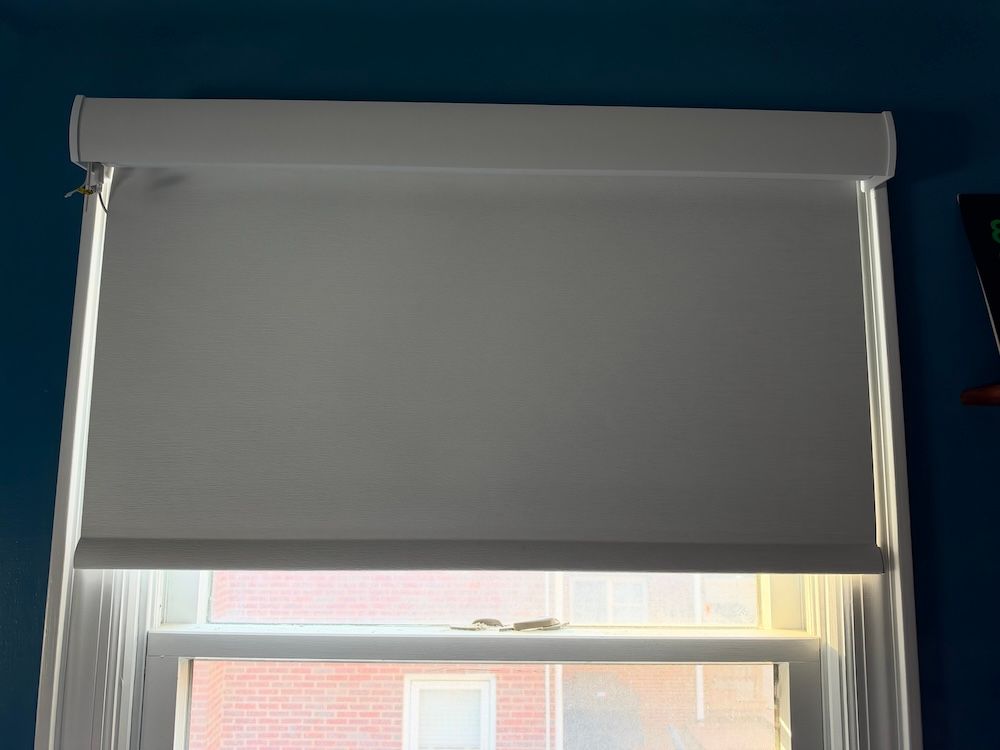
Graywind Matter Roller Shades Review: Custom Style With a Setup Caveat
Smart shades should complement your room and connect to your smart home. And I have been testing many of these new smart home devices over the past few weeks. The most recent was the Graywind Matter Roller Shades, which aim to deliver both: custom sizing and finishes, plus rechargeable motorized operation and compatibility with leading smart-home ecosystems. With Graywind’s help selecting the correct size, we installed a smart shade in our smart home to evaluate its construction, installation, everyday operation, and Matter pairing with a Matter controller (an Aqara Hub M3). Our $461.99 configuration included a valance, solar panel, charging cable, and other accessories, giving us a chance to see whether the custom fit and connected features justify the investment.
Quick Verdict
Graywind Matter Roller Shades are a good choice for homeowners who want custom window treatments with motorized control and support for major smart-home platforms. Our shade felt well made, snapped easily into its mounting brackets, and looked like a custom furnishing once installed. The optional solar panel is an accessory we recommend considering, especially where reaching the charging port would be inconvenient.
There are compromises. Our motor was louder than some other smart shades we have tested, accessories can push up the price, and pairing with an Aqara Hub M3 required moving the hub into the same room. We recommend Graywind for its build quality and customization, with a little planning for smart-home connectivity.
| Review snapshot | Details |
|---|---|
| Product tested | Graywind Matter Roller Shade, custom configuration |
| Test setting | A window in GearBrain’s smart home |
| Configuration price | $461.99, including shade, charging cable, valance, solar panel, and other accessories |
| Amazon prices recorded during our research | $339.99 starting price; $402.98 for the configuration we selected |
| Matter controller tested | Aqara Hub M3 |
| Best fit | Buyers who prioritize custom fit, finish, and smart-home integration |
| Main limitations | Pairing proximity, audible motor, and configuration-dependent pricing |
Testing context: Graywind helped us select the correct shade size for our test window. Findings below reflect that installation; manufacturer claims are identified separately.
What Are Graywind Matter Roller Shades?

Graywind Matter Roller Shades combine made-to-measure window coverings with a rechargeable motor and Matter smart-home integration. Instead of choosing an off-the-shelf width and accepting the closest fit, buyers configure a shade around their window and preferred look.
Options can include fabric, color, dimensions, mounting style, roll direction, valance or cassette finish, bottom-bar finish, and accessories. Check the available selections for the exact model and motor you order.
The Matter version is intended for compatible Apple Home, Amazon Alexa, Google Home, and Samsung SmartThings setups. Graywind also sells other motor configurations, so selecting the correct motor matters as much as selecting the fabric.
Key Specifications and Features

| Feature | What buyers should know |
|---|---|
| Shade style | Custom motorized roller shade |
| Light control | Blackout fabric options; coverage at the edges depends on installation |
| Power | Rechargeable battery motor with USB-C charging |
| Solar charging | Optional window-mounted panel for supplemental charging |
| Basic operation | Supplied remote on our test configuration |
| Smart-home control | Compatible Matter controller and appropriate network hardware required |
| Supported ecosystems | Apple Home, Alexa, Google Home, and SmartThings, subject to controller and platform support |
| Headrail | Aluminum, according to the supplied specifications |
| Size and mounting requirements | Vary by product and configuration; verify against the exact order |
Graywind offers multiple roller-shade ranges. The supplied product information included different dimension limits and mounting-depth requirements, so buyers should use the measuring guide for their selected shade rather than assume one range applies to every model.
Design and Build Quality: A Custom Finish You Can Feel
The strongest first impression was the construction. When we handled the shade and then saw it installed, it felt like a custom window treatment. The structure was solid, and the finished appearance supported that impression.
Fit is central to the appeal. Graywind helped us choose the right size, and its website explains how to measure the window opening. Follow those instructions carefully and decide on an inside or outside mount before ordering. The mounting style affects both the measurements and the finished look.
For someone matching shades to a room’s décor, the range of finishes and accessories is useful. It also creates more decisions—and more opportunities for the final price to increase.
How Easy Are Graywind Shades to Install?
Our favorite installation detail was the way the shade snapped into the brackets. That part was straightforward and made it easy to secure the shade.
Our package didn't include paper instructions, so we had to go online or use the app to access guidance. Open the instructions before you start, especially if this is your first motorized shade installation.
Two details deserve attention before mounting. Remove the protective cap from the USB-C charging port while it is easy to reach, and locate the reset button beside it. We found that button difficult to press. Knowing where it is before you install the shade can save frustration during setup.
Charge the motor before initial use, too. Our test package included a USB-to-USB-C cable and power adapter.
Matter Compatibility: Check Your Controller Before Buying
Graywind’s Matter guidance describes Matter-over-Thread offerings. That setup needs both Matter controller and Thread border router functionality, which the same hub may provide. Confirm the transport and requirements for the exact motor on your order. A Bluetooth bridge intended for another Graywind motor is not interchangeable with the required Matter setup.
We used an Aqara Hub M3 for our test. Pairing initially gave us trouble; moving the M3 into the same room as the shade allowed it to connect.
That is a useful troubleshooting lesson, rather than proof that every installation requires a permanently co-located hub. If pairing fails, try bringing the controller and relevant network hardware closer before assuming the shade is defective. Plan network coverage around the window’s location and the rest of the room.
Once integrated into a supported platform, you can include shades in routines alongside compatible lights or thermostats. For example, a bedtime routine could lower the shade and dim the lights, while a daytime routine could close it during strong sunlight. These are possible uses, but we didn't test routines across all four ecosystems.
The supplied remote also lets you operate the shade without setting up smart-home control. We would keep it accessible for household members and guests.
Real-World Performance: Good Construction, Audible Movement
Our overall impression was of a quality shade with convenient motorized operation. However, the motor was more audible than some other smart shades we have tested. We wouldn't describe it as excessively loud, but buyers expecting nearly silent movement should keep that in mind.
This was a listening observation in our smart home, not a measured decibel test. Likewise, we did not record timed response measurements or conduct a long-term reliability study.
Graywind markets blackout fabrics for privacy and light control. Remember that blackout fabric does not automatically mean a completely dark room: mounting position, fabric width, and gaps around the edges also affect the result. We did not perform instrumented light-blocking, UV, or thermal-insulation testing, so we cannot quantify those benefits or promise energy savings.
Battery Life and Solar Charging
We tested the optional solar panel and recommend considering it. Reaching a charging port every few months can become inconvenient, especially on a high window or across several shades. A panel mounted at the window provides supplemental charging and can reduce that task.
Its effectiveness will depend on available light. Don't treat it as a guarantee that manual charging will never be necessary.
We also recommend considering the compatible magnetic charging cable. Connecting a cable to a small USB-C port near the top of an installed shade can be awkward; an easier connection is a practical upgrade.
Price and Availability
Our test configuration cost $461.99, including the roller shade, charging cable, valance, solar panel, and other accessories.
On Amazon, we recorded a $339.99 starting price for Matter roller shades. Customizing a shade there produced a $402.98 quote. Those figures represent different configurations; they are not evidence that identical packages cost different amounts.
The total depends on dimensions, fabric or color, valance style, light blockers, motor choice, charging accessories, solar panel, and the number of shades ordered. Compare the full configuration before purchasing, including whether your existing smart-home hardware meets its requirements.
Buyers considering Graywind alongside Lutron or GE/Cync should compare equivalent window coverage, finishes, motors, and included accessories. A starting price alone says little about the cost of furnishing the same window.
What We Liked and What Could Be Better
Pros
- Solid construction and a convincing custom finish.
- Extensive options for fit and appearance.
- Shade snaps easily into correctly installed brackets.
- Matter integration offers flexibility across supported ecosystems.
- Optional solar panel can reduce charging maintenance.
- Supplied remote provides convenient basic control.
Cons
- Matter pairing took extra work with our Aqara M3.
- The motor was louder than some competing shades we tested.
- Reset button was difficult to press.
- Our test package didn't include paper instructions.
- Accessories and customization can raise the total considerably.
Who Should Buy Graywind Matter Roller Shades?
Graywind is a good fit for homeowners who care about the appearance of their window treatments and want those shades integrated with an existing smart home. It is especially appealing when standard sizes or limited finish choices would leave too much compromise.
It is a less obvious choice for buyers prioritizing the lowest price, minimal configuration decisions, or the quietest motor. If you are planning a larger installation, start with one window: confirm fit, sound level, charging arrangement, and connectivity before expanding.
Frequently Asked Questions
Do Graywind Matter Roller Shades need a hub?
For smart-home integration, they need a compatible Matter controller and the network hardware required by the selected motor. Matter-over-Thread models require Thread border router functionality. Our test used an Aqara Hub M3.
Do they work with Apple Home, Alexa, Google Home, and SmartThings?
The Matter version is designed for compatible installations using those ecosystems. We paired our shade with an Aqara M3; we did not independently test every ecosystem or every advertised control feature.
Can I use them without smart-home setup?
Our configuration included a remote for basic operation without completing Matter integration.
Can I pull the shade by hand?
Do not assume so. Graywind also sells manual-motorized models, but that description doesn't apply to every Matter shade. Follow the instructions for the exact motor supplied with your order.
How often do they need charging?
Graywind recommends approximately every three to six months, depending on use. Solar charging can reduce manual charging, subject to light conditions.
Does the Matter controller need to stay in the same room?
Moving our Aqara M3 into the room solved pairing in our installation. That does not establish a universal placement requirement. Keep proximity in mind when troubleshooting and confirm adequate network coverage.
GearBrain Verdict
Graywind Matter Roller Shades earn our recommendation for their solid build, custom appearance, and range of configuration options. The shade felt well made from the moment we handled it, and the easy snap-in mounting was a welcome detail.
The buying decision comes down to the complete package: the right measurements, the finish you want, the charging accessories you need, and a smart-home network that reaches the window. Our $461.99 configuration delivered a premium impression, but pairing required attention, and the motor was more audible than some alternatives.
For a similar installation, we would consider the solar panel and magnetic charging cable worthwhile additions. Have your Matter controller nearby during initial setup if you run into the same pairing difficulty we experienced.
Long-term battery endurance, solar charging through seasonal changes, and sustained connectivity remain useful follow-up checks; this review does not claim those results.
Editor’s note: This review is based on GearBrain’s hands-on installation and testing notes. Prices reflect the configurations recorded during the review and may change. Advertised battery life and fabric benefits are manufacturer claims, not laboratory-verified results.
Use GearBrain’s Compatibility Find Engine to see which smart shades work with your existing smart home, voice assistant, and smartphone.
