How to Plan a Smart Outdoor Living Space Before You Build It
Most people build their smart outdoor setup backward. They finish the patio, live with it for a season, then start bolting on devices — a string of smart café lights here, a weatherproof speaker there, an outdoor plug run off an extension lead through a cracked-open window. It works, sort of, until you're tripping over cables and wondering why the camera by the back gate keeps dropping off the Wi-Fi.
The smart outdoor spaces that actually feel seamless got that way because the technology was planned alongside the space, not after it. Where the power runs, how the Wi-Fi reaches, which zones need what — these decisions are cheap and easy before the pavers go down, and expensive and annoying afterward. Whether you're doing a backyard, a deck, or a rooftop terrace, the infrastructure comes first, and the gadgets come second.
Start With Zones, Not Gadgets

Before you look at a single product, break the space down into how you'll actually use it. A dining zone behaves nothing like a lounge corner, which behaves nothing like the grill area or the path down to the garden.
Each of those zones has its own tech needs. The dining area wants warm overhead lighting and maybe discreet speakers. The lounge corner wants dimmable ambient light and a screen you can actually see. The cooking zone needs task lighting and a nearby weatherproof outlet. The path down the side of the house needs motion-triggered lights for safety, not mood. Map the zones first, and the device list writes itself — and more importantly, you'll know where the power and network need to reach before anyone pours concrete over the routes.
Visual Planning Helps Place Devices Before Installation
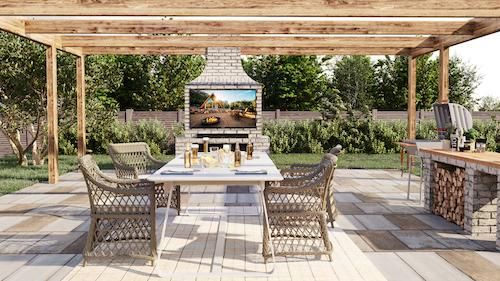
Here's the part that's genuinely hard to do in your head: picturing where every device sits, how it looks at night, and whether the lighting, seating, shade, and hardware actually work together. It's easy to mount a camera only to find a pergola post blocks its sightline, or install an outdoor TV in the one spot that catches full afternoon glare.
Before buying connected lights, speakers, screens, cameras, and outdoor plugs, 3d exterior rendering services can help a project team understand where each device will sit, how the space will look at night, and whether seating, shade, power, and smart-home hardware are coordinated. Seeing the space resolved — including how it lights up after dark, which is when a lot of outdoor tech earns its keep — catches the placement mistakes while they're still just marks on a plan rather than holes drilled in the wrong spot.
Plan Power and Weather Protection Early

Outdoor tech lives or dies on power and weatherproofing, and both are far easier to sort before construction. Every device needs a safe, outdoor-rated place to plug in, which means GFCI-protected outlets positioned where you'll actually use them, not one lonely socket by the back door feeding a spider's web of extension leads.
Think about which locations are covered versus fully exposed, and match your device IP ratings to reality. An outdoor smart plug like the Lutron Caséta model carries an IP65 rating, plugs into a GFCI outlet, and lets you control outdoor lighting or other devices remotely — but even a weather-rated device is happier under some shelter. Plan the cable runs, add surge protection, and leave yourself access to reach devices for the inevitable maintenance. All of this is trivial to rough in early and miserable to retrofit.
Outdoor Lighting Should Be Smart and Practical
Lighting is where smart outdoor tech pays off most obviously, because it does double duty — safety and atmosphere. Path and step lighting keep people from breaking an ankle in the dark; café strings and accent lights set the mood for an evening outside.
The smart layer is what ties it together. Modern smart café lights can be controlled remotely, dimmed, color-changed, scheduled, synced to music, grouped into scenes, and, in some cases, triggered by geofencing so they turn on as you arrive home. Layer your lighting the way you would indoors — ambient, task, and accent — and set color temperature deliberately: warm for the dining and lounge zones, cooler and motion-triggered for the security and path lighting. Schedules and timers mean you're not fiddling with an app every night; the space just does the right thing at dusk.
Rooftop Terraces Need a More Integrated Plan
Rooftop terraces raise the difficulty considerably. Space is tight, wind and weather exposure are brutal, and you're working over a roof membrane you really don't want to compromise with careless cable runs or fixings.
That combination makes upfront planning essential — everything has to be coordinated because there's no room for mistakes or later additions. For townhomes, penthouses, or multifamily buildings with rooftop outdoor areas, terrace home renders can help show how lighting, seating, shade, greenery, outdoor screens, and power points will work together before installation starts. On a rooftop, you're solving for wind-rated shade structures, planters that don't overload the roof, Wi-Fi that reaches a space often far from the router, weatherproof speakers and screens, discreet power points, and clear maintenance access — all in a footprint that leaves no slack. Getting it right on a plan first is the only sensible way to approach it.
Wi-Fi Coverage Can Make or Break the Whole Thing
None of this connected hardware works without a reliable network connection, and outdoor Wi-Fi is where many smart setups quietly fall apart. Exterior walls, glass, and sheer distance from the router all sap the signal, and a camera or speaker that drops offline constantly is worse than no device at all.
Plan for coverage the way you plan for power. A mesh Wi-Fi system or a dedicated outdoor access point often makes the difference between reliable devices and constant frustration. And test your devices in their actual intended positions before committing to permanent mounting — the corner of the terrace where you wanted the camera might be exactly where the signal gives out. Detached patios and rooftops almost always require additional network planning, so budget for it up front rather than discovering dead zones after everything's installed.
Outdoor Entertainment Needs Glare, Sound, and Weather Planning

An outdoor TV is a genuinely different beast from an indoor one, and the planning reflects that. Sunlight is the enemy of watchability — a screen that's dazzling indoors can be unreadable in the glare of sunlight. Products like the Furrion Aurora are built with different brightness models specifically for full-sun, partial-shade, or shaded positions, and choosing the wrong one for your spot is a costly mistake.
So plan the viewing position around glare and seating angles, mount at a sensible height, and confirm the set is rated for your outdoor temperature range. Pair it with weatherproof speakers positioned to direct sound at the seating rather than at the neighbors — outdoor sound travels, and nobody wants a noise complaint. Route all cabling through protected, planned-in-advance runs.
Security Devices Should Blend Into the Design
Outdoor security tech works best when it's effective and unobtrusive. Cameras need clear sightlines to entry points and gates; motion sensors and smart floodlights should cover approaches without blinding your seating area; video doorbells and smart locks handle access.
Solar-powered floodlights with dusk-to-dawn sensors are a popular option because they eliminate the need for wiring, and camera-light combinations cover deck, garage, and pool areas in a single unit. The planning goal is coverage without the space looking like a surveillance operation — cameras positioned to see what matters while sitting naturally within the design, and lighting automations that make the whole property feel occupied and secure.
Smart Irrigation and Weather Data

For spaces with plants — garden beds, terrace planters — smart irrigation and weather data round out the setup. Smart sprinkler controllers zone your watering, rain sensors and weather stations prevent the classic sight of a system watering enthusiastically in the middle of a downpour, and automated schedules keep everything alive without daily attention. It's a small addition to the plan that saves both water and the plants.
Check Compatibility Before You Buy
The single most common smart-home headache is buying a great device that doesn't play nicely with everything else. Before committing, confirm each outdoor device works with your ecosystem — Alexa, Google Assistant, Apple Home, SmartThings — and check whether it runs on Wi-Fi, Zigbee, Z-Wave, or Thread, and whether it needs a hub you don't have. Matter support is worth prioritizing for future-proofing. Sorting compatibility upfront saves the miserable experience of juggling five separate apps for one patio and leaves room to expand the setup later without starting over.
Smart Outdoor Living Checklist
Before you build: Have you mapped the outdoor zones? Is Wi-Fi genuinely strong in each one? Are outlets planned in safe, useful places with GFCI protection? Are all devices rated for outdoor use with appropriate IP ratings? Is lighting layered for both safety and mood? Will cameras have clear sightlines? Is the outdoor TV protected from glare and weather? Are speakers aimed at your seating, not your neighbors? Does everything work with your existing smart-home ecosystem? Is there access to maintain it all? And has the whole layout been reviewed before anyone starts installing?
A smart outdoor space should feel effortless to use — but that ease is entirely a product of the planning behind it. Sort out the layout, power, Wi-Fi, weatherproofing, lighting, security, and entertainment before the build, and your patio, deck, or rooftop terrace ends up working like a genuine extension of the connected home, rather than a pile of gadgets fighting the weather and each other.
Check out The GearBrain, our smart home compatibility find engine. It can help you find, buy, and connect any smart devices or devices. It can even help you find other smart devices compatible with your existing smart devices, such as Google Assistant and Amazon Alexa-enabled devices.
