Today, every technology is smart. That includes lighting.
It sounds wonderful, even a little futuristic. The idea is simple too! You can control lighting using a phone app or even voice commands.
So you start shopping for it.
Then you realize one bulb works with Wi-Fi, another needs a hub, a third supports Matter or Zigbee, and suddenly choosing a smart bulb feels like earning a college degree.
But hey, there’s good news!
You do not need to be a tech wizard. You just need to check these five things:
Start With The Devices And Apps You Already Use
Before choosing a smart bulb, take stock of your existing setup.
And by setup, I mean:
Which phone do you use? Do you already have a lighting app? Do you already have a Google Home, Amazon Alexa, or Apple Home device in the house? Do you have a lighting hub or bridge connected to your router?
This matters because smart lighting should make things easier. If you’re already using an app that has lighting controls, it’s smart to use that. (Pun intended)
Some smart fittings let you use your preferred smart home platform, while others let you control the light from the manufacturer's app.
The goal isn't to have a collection of apps for every room, but rather to gather everything in one space as much as you can.
Useful Features
Also prioritize the features you actually need over the ones that merely sound impressive.
For example, if you mainly want to turn lights on and off from your phone and set a schedule, you may not need a color-changing bulb. If you want lighting that changes throughout the day, features like dimming and adjustable white tones could be good additions.
In other words, you don’t need the longest list of features, just the ones you need.
Check How The Bulb Connects
Smart light bulbs can connect to your preferred controls or devices in several ways. This, of course, affects how you set them up and use them.
Wi-Fi bulbs connect directly to your home network. A light bulb connects to your Wi-Fi and can be controlled through its app, as long as the phone is also connected to the internet (not necessarily the same network).
Some models support remote control as long as both the lighting system and your phone have an internet connection. Check the product’s requirements.
Bluetooth is another connectivity option. This is more for local control. The idea is simple: the light and controller connect using Bluetooth. Range and features will depend on the specific lighting product.
Then there are hub-based systems. A hub, sometimes called a bridge, acts as the middleman between your lighting and the rest of your smart home. A popular example is Philips Hue, which uses a Hue Bridge to connect and manage “Hue devices.”
Communication Protocols
A few Google searches deep, and you’ll likely come across terms like Zigbee, Thread, and Matter. You could say these are more “high-level” smart lighting options. Zigbee and Thread are “wireless mesh networking technologies.” They essentially let smart home devices talk to each other.
Matter is a shared standard that helps compatible devices work with supported platforms such as Apple Home, Google Home, and Amazon Alexa. Matter devices connect over Wi-Fi, Thread, or Ethernet; check which controller or hub the chosen product needs.
These protocols involve a significant learning curve, so if that’s not to your liking, simpler options are best.
Confirm The App And Voice Controls You Need
Just because a light is smart doesn’t mean it works with every smart or voice control app.
If you have a preferred app, check whether the exact smart light model you’re eyeing is supported. Also check whether your preferred app supports all features.
A smart light might work with both Google Home and Alexa, but that doesn't necessarily mean both platforms support every function. You might be shocked to see that some features, such as changing brightness or color, may not be available.
It is worth checking individual features. Can you:
- Turn the bulb on and off from the app?
- Dim it?
- Change the color or white tone?
- Create schedules?
- Group several lights together?
- Give other people in your household access?
- Control it when you are away from home?
Also check what happens if your internet connection goes down. Some smart lighting systems rely on cloud services for certain functions, while others can perform some actions locally.
If you’re using only Bluetooth, internet connectivity isn't an issue.
The important word here is "some". Do not assume every feature works the same way across all smart lights. Always check the instructions for the product you are buying.
Choose A Bulb That Suits The Fitting And The Room
 Choose A Bulb That Suits The Fitting And The Room Philips
You might be so excited about owning bulbs you can control from your phone that you forget one of the most important things: Will it fit your current setup?
Check the fitting. In the UK, common bulb caps include B22 bayonet and E27 screw fittings, while smaller fittings such as E14 are also widely used. Check what your existing fitting takes before ordering.
A B22 light bulb is useless if your fitting is made for E27 bulbs.
Also consider the bulb's physical size. A smart bulb may be slightly different in shape or size from the standard bulb it replaces. This matters inside enclosed shades or compact fittings.
Next, look at brightness. Just because a light bulb is smart doesn’t mean it’s bright enough for your needs. Check lumens (lm), not watts, when choosing brightness.
Color temperature is another big one. This creates the mood and vibe of the space. Warm white creates a softer, cosier feel. If you have a lot of timber in your home, these highlight it. Cooler white can feel crisper and is typically preferred in more modern, minimalist interiors.
Some smart bulbs let you adjust between different white tones, which can be useful for multipurpose rooms. Check that the chosen model supports this.
Try One Bulb Before Changing The Whole Home
 Try One Bulb Before Changing The Whole Home Lifx
If smart lighting is the future, you might as well swap all the lights in your home, right?
Well, not quite.
There’s no merit in making your entire home’s lighting system smart in one Saturday afternoon, even when you have the budget. This is especially true if you’re new to smart lighting.
Don’t rush it. Start with one bulb in a room you use regularly. It could be a living room light or a bedside lamp. The idea is to test whether the controls actually make life easier.
Think of this as a “practice run.” Learn the entire setup from beginning to end. Connect the bulb, test the app, try the voice commands, and create a simple schedule.
Then involve the other people who live in the house. Get them familiar with the controls, and make sure no one gets stuck with a light they can’t switch off because they forgot the right voice command.
If the trial works for you and the people in your home, then plan to expand.
Before you buy, check:
- Connection: Wi-Fi, Bluetooth, or a hub-based system?
- App: Does the exact model work with the app you want?
- Voice assistant: Is it compatible with Alexa, Google Home, or Apple Home?
- Features: Does it support the convenience you actually want?
- Fitting: Does the cap and physical size suit your light fitting?
- Brightness: Is the light output suitable for the room?
- Compatibility: Will it work with your existing dimmer and other equipment?
- Power: What happens when you turn off the wall switch or restore power?
Smart lighting doesn’t need to be complicated. Start small, check compatibility and features carefully, and test one bulb before committing to a whole-house change. Your smart lighting should do what it needs to do: make life easier… at least on your lighting.
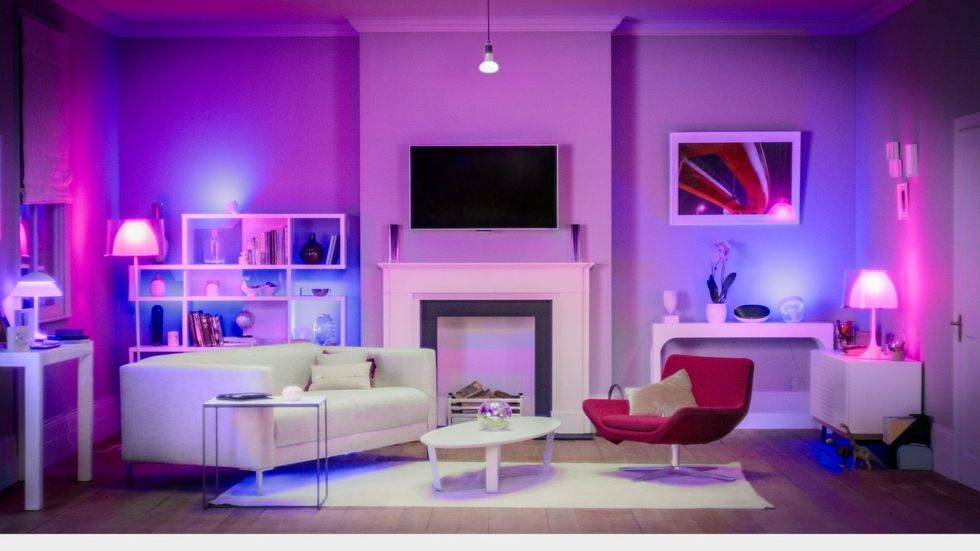 Choose A Bulb That Suits The Fitting And The Room Philips
  Try One Bulb Before Changing The Whole Home Lifx

