Remote Desktop Protocol is not bad at peripheral redirection. In current Microsoft environments, it can redirect a wide range of resources, including printers, storage, microphones, webcams, smart cards, and some USB peripherals. For routine office work, that is often enough.
The problem starts when a USB device stops behaving like a generic peripheral and starts behaving like what it actually is: driver-dependent hardware with timing requirements, bandwidth sensitivity, and application-specific expectations. That is where native RDP redirection becomes conditional. It may work in one environment, fail in another, or behave differently after reconnects, policy changes, or host migration. Microsoft’s own documentation reflects that complexity by separating USB redirection into different modes and configuration points rather than treating it as a single universal passthrough feature.
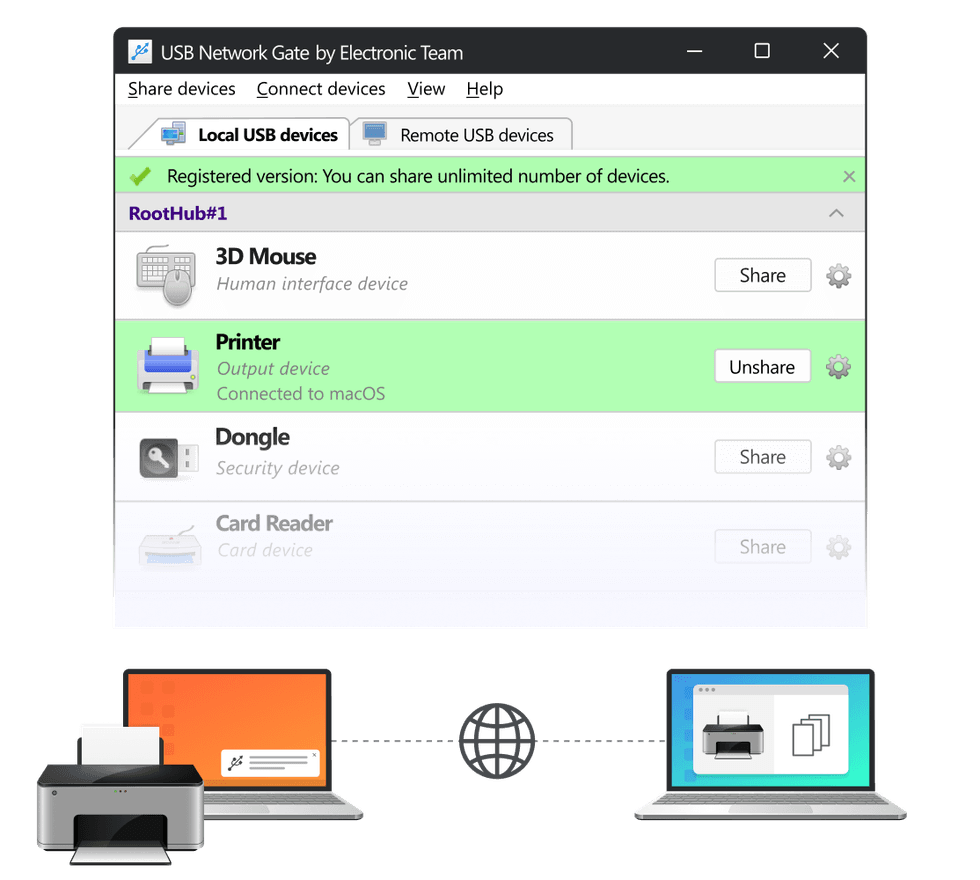
This is the point where USB Network Gate becomes relevant. Instead of asking RDP to carry every device-specific edge case through its own redirection stack, USB Network Gate creates a separate USB-over-network path and presents the device on the remote side more like locally attached hardware. That is also how the vendor positions it: as a USB sharing and passthrough layer for remote desktops, VMs, and cloud-style workstations.
Why the usual RDP approach breaks under heavier USB workloads
 Why the usual RDP approach breaks under heavier USB workloads Remote Desktop Protocol (RDP) and Secure Network Access Technology Concept
A lot of articles describe this as a “channel overload” problem. That is too vague. The more accurate explanation is that a live RDP session is already multiplexing several classes of traffic and device handling at once: display, input, clipboard, storage, printing, audio, camera, and policy-controlled peripheral redirection. Microsoft also documents separate properties and optimization paths for some of these functions, which makes the session architecture more layered than many admins assume.
That matters because not all USB devices tolerate abstraction equally well. A keyboard or flash drive is one thing. A scanner using vendor TWAIN components, a hardware dongle that expects uninterrupted presence, or a composite USB device exposing multiple interfaces is something else entirely. Once the device depends on stable enumeration, long-running transfers, exclusive ownership, or vendor middleware, native redirection becomes much less deterministic.
This is why USB failures in RDP sessions often look random to users. The device may appear in the remote OS but not in the application. It may work over LAN and fail across VPN. It may survive a fresh logon but break after reconnect. Those symptoms usually point to a mismatch between what the application expects from locally attached hardware and what the RDP redirection layer can consistently reproduce. That is the practical limitation your article should focus on.
Where native redirection usually starts to fail first
Scanners and multifunction devices are one of the clearest examples. Printing may work because it maps cleanly to built-in redirection, while scanning fails because the scan workflow depends on vendor software, TWAIN or WIA behavior, and sustained transfer stability. In other words, one function of the same device fits the RDP model and another does not.
USB audio can fail for a different reason. Microsoft supports audio and video redirection, and for general conferencing that is often sufficient. But low-latency audio gear, specialist USB interfaces, or software that is sensitive to buffering and endpoint behavior can still expose the difference between application-level media redirection and true device-level access.
Webcams and video capture devices are similar. Support exists, but live video remains sensitive to transport quality, app compatibility, and reconnect behavior. A webcam that works in one collaboration app may behave poorly in another, especially when bandwidth and latency conditions are less controlled.
Hardware security dongles are where the argument for USB Network Gate is strongest. CAD, GIS, industrial, and engineering software often expects the dongle to remain continuously present and to behave exactly like local hardware. That expectation is difficult to satisfy consistently in shared RDS environments or after session changes. USB Network Gate explicitly targets those cases, including RDP, VM, and isolated shared-system use.
How USB Network Gate Solves the Core Limitations of Native USB RDP Redirection
 How USB Network Gate Solves the Core Limitations of Native USB RDP Redirection
USB Network Gate changes the model from “redirect a supported peripheral through RDP” to “expose the USB device itself over the network.” That is a much better fit for devices whose applications expect direct hardware semantics rather than generic remote-session abstractions. It does not make physics disappear, and it does not mean every USB workload will behave perfectly over a poor network. But it reduces dependency on device-class-specific RDP handling and gives the remote OS a more hardware-like device presentation.
That distinction is also why UNG makes more sense when several remote-session mechanisms are already competing in the same workflow. If the session is already juggling graphics, media, storage mapping, clipboard, and policy-governed redirection, moving a difficult USB device onto its own dedicated passthrough layer is often cleaner than forcing it through native RDP logic that was never optimized for that exact device behavior.
On the vendor side, the current public materials position USB Network Gate as a cross-platform tool for Windows, macOS, Linux, Android, and ARM, with RDP, VM, and cloud use cases, plus per-session and per-user isolation on Windows shared systems. The download pages currently list version 11.0.2724 for Windows, released on June 12, 2025, with a fully functional 14-day trial.
When built-in RDP is enough — and when USB Network Gate is the better answer
If the environment is stable and the device is ordinary, start with native RDP. It is built in, policy-driven, documented by Microsoft, and usually good enough for standard office peripherals and supported remote-device scenarios.
But when the device is specialized, the application is strict about hardware presence, or the environment includes WAN links, reconnects, shared hosts, or VMs, the calculus changes. That is where USB Network Gate is easier to justify: not as a replacement for every RDP feature, but as a dedicated workaround for the USB cases that native redirection handles inconsistently.
Bottom line
Native RDP redirection is better than the old “it never works” narrative suggests. But it is not a universal answer for specialized USB hardware. The more a device depends on vendor drivers, stable enumeration, uninterrupted presence, or exclusive access, the more likely it is to hit the limits of native remote-session redirection.
That is exactly where USB Network Gate has the stronger technical story. Its value is not that it replaces RDP across the board. Its value is that it sidesteps the parts of RDP redirection that become brittle under complex USB workloads and gives those devices a more direct, more predictable path into the remote machine.
Related Articles Around the Web
 Why the usual RDP approach breaks under heavier USB workloads
 How USB Network Gate Solves the Core Limitations of Native USB RDP Redirection