Editor’s note: We refreshed this guide on October 19, 2026, with a new product selection and updated buying considerations. Recommendations are based on published product information and editorial assessment; this guide does not represent hands-on testing of every featured product. Prices, plans, and availability can change.
Affiliate disclosure: GearBrain may earn a commission when you purchase through affiliate links in this article.
The best holiday tech gifts for grandparents fit the things they already enjoy: cooking for family, following the grandchildren’s activities, listening to music, or keeping their home comfortable. A thoughtful gadget should earn its place in their routine—and work with the phone, television, and smart home devices they already own.
For 2026, our gift ideas range from wireless meat thermometers and charging stands to robot vacuums, smart displays, and backup power. Some suit grandparents who love exploring technology; others make familiar activities easier. The right choice depends on the person, not their age.
Before buying, ask three questions: Will they want to use it? Will it work in their home? Who will handle setup and ongoing costs?
What are the best tech gifts for grandparents in 2026?
For grandparents who cook, consider the TempSpike Pro TP980 wireless thermometer. Cozyla Calendar Neo suits families who want a shared schedule and display, while JubileeTV offers remote television help and big-screen family calls. For everyday convenience, consider a compatible charging stand, item tracker, or smart speaker. Robot vacuums and a Jackery power station are bigger gifts that deserve a conversation before you buy.
Quick picks: Match the gift to the grandparent
| Gift | Best fit | What to check before buying |
|---|
| TempSpike Pro TP980 | Cooks, grillers, and holiday hosts | Probe bundle, app setup, and local versus remote monitoring |
| Cozyla Calendar Neo | Grandparents involved in family activities | Calendar sharing and paid photo/AI features |
| Hubble GoBaby AI Portable Pro | Grandparents who regularly babysit | Stock, app access, internet requirements, and AI feature costs |
| ECOVACS DEEBOT T90 PRO OMNI | Households wanting automated vacuuming and mopping | Floor suitability, dock space, and tank maintenance |
| iRobot Roomba Max 775 Combo | Households wanting a robot with an automated cleaning dock | Exact model, floor plan, and ongoing supplies |
| Jackery HomePower 3600 Plus | Families planning for power outages | Appliance loads, runtime, weight, and configuration |
| JubileeTV | Families providing remote TV help | HDMI connections, external TV source, Wi-Fi, and plan |
| Apple HomeView | Apple households wanting a shared home screen | Compatible iPhone/iPad, Apple Home devices, and delivery date |
| Ring Peephole Cam 2K | Suitable apartment or condo doors | Peephole dimensions, building rules, and loss of optical viewing |
| Ring Battery Doorbell 2K | Homes needing an exterior video doorbell | Mounting, Wi-Fi coverage, and recording plan |
| Belkin or ESR 3-in-1 charger | Owners of compatible Apple devices | Exact phone, watch, earbud case, and charging standard |
| Echo Pop, Echo Dot Max, or Echo Show 8 | Alexa households | Speaker versus screen, account setup, and service costs |
| AirTag, Tile, or Chipolo POP | Finding keys, bags, and everyday belongings | Phone platform and finding network |
| HelloTech service | Anyone who would appreciate installation help | Local coverage, device eligibility, and service scope |
Best cooking gift: TempSpike Pro TP980 wireless meat thermometer
Best for: Grandparents who enjoy roasting, grilling, smoking, or hosting family meals.
The TempSpike Pro TP980 puts internal food and surrounding cooking temperatures in one monitoring system. Its wireless probes eliminate cables running from the food to a display, while the LCD booster lets cooks check temperatures without constantly opening a phone.
Wi-Fi and Bluetooth provide different ways to monitor a cook. The app adds alerts and cooking information; remote monitoring depends on an internet connection. Multiple probe packages let you track more than one food at a time.
Why it makes a thoughtful gift: It adds useful information to a hobby the recipient already enjoys.
Before you buy: Confirm how many probes are included and how to configure the app. Bluetooth range varies with walls and grill construction. Follow insertion and temperature limits; the probe’s internal-food limit differs from its ambient heat rating.
Price: Listed at $99.99 when checked; package pricing may vary. Check the TP980 configuration and price.
Best shared calendar and photo-display gift: Cozyla Calendar Neo
Best for: Grandparents who want to keep track of family visits, school events, and grandchildren’s activities.
Cozyla Calendar Neo combines a family calendar with display features. Its 15.6-inch version provides a shared view of schedules, and the lineup also includes a 24-inch option. It supports calendar syncing with Apple, Google, and Outlook.
The appeal is practical: put family plans where everyone can see them instead of asking a grandparent to search through messages.
Compatibility and costs: Core calendar features work without a paid membership. Calendar Essential adds advanced tools, including AI voice assistance and meal planning. Cozyla’s support documentation also places its personal-photo screensaver feature behind that membership.
Before you buy: Confirm the selected size, purchase option, and photo-sharing entitlement. At our check, the 15.6-inch page listed $199.99 without membership; the optional plan was $79.99 annually after a trial. Lower hardware offers may require a membership.
Check Cozyla Calendar Neo options.
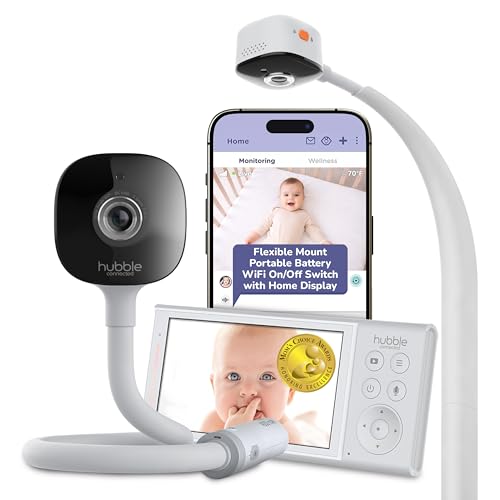
Best baby-monitor gift for frequent babysitters: Hubble GoBaby AI Portable Pro
Best for: Grandparents who regularly care for an infant and want a monitor coordinated with the parents.
Hubble’s GoBaby AI Portable Pro includes a 2K camera, portable battery pack, flexible mount, night vision, and soothing features. Hubble also advertises cry detection, rollover and covered-face notifications, and sleep analytics.
Why it makes a thoughtful gift: It can help equip a second caregiving location rather than requiring parents to pack their home monitor for every visit.
Compatibility and setup: Hubble lists 2.4GHz and 5GHz Wi-Fi support. A portable battery supplies power; it does not establish that remote video works without a suitable network connection.
Before you buy: Agree on app access with the parents and confirm which AI/cloud features require payment. Monitoring alerts do not replace attentive supervision or safe sleep practices.
Price and availability: $199.99; Hubble’s page showed sold out when checked. Verify delivery before making it a holiday gift.
Check Hubble availability.
Best robot vacuum gifts for less everyday floor cleaning
A robot vacuum can take routine floor cleaning off the household to-do list. Choose based on your home’s floors, thresholds, furniture, and maintenance needs—not just suction numbers.
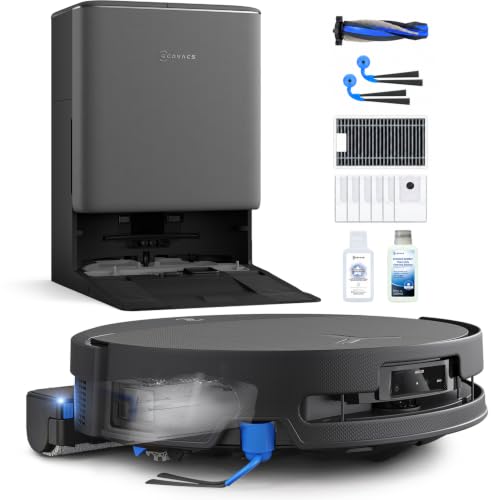
ECOVACS DEEBOT T90 PRO OMNI
Best for: Grandparents interested in automated vacuuming and roller mopping.
ECOVACS lists a roller-mop system, automated mop washing, carpet-related lifting functions, and an anti-tangle brush design. These are useful features to compare for mixed-floor households and homes with pets.
Before you buy: Check dock dimensions, floor-care instructions, and app requirements. Plan for clean-water refills, dirty-water disposal, and cleaning the robot and station. An automated dock reduces some tasks but does not eliminate maintenance.
Price: Check the selected package and current offer. See the DEEBOT T90 PRO OMNI.
iRobot Roomba Max 775 Combo with AutoWash Dock
Best for: Grandparents considering a vacuum-and-mop robot with an automated dock.
iRobot lists roller mopping, mapping and obstacle-recognition technology, debris emptying, and heated mop washing and drying. These features are designed to reduce how often someone has to manually handle dust and mop care.
Before you buy: Match the exact model and retailer listing. The Max 775 and similarly named variants should not be treated as interchangeable. Help with initial mapping, room names, and cleaning schedules, and budget for replacement bags, filters, and other supplies.
Price: $799.99 when checked, down from a displayed regular price of $999.99; the promotion may end before holiday shopping peaks.
Check the Roomba Max 775 Combo.
Best larger family gift for outage preparation: Jackery HomePower 3600 Plus
Best for: Grandparents who want backup power for selected household essentials.
The Jackery HomePower 3600 Plus offers 3,584Wh of battery capacity and a 3,600W output rating. Built-in wheels and a pull handle make it easier to move over suitable surfaces. A battery power station can operate indoors, per its instructions, without a fuel-burning engine.
Why it makes a thoughtful gift: Several family members could contribute toward a practical outage plan.
Before you buy: List the appliances to power, their startup and running loads, and the desired runtime. Runtime depends on actual demand and usable energy; a large appliance can drain a battery much faster than lights or a router. A single unit is not automatically a whole-home or 240V solution. Circuit integration requires compatible equipment and appropriate installation.
Price: Jackery was listed at $1,709 for the basic unit when I checked. Batteries, solar panels, and bundles change the total substantially.
Compare Jackery configurations.
Best gift for remote TV help and big-screen calls: JubileeTV
 Best gift for remote TV help and big-screen calls: JubileeTV iStock
Best for: Families who frequently help a grandparent troubleshoot the television.
JubileeTV lets approved family members help with TV controls remotely and connect through the TV screen. It is especially relevant when the TV is already the recipient’s preferred place for entertainment.
Compatibility: Plan for a TV with HDMI, Wi-Fi, the JubileeTV hardware, and a compatible external cable/satellite box or streaming player. JubileeTV can't control streaming apps built directly into a smart TV; you'll need a separate streaming device for that.
Costs: The current site advertises $39 monthly, $389 annually, or a $789 one-time All-In option, with hardware included. Confirm checkout terms and any installation charges.
Before you buy: Agree with the recipient on family access, automatic answering, and camera check-ins. Remote support should reflect their preferences. Confirm compatibility with existing TV equipment before ordering.
Explore JubileeTV.
Best upcoming smart display for Apple households: Apple HomeView
 How much will your HomeView setup really cost? Apple
Best for: Grandparents who use compatible Apple devices and want a shared screen for FaceTime and Apple Home controls.
Apple HomeView brings household controls and communication into a dedicated display. It is a more natural fit for someone already using Apple Home than for someone who would need to change their devices to accommodate it.
Compatibility and setup: Check the supported iPhone or iPad and software requirements. Confirm each important accessory’s Apple Home or supported Matter integration; Alexa compatibility alone does not establish Apple Home support.
Before you buy: The desktop model offers a straightforward placement option without planning a wall installation. Wall-mounted configurations require attention to mounting and power costs. GearBrain’s buying guide is based on published specifications, not hands-on testing.
Price and availability: Apple lists $299, with availability beginning November 13, 2026. Treat this as a preorder gift and verify the delivery estimate.
Read GearBrain’s Apple HomeView buying guide.
Best door camera for a suitable apartment door: Ring Peephole Cam 2K
Best for: Grandparents in an apartment or condo with a compatible existing door peephole.
The Ring Peephole Cam 2K replaces the peephole with a battery-powered camera that offers 2K video, motion alerts, Live View, and Two-Way Talk. Its no-drill approach can suit buildings where conventional doorbell mounting is difficult.
Compatibility and setup: Check peephole dimensions, door thickness, building policies, and 2.4GHz Wi-Fi coverage. A compatible Echo Show can provide an alternative viewing screen.
Important limitation: Ring says this model removes the ability to look through the original optical peephole. Discuss that tradeoff before giving it to someone who relies on a physical viewer.
Costs: $99.99 list price. Core live functions don't require a subscription; recorded-video access does.
Read GearBrain’s Ring Peephole Cam 2K buying guide.
Best exterior video-doorbell gift: Ring Battery Doorbell 2K
Best for: Grandparents who want to see and speak to visitors at a conventional front entrance.
For homes without a suitable peephole, the Ring Battery Doorbell 2K is an exterior-mounted option to consider. Its live video, two-way communication, and motion notifications let you check the entrance on your phone.
Before you buy: Confirm the exact model, mounting location, Wi-Fi signal, charging arrangements, and how you want to receive alerts. If you want an existing indoor chime to ring, check the precise wiring and chime requirements rather than assuming compatibility.
Costs: Ring lists $99.99 before promotions. Budget for a paid recording plan if reviewing past events matters, plus any optional chime or mounting accessories.
Check Ring Battery Doorbell 2K.
Best charging gifts: Belkin BoostCharge Pro and ESR CryoBoost 3-in-1 chargers
Best for: Grandparents who own a compatible iPhone, Apple Watch, and wirelessly rechargeable earbuds.
A 3-in-1 charging station gives devices a consistent home and can reduce cable clutter. Belkin’s BoostCharge Pro Qi2 15W 3-in-1 stand is one option; ESR’s CryoBoost range combines magnetic charging with active cooling on supported models.
Compatibility matters: These names cover multiple products and generations. Check the exact charging stand against the recipient’s phone, case, Apple Watch, and earbud charging case. A Samsung or other non-Apple watch should not be assumed to work on an Apple Watch charging puck.
Before you buy: Match the selected model’s charging standard, included power adapter, plug type, and physical layout. For a bedside stand, consider the lights and, on actively cooled models, whether the fan noise would bother the recipient.
Price: Varies by version. Check Belkin’s Qi2 stand and ESR’s charging range.
Best Alexa gifts: Echo Pop, Echo Dot Max, and Echo Show 8
Best for: Grandparents who want voice access to music, timers, information, and compatible home devices.
Choose around the task:
- Echo Pop: Consider it for basic voice interactions in a smaller room.
- Echo Dot Max: Consider it when music and a fuller speaker system matter more than a display.
- Echo Show 8: Consider it when you want a touchscreen, supported video calls, and compatible camera feeds.
Compatibility and setup: These products need an Amazon account and Wi-Fi. Verify the release year and model when buying an Echo Show 8, since retailer listings may show different generations. Check each smart-home accessory’s actual Alexa support.
Before you buy: Set up only the services the recipient wants, adjust privacy settings together, and explain any optional paid music or Alexa service. Keep camera and communication settings under their control.
Price: Varies by model and promotion. Compare Amazon Echo devices.
Best small tech gifts: Apple AirTag, Tile, and Chipolo POP
Best for: Grandparents who want help finding keys, a bag, or another everyday belonging.
Choose the finding system before choosing the color or multipack:
- Apple AirTag: Designed around Apple’s Find My system. Apple introduced an updated AirTag in January 2026; check generation and device requirements before buying.
- Tile: An option for iPhone and Android users through its supported app system. Optional paid plans add services beyond basic finding.
- Chipolo POP: Can join Apple Find My or Google Find Hub, one network at a time. Do not confuse it with the older Apple-only ONE Spot.
Before you buy: Help pair the tracker and demonstrate ringing an item. Confirm battery replacement, attachment needs, and any feature-specific phone requirements. These products help locate belongings; they are not a substitute for a purpose-built personal emergency device.
Apple AirTag | Tile | Chipolo POP
Best companion gift: HelloTech installation and support
Best for: Grandparents who would appreciate help getting a new device working—or improving equipment they already own.
HelloTech provides technology setup and support services, including smart-home work. Pairing professional help with a doorbell, speaker, or other eligible device can make the gift more useful than adding another accessory.
Before you buy: Confirm coverage at the recipient’s address, support for the exact device, appointment availability, and the quoted scope. Ask whether the service includes account setup, connecting existing devices, and a walkthrough of everyday controls.
Costs: Depend on the service and location. Hardware, extra installation work, and ongoing support may cost separately.
A helpful gift includes time for the recipient to practice the controls and ask questions. Keep accounts in their name and agree on any family access.
Check HelloTech services.
How to choose a tech gift your grandparents will use
Start with their interests and preferences. Someone who enjoys mastering a new gadget may welcome app controls and advanced settings. Someone who wants a dependable, familiar routine may prefer a charging stand or a device you configure together.
Check these details before ordering:
- Existing devices: Record the exact phone, television, watch, and relevant smart-home models.
- Connectivity: Verify Wi-Fi at the installation location and any required network band.
- Everyday controls: Decide whether the recipient prefers a button, remote, touchscreen, voice command, or app.
- Ongoing work: Account for charging, water tanks, replacement filters, batteries, and troubleshooting.
- Total cost: Include subscriptions, installation, adapters, and consumables—and decide who pays.
- Privacy: Agree on camera access, shared calendars, remote control, and family permissions.
- Returns and delivery: Confirm the return window and arrival date, particularly for preorders or out-of-stock products.
For a connected gift, check GearBrain’s compatibility platform and confirm current requirements with the manufacturer. A familiar brand name doesn't guarantee every model works with the same systems.
Frequently asked questions about tech gifts for grandparents
 Frequently asked questions about tech gifts for grandparents ADT
What is a good tech gift for grandparents who dislike complicated technology?
A compatible charging stand is a useful starting point because it doesn't require a new app for everyday use. Other gifts can work well if you set it up together and show only the functions the recipient actually wants.
What tech gifts are good for Grandma or Grandpa who already have everything?
Look for a specific inconvenience rather than another gadget category. Consider an item tracker for frequently misplaced keys, a shared family calendar, or professional help getting existing devices to work properly. Their interests matter more than whether the gift is marketed to Grandma or Grandpa.
Which gifts work without home Wi-Fi?
Compatible charging stands operate without Wi-Fi. The TP980 offers an on-device temperature display and connected features, while the Jackery provides power independently of home Wi-Fi. Distinguish a product’s basic local operation from features requiring an app, internet service, or a cloud connection.
Do these tech gifts require subscriptions?
Some do, and others reserve selected features for paid plans. JubileeTV offers paid service options; Cozyla charges for advanced Calendar Essential features; Ring charges for recorded-video access. Check the precise feature you are getting, not just whether the hardware powers on without a subscription.
Is a digital calendar the same as a digital picture frame?
No. A calendar emphasizes schedules and family organization, while a dedicated frame emphasizes displaying photos. Calendar Neo combines these uses, but confirm the membership needed for personal-photo display before choosing it primarily as a photo gift.
Can I set up a tech gift before giving it?
You can often prepare accounts, updates, and settings in advance, but final setup may require the recipient’s Wi-Fi, phone, television, or smart-home system. Keep account ownership clear and obtain agreement before enabling cameras or remote access.
Which is better for grandparents: an Echo Show or Apple HomeView?
Start with their existing ecosystem and preferred calling services. Consider an Echo Show for an Alexa household; consider HomeView for compatible Apple households using Apple Home and FaceTime. Check the exact functions, device requirements, and delivery date before choosing.
Give the setup help along with the gift
The most thoughtful holiday tech gift is one your grandparent wants to keep using after the decorations come down. Match it to their interests, check compatibility, explain recurring costs, and leave time to set it up together. That attention can matter as much as the device itself.
Summary
Smart devices can greatly enhance your grandparents' daily lives by adding convenience, security, and entertainment. From smart meat thermometers to robot vacuums, these tech gifts are practical, thoughtful choices for the holiday season. GearBrain’s curated list ensures that you’ll find the perfect smart device to surprise and delight your grandparents, making their holiday season both festive and functional.
Plus, check out The GearBrain, our smart home compatibility find engine, to see the other compatible products that work with Amazon Alexa and Google Assistant-enabled devices.
How GearBrain Helps You Find, Buy and Connect Smart Locks Faster Than Amazon In this video we demonstrate how GearBrain can make buying smart locks on Amazon easier. We show how our filtering can ...





 Best gift for remote TV help and big-screen calls: JubileeTV iStock
 How much will your HomeView setup really cost? Apple


 Frequently asked questions about tech gifts for grandparents ADT